> ## Documentation Index
> Fetch the complete documentation index at: https://stytch.com/docs/llms.txt
> Use this file to discover all available pages before exploring further.
# Admin Portal Overview
> Add Admin Portal to your Next.js application
export const organization = "Represents an instance or tenant in your application, typically mapping to each of your top-level customers.";
export const member = "Represents an individual end user's account within a given Organization, uniquely identified within that Organization by their email address.";
Admin Portal is a set of drop-in components that allow you to add full-featured Org Management UI to your application.
Admin Portal provides:
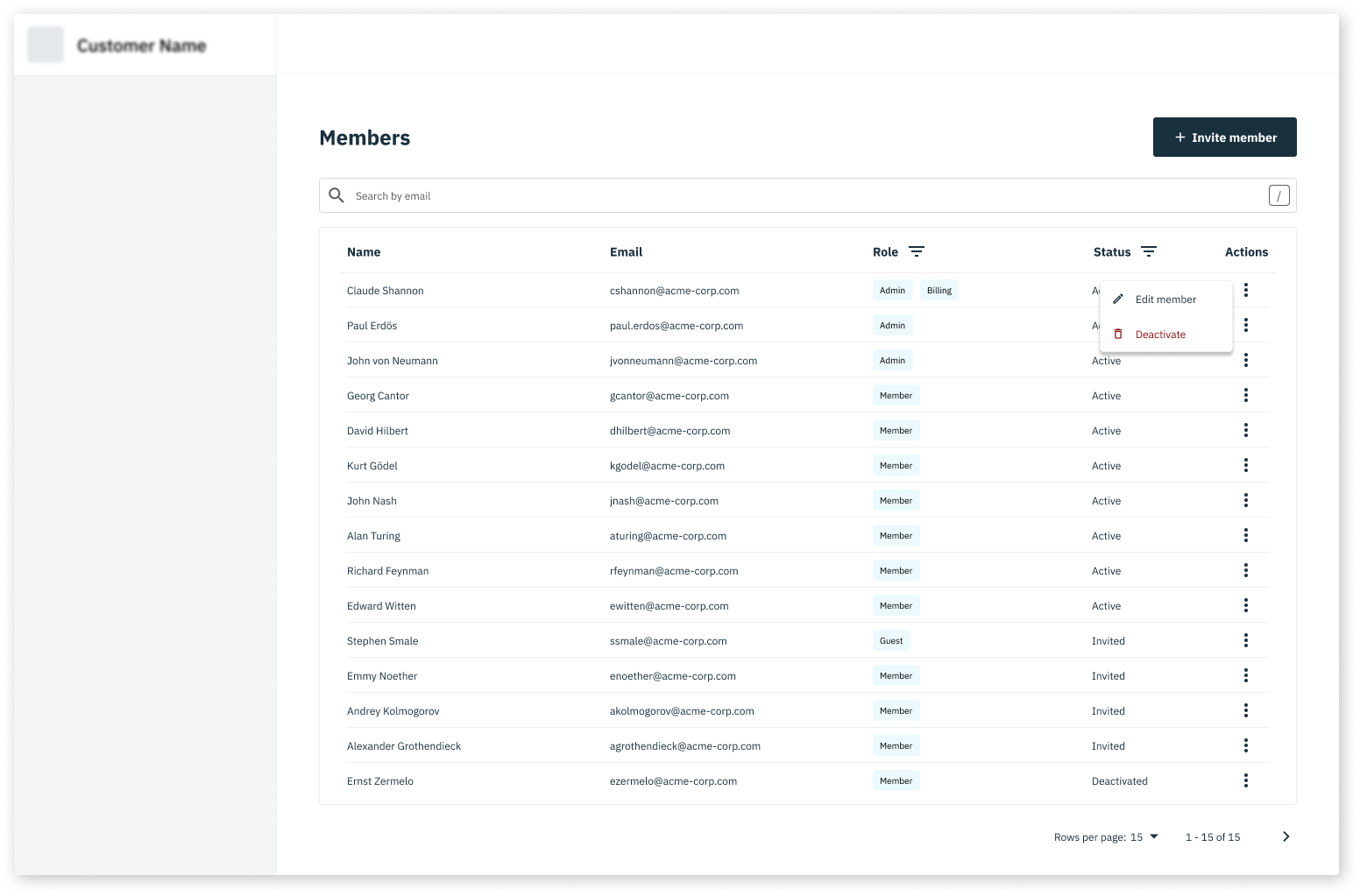
* [`AdminPortalMemberManagement`](/docs/api-reference/b2b/frontend-sdks/react/prebuilt-ui/admin-portal/member-management) - allows Members of the Organization to invite new Members and manage existing Members
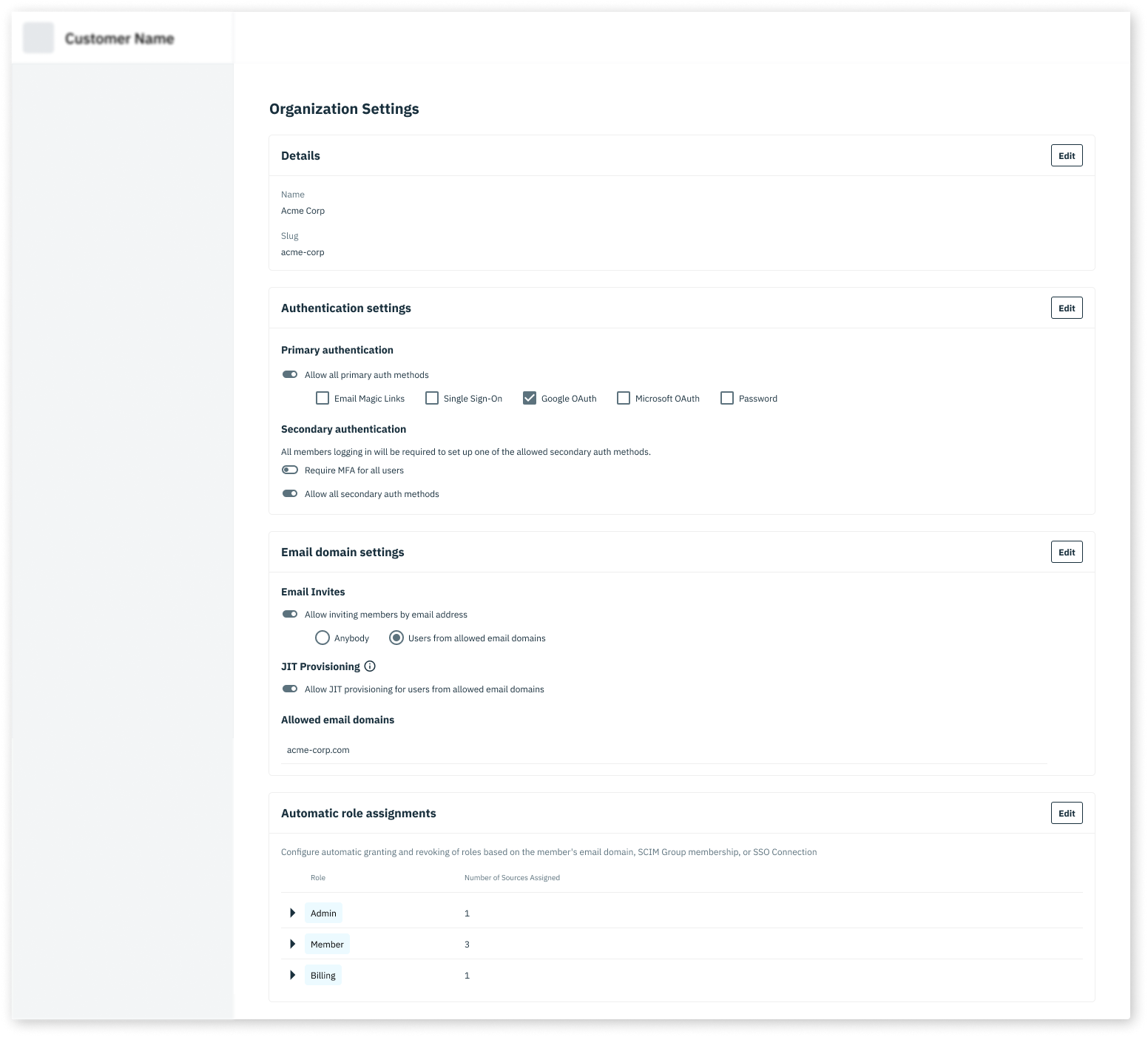
* [`AdminPortalOrgSettings`](/docs/api-reference/b2b/frontend-sdks/react/prebuilt-ui/admin-portal/organization-settings) - allows Members of the Organization to manage their own Organization settings, including authentication methods and JIT provisioning settings.
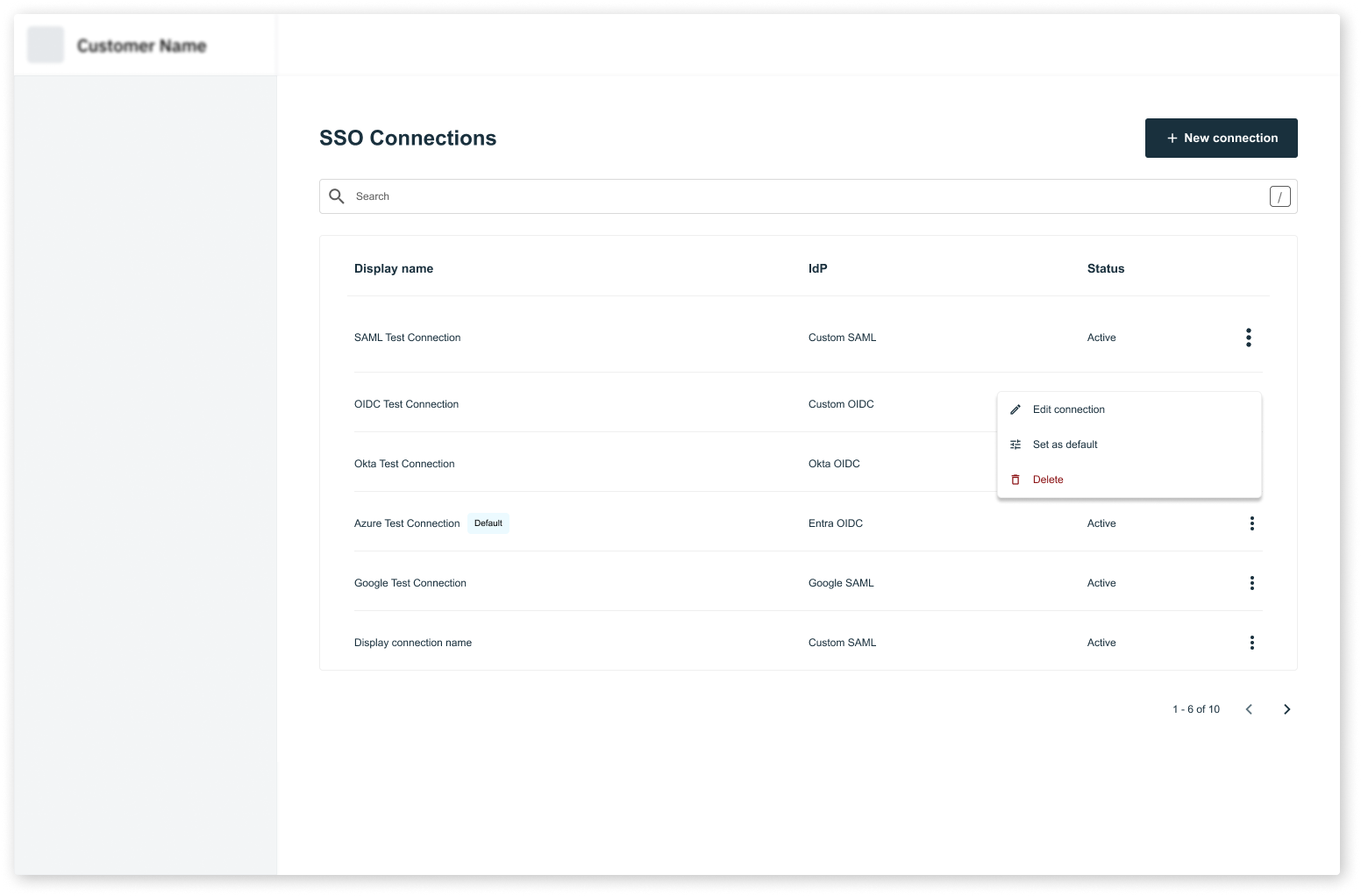
* [`AdminPortalSSO`](/docs/api-reference/b2b/frontend-sdks/react/prebuilt-ui/admin-portal/sso) - allows Members of the Organization to manage their own SSO connections
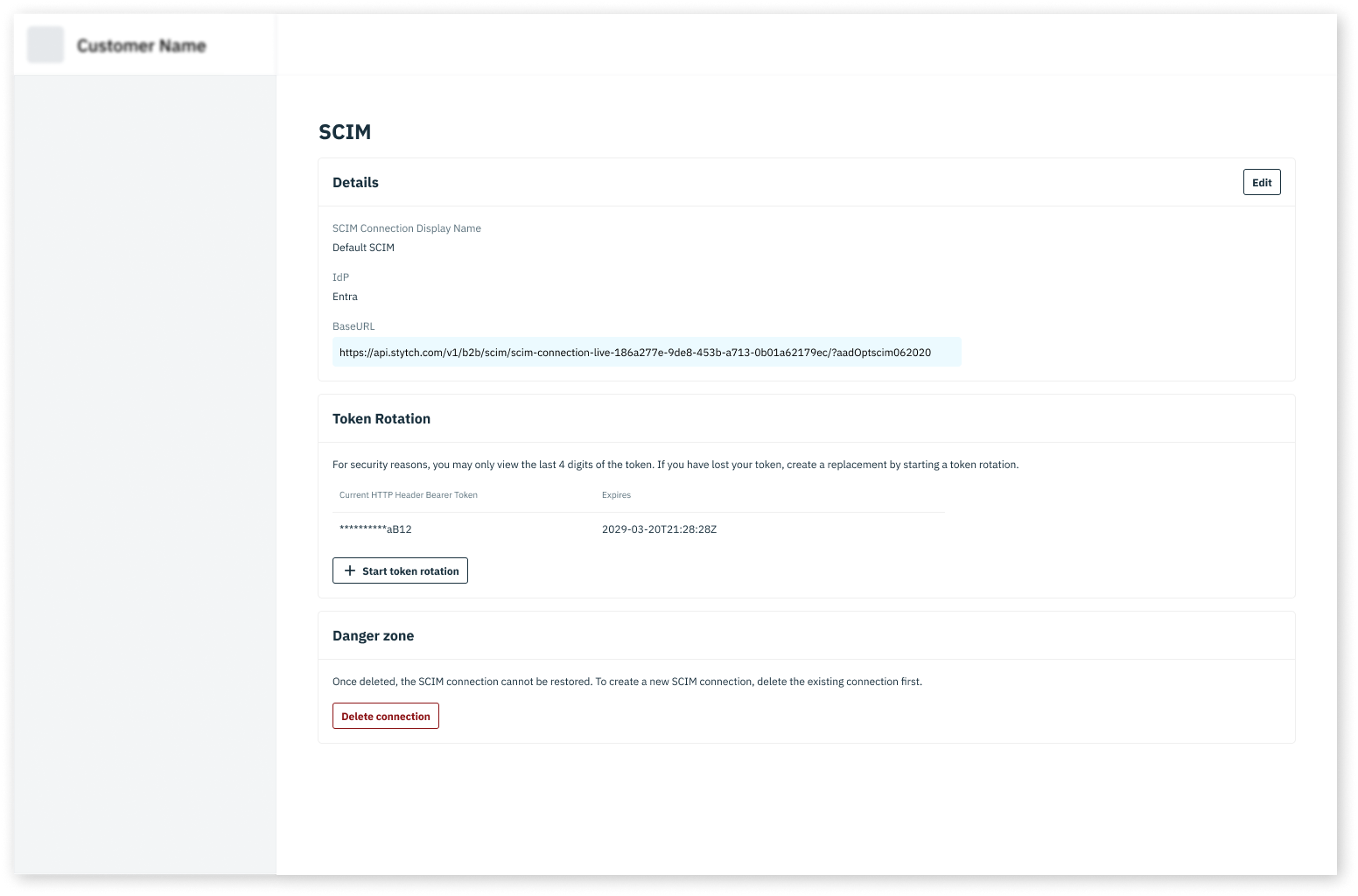
* [`AdminPortalSCIM`](/docs/api-reference/b2b/frontend-sdks/react/prebuilt-ui/admin-portal/scim) - allows Members of the Organization to manage their own SCIM connections
Want to see the Admin Portal in action? Log into your [Stytch Dashboard](https://stytch.com/dashboard/settings/team) and check out the Team, Access Settings, SSO, and SCIM pages. These are all built with Admin Portal!
 ## Add Admin Portal to your application
Complete all the steps in the [installation guide](/docs/api-reference/b2b/frontend-sdks/react/installation)
Create the following file structure in your Next.js app directory:
```
app/
admin/
members/
page.tsx
organization/
page.tsx
sso/
page.tsx
scim/
page.tsx
```
Typically, these routes will live wherever you have other "settings" type pages for the Organization.
```jsx members/page.tsx theme={null}
import {
AdminPortalMemberManagement
} from "@stytch/nextjs/b2b/adminPortal";
// Optional: customize the styles of the Admin Portal components
const styles = { colors: { primary: "#000000" } };
// Optional: set custom configurations
const config = {
getRoleDisplayName: (role: string) => {
return role.charAt(0).toUpperCase() + role.slice(1);
},
}
export default function MembersPage() {
return ;
}
```
```jsx organization/page.tsx theme={null}
import {
AdminPortalOrgSettings
} from "@stytch/nextjs/b2b/adminPortal";
// Optional: customize the styles of the Admin Portal components
const styles = { colors: { primary: "#000000" } };
// Optional: set custom configurations
const config = {
getRoleDisplayName: (role: string) => {
return role.charAt(0).toUpperCase() + role.slice(1);
},
}
export default function OrganizationPage() {
return ;
}
```
```jsx sso/page.tsx theme={null}
import {
AdminPortalSSO
} from "@stytch/nextjs/b2b/adminPortal";
// Optional: customize the styles of the Admin Portal components
const styles = { colors: { primary: "#000000" } };
// Optional: set custom configurations
const config = {
getRoleDisplayName: (role: string) => {
return role.charAt(0).toUpperCase() + role.slice(1);
},
}
export default function SSOPage() {
return ;
}
```
```jsx scim/page.tsx theme={null}
import {
AdminPortalSCIM
} from "@stytch/nextjs/b2b/adminPortal";
// Optional: customize the styles of the Admin Portal components
const styles = { colors: { primary: "#000000" } };
// Optional: set custom configurations
const config = {
getRoleDisplayName: (role: string) => {
return role.charAt(0).toUpperCase() + role.slice(1);
},
}
export default function SCIMPage() {
return ;
}
```
That's it! You can now test the Admin Portal components by navigating to the routes you created.
Complete all the steps in the [installation guide](/docs/api-reference/b2b/frontend-sdks/react/installation)
Create the following file structure in your Next.js pages directory:
```
pages/
admin/
members.tsx
organization.tsx
sso.tsx
scim.tsx
```
Typically, these routes will live wherever you have other "settings" type pages for the Organization.
```jsx members.tsx theme={null}
import {
AdminPortalMemberManagement
} from "@stytch/nextjs/b2b/adminPortal";
// Optional: customize the styles of the Admin Portal components
const styles = { colors: { primary: "#000000" } };
// Optional: set custom configurations
const config = {
getRoleDisplayName: (role: string) => {
return role.charAt(0).toUpperCase() + role.slice(1);
},
}
export default function MembersPage() {
return ;
}
```
```jsx organization.tsx theme={null}
import {
AdminPortalOrgSettings
} from "@stytch/nextjs/b2b/adminPortal";
// Optional: customize the styles of the Admin Portal components
const styles = { colors: { primary: "#000000" } };
// Optional: set custom configurations
const config = {
getRoleDisplayName: (role: string) => {
return role.charAt(0).toUpperCase() + role.slice(1);
},
}
export default function OrganizationPage() {
return ;
}
```
```jsx sso.tsx theme={null}
import {
AdminPortalSSO
} from "@stytch/nextjs/b2b/adminPortal";
// Optional: customize the styles of the Admin Portal components
const styles = { colors: { primary: "#000000" } };
// Optional: set custom configurations
const config = {
getRoleDisplayName: (role: string) => {
return role.charAt(0).toUpperCase() + role.slice(1);
},
}
export default function SSOPage() {
return ;
}
```
```jsx scim.tsx theme={null}
import {
AdminPortalSCIM
} from "@stytch/nextjs/b2b/adminPortal";
// Optional: customize the styles of the Admin Portal components
const styles = { colors: { primary: "#000000" } };
// Optional: set custom configurations
const config = {
getRoleDisplayName: (role: string) => {
return role.charAt(0).toUpperCase() + role.slice(1);
},
}
export default function SCIMPage() {
return ;
}
```
That's it! You can now test the Admin Portal components by navigating to the routes you created.
## RBAC considerations
Admin Portal respects all RBAC policies configured in your [Stytch Dashboard](https://stytch.com/dashboard/rbac). Use the resources prefixed with `stytch.` to control who can access and update settings in the Admin Portal.
For example, in the `AdminPortalMemberManagement` component, only Members with permission to `search` on `stytch.member` will be able to view and search for Members.
Read the [RBAC guide](/docs/multi-tenant-auth/enterprise-ready/rbac/create-rbac-policy) for more information about configuring RBAC policies.
## Add Admin Portal to your application
Complete all the steps in the [installation guide](/docs/api-reference/b2b/frontend-sdks/react/installation)
Create the following file structure in your Next.js app directory:
```
app/
admin/
members/
page.tsx
organization/
page.tsx
sso/
page.tsx
scim/
page.tsx
```
Typically, these routes will live wherever you have other "settings" type pages for the Organization.
```jsx members/page.tsx theme={null}
import {
AdminPortalMemberManagement
} from "@stytch/nextjs/b2b/adminPortal";
// Optional: customize the styles of the Admin Portal components
const styles = { colors: { primary: "#000000" } };
// Optional: set custom configurations
const config = {
getRoleDisplayName: (role: string) => {
return role.charAt(0).toUpperCase() + role.slice(1);
},
}
export default function MembersPage() {
return ;
}
```
```jsx organization/page.tsx theme={null}
import {
AdminPortalOrgSettings
} from "@stytch/nextjs/b2b/adminPortal";
// Optional: customize the styles of the Admin Portal components
const styles = { colors: { primary: "#000000" } };
// Optional: set custom configurations
const config = {
getRoleDisplayName: (role: string) => {
return role.charAt(0).toUpperCase() + role.slice(1);
},
}
export default function OrganizationPage() {
return ;
}
```
```jsx sso/page.tsx theme={null}
import {
AdminPortalSSO
} from "@stytch/nextjs/b2b/adminPortal";
// Optional: customize the styles of the Admin Portal components
const styles = { colors: { primary: "#000000" } };
// Optional: set custom configurations
const config = {
getRoleDisplayName: (role: string) => {
return role.charAt(0).toUpperCase() + role.slice(1);
},
}
export default function SSOPage() {
return ;
}
```
```jsx scim/page.tsx theme={null}
import {
AdminPortalSCIM
} from "@stytch/nextjs/b2b/adminPortal";
// Optional: customize the styles of the Admin Portal components
const styles = { colors: { primary: "#000000" } };
// Optional: set custom configurations
const config = {
getRoleDisplayName: (role: string) => {
return role.charAt(0).toUpperCase() + role.slice(1);
},
}
export default function SCIMPage() {
return ;
}
```
That's it! You can now test the Admin Portal components by navigating to the routes you created.
Complete all the steps in the [installation guide](/docs/api-reference/b2b/frontend-sdks/react/installation)
Create the following file structure in your Next.js pages directory:
```
pages/
admin/
members.tsx
organization.tsx
sso.tsx
scim.tsx
```
Typically, these routes will live wherever you have other "settings" type pages for the Organization.
```jsx members.tsx theme={null}
import {
AdminPortalMemberManagement
} from "@stytch/nextjs/b2b/adminPortal";
// Optional: customize the styles of the Admin Portal components
const styles = { colors: { primary: "#000000" } };
// Optional: set custom configurations
const config = {
getRoleDisplayName: (role: string) => {
return role.charAt(0).toUpperCase() + role.slice(1);
},
}
export default function MembersPage() {
return ;
}
```
```jsx organization.tsx theme={null}
import {
AdminPortalOrgSettings
} from "@stytch/nextjs/b2b/adminPortal";
// Optional: customize the styles of the Admin Portal components
const styles = { colors: { primary: "#000000" } };
// Optional: set custom configurations
const config = {
getRoleDisplayName: (role: string) => {
return role.charAt(0).toUpperCase() + role.slice(1);
},
}
export default function OrganizationPage() {
return ;
}
```
```jsx sso.tsx theme={null}
import {
AdminPortalSSO
} from "@stytch/nextjs/b2b/adminPortal";
// Optional: customize the styles of the Admin Portal components
const styles = { colors: { primary: "#000000" } };
// Optional: set custom configurations
const config = {
getRoleDisplayName: (role: string) => {
return role.charAt(0).toUpperCase() + role.slice(1);
},
}
export default function SSOPage() {
return ;
}
```
```jsx scim.tsx theme={null}
import {
AdminPortalSCIM
} from "@stytch/nextjs/b2b/adminPortal";
// Optional: customize the styles of the Admin Portal components
const styles = { colors: { primary: "#000000" } };
// Optional: set custom configurations
const config = {
getRoleDisplayName: (role: string) => {
return role.charAt(0).toUpperCase() + role.slice(1);
},
}
export default function SCIMPage() {
return ;
}
```
That's it! You can now test the Admin Portal components by navigating to the routes you created.
## RBAC considerations
Admin Portal respects all RBAC policies configured in your [Stytch Dashboard](https://stytch.com/dashboard/rbac). Use the resources prefixed with `stytch.` to control who can access and update settings in the Admin Portal.
For example, in the `AdminPortalMemberManagement` component, only Members with permission to `search` on `stytch.member` will be able to view and search for Members.
Read the [RBAC guide](/docs/multi-tenant-auth/enterprise-ready/rbac/create-rbac-policy) for more information about configuring RBAC policies.