> ## Documentation Index
> Fetch the complete documentation index at: https://stytch.com/docs/llms.txt
> Use this file to discover all available pages before exploring further.
# StytchB2B Configuration
> Configuration options for the StytchB2B Login component
 ## Props
The configuration object for the StytchB2B pre-built UI component.
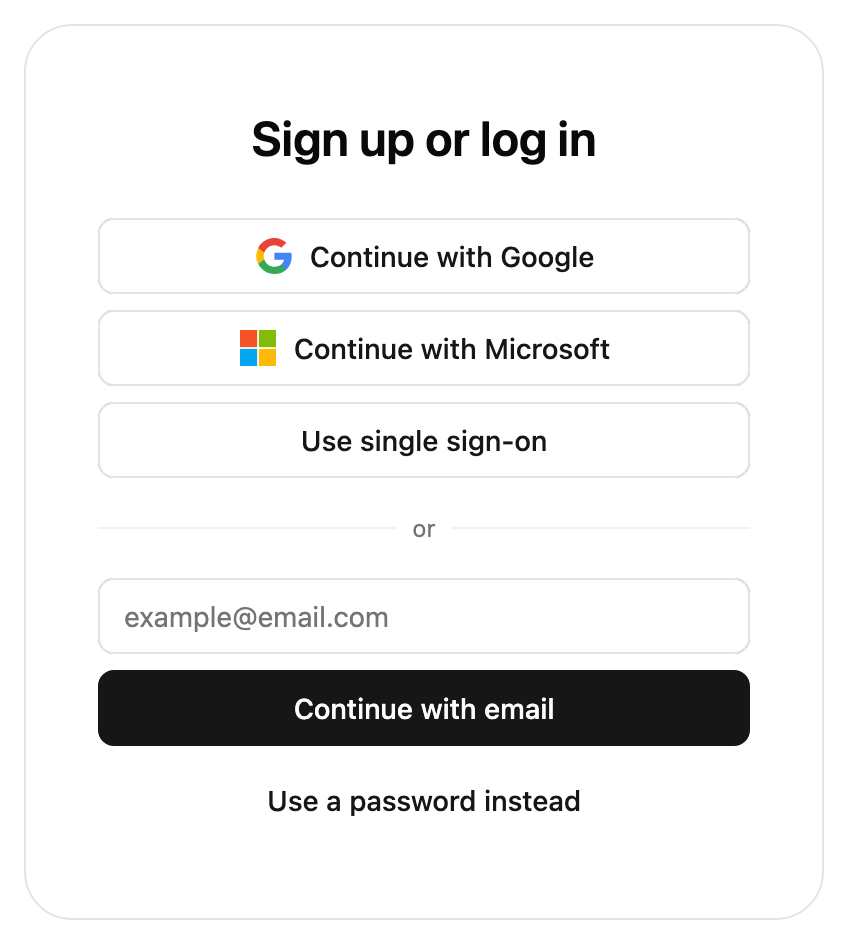
The products array allows you to specify the authentication methods that you would like to expose to your users.
The order of the products that you include here will also be the order in which they appear in the login form, with the first product specified appearing at the top of the login form.
Currently the JavaScript B2B SDK supports our `emailMagicLinks`, `oauth`, `sso`, and `passwords` products.
`emailMagicLinks` and `oauth` are supported in both authentication flow types, whereas `sso` is only supported in the Organization authentication flow type. `passwords` is always supported in the Organization authentication flow type, but is also supported in the Discovery flow if cross-org passwords are enabled for the project.
If the only product specified is `oauth`, and the only OAuth provider specified is google with `one_tap` set to true, the login form will not be displayed. Instead, we will only show the Google One Tap prompt in the upper right of the user's browser.
The authFlowType lets you specify the authentication flow type that you wish to enable in the SDK. The options are `Discovery` to let Members log into any Organization they are a part of; `Organization` to let Members log into a specific Organization; and `PasswordReset` to handle password reset flows (after the user clicks the password reset redirect URL). To enable the Organization flow type, you also must add a slug pattern to the authorized domain through the Frontend SDK page in the Dashboard.
The slug of the Organization to present login options for. This is only used when the authFlowType is set to Organization. If you do not specify an `organizationSlug` value, the UI component will use the Organization URL template set up in the [Frontend SDK page](https://stytch.com/dashboard/sdk-configuration) of the Stytch Dashboard in order to infer the Organization from the URL that the component is hosted on.
The options for email magic links. This is required if `emailMagicLinks` is present in the products array.
The URL that will appear in your email template and accepts a token (ex: you implement '[https://example.com/authenticate?token=123](https://example.com/authenticate?token=123)' in your app and pass '[https://example.com/authenticate](https://example.com/authenticate)' as the redirect URL). This link should route to an endpoint that authenticates your user via Stytch's authenticate endpoint and redirect to your app's experience for existing users.
The URL that will appear in your email template and accepts a token (ex: you implement '[https://example.com/authenticate?token=123](https://example.com/authenticate?token=123)' in your app and pass '[https://example.com/authenticate](https://example.com/authenticate)' as the redirect URL). This link should route to an endpoint that authenticates your user via Stytch's authenticate endpoint and redirect to your app's experience for new users.
The URL that will appear in your email template and accepts a token (ex: you implement '[https://example.com/authenticate?token=123](https://example.com/authenticate?token=123)' in your app and pass '[https://example.com/authenticate](https://example.com/authenticate)' as the redirect URL). This link should route to an endpoint that authenticates your user via Stytch's discovery authenticate endpoint and redirect to your app's experience for users logging into the discovery flow.
Custom template ID for login emails. By default, it will use your default email template. Templates can be added in the [Stytch dashboard](https://stytch.com/dashboard/templates) using our built-in customization options or custom HTML templates with type “Magic links - Login”.
Custom template ID for sign-up emails. By default, it will use your default email template. Templates can be added in the [Stytch dashboard](https://stytch.com/dashboard/templates) using our built-in customization options or custom HTML templates with type “Magic links - Sign-up”.
Used to determine which language to use when sending the user this delivery method. Parameter is an [IETF BCP 47 language tag](https://www.w3.org/International/articles/language-tags/), e.g. "en".
Supported languages are English ("en"), Spanish ("es"), French ("fr") and Brazilian Portuguese ("pt-br"); if no value is provided, the copy defaults to English.
A hint indicating which domain the email will be sent from used in the filters included in the component's links to common email inboxes (for example, [https://mail.google.com/mail/u/0/#search/from%3A%40domainHint%20in%3Aanywhere](https://mail.google.com/mail/u/0/#search/from%3A%40domainHint%20in%3Aanywhere)). This field is only required if your project uses more than one custom domain to send emails.
The options for email one time passcodes. This is required if `emailOtp` is present in the products array.
Custom template ID for login emails. By default, it will use your default email template. Templates can be added in the [Stytch dashboard](https://stytch.com/dashboard/templates) using our built-in customization options or custom HTML templates with type “OTP - Login”.
Custom template ID for sign-up emails. By default, it will use your default email template. Templates can be added in the [Stytch dashboard](https://stytch.com/dashboard/templates) using our built-in customization options or custom HTML templates with type “OTP - Sign-up”.
Used to determine which language to use when sending the user this delivery method. Parameter is an [IETF BCP 47 language tag](https://www.w3.org/International/articles/language-tags/), e.g. "en".
Supported languages are English ("en"), Spanish ("es"), French ("fr") and Brazilian Portuguese ("pt-br"); if no value is provided, the copy defaults to English.
The options for SSO. This is required if `sso` is present in the products array.
The URL that will appear in your email template and accepts a token (ex: you implement '[https://example.com/authenticate?token=123](https://example.com/authenticate?token=123)' in your app and pass '[https://example.com/authenticate](https://example.com/authenticate)' as the redirect URL). This link should route to an endpoint that authenticates your user via Stytch's authenticate endpoint and redirect to your app's experience for existing users.
The URL that will appear in your email template and accepts a token (ex: you implement '[https://example.com/authenticate?token=123](https://example.com/authenticate?token=123)' in your app and pass '[https://example.com/authenticate](https://example.com/authenticate)' as the redirect URL). This link should route to an endpoint that authenticates your user via Stytch's authenticate endpoint and redirect to your app's experience for new users.
The options for OAuth. This is required if `oauth` is present in the products array.
Specifies which OAuth providers to display.
The provider type. Currently we support `'google'`, `'microsoft'`, `'hubspot'`, `'slack'`, and `'github'`.
Whether to display the Google One Tap prompt in the top right corner of the user's browser. This parameter is only allowed (and required) if the type is set to google.
Controls whether the Google One Tap prompt is automatically dismissed when the user taps outside of it. This parameter is only allowed if the type is set to google and one\_tap is set to true. Defaults to true.
An optional array of scopes that Stytch will request for your application in addition to the base set of scopes required for login.
An object with any additional parameters that you'd like to pass along to the OAuth provider (for example, `login_hint`, for providers that support it).
The URL that will appear in your email template and accepts a token (ex: you implement '[https://example.com/authenticate?token=123](https://example.com/authenticate?token=123)' in your app and pass '[https://example.com/authenticate](https://example.com/authenticate)' as the redirect URL). This link should route to an endpoint that authenticates your user via Stytch's authenticate endpoint and redirect to your app's experience for existing users.
The URL that will appear in your email template and accepts a token (ex: you implement '[https://example.com/authenticate?token=123](https://example.com/authenticate?token=123)' in your app and pass '[https://example.com/authenticate](https://example.com/authenticate)' as the redirect URL). This link should route to an endpoint that authenticates your user via Stytch's authenticate endpoint and redirect to your app's experience for new users.
The URL that will appear in your email template and accepts a token (ex: you implement '[https://example.com/authenticate?token=123](https://example.com/authenticate?token=123)' in your app and pass '[https://example.com/authenticate](https://example.com/authenticate)' as the redirect URL). This link should route to an endpoint that authenticates your user via Stytch's discovery authenticate endpoint and redirect to your app's experience for users logging into the discovery flow.
The options for Passwords. This is required if `passwords` is present in the products array.
The URL that will appear in your email template and accepts a token (ex: you implement '[https://example.com/authenticate?token=123](https://example.com/authenticate?token=123)' in your app and pass '[https://example.com/authenticate](https://example.com/authenticate)' as the redirect URL). This link should route to an endpoint that authenticates your user via Stytch's authenticate endpoint and redirect to your app's experience for existing users.
The URL that will appear in your email template and accepts a token (ex: you implement '[https://example.com/authenticate?token=123](https://example.com/authenticate?token=123)' in your app and pass '[https://example.com/authenticate](https://example.com/authenticate)' as the redirect URL). This link should route to an endpoint that authenticates your user via Stytch's authenticate endpoint and redirect to your app's experience for existing users.
The number of minutes that the password reset token sent in password reset emails will be valid for. Defaults to 30 minutes.
Custom template ID for password reset emails, configured via [the Branding page](https://stytch.com/dashboard/templates) in the Stytch Dashboard. If this value is not specified, your default password reset template will be used.
The redirect URL used in password reset emails in the Discovery (cross-Organization) Passwords flow.
Custom template ID for email verification emails. By default, it will use your default email template. Templates can be added in the [Stytch dashboard](https://stytch.com/dashboard/templates) using our built-in customization options or custom HTML templates with type "Passwords - Email verification".
Used to determine which language to use when sending the user this delivery method. Parameter is an [IETF BCP 47 language tag](https://www.w3.org/International/articles/language-tags/), e.g. "en".
Supported languages are English ("en"), Spanish ("es"), French ("fr") and Brazilian Portuguese ("pt-br"); if no value is provided, the copy defaults to English.
The options for SMS OTP MFA.
Used to determine which language to use when sending the user this delivery method. Parameter is an [IETF BCP 47 language tag](https://www.w3.org/International/articles/language-tags/), e.g. "en".
Supported languages are English ("en"), Spanish ("es"), French ("fr") and Brazilian Portuguese ("pt-br"); if no value is provided, the copy defaults to English.
The options for session management. We create a session for Members when they log in. You can access a Member or session using the Member or Session SDK methods.
Set the session lifetime to be this many minutes from now; minimum of 5 and a maximum of 525600 minutes (365 days). Note that a successful authentication will continue to extend the session this many minutes.
MFA products to include in the UI. If specified, the list of available products will be limited to those included. Defaults to all available products.
Note that if an Organization restricts the available MFA methods, the Organization's settings will take precedence. In addition, if a Member is enrolled in MFA compatible with their Organization's policies, their enrolled methods will always be made available.
Currently the JavaScript B2B SDK supports our `smsOtp` and `totp` MFA products.
The order to present MFA products to a Member when multiple choices are available, such as during enrollment.
Currently the JavaScript B2B SDK supports our `smsOtp` and `totp` MFA products.
A configuration option that allows you to skip the discovery flow and log a Member in directly only if they are a Member of a single Organization.
Whether or not direct login for single membership is enabled. If the user has an invite or can JIT provision into an Organization the Discovery Organization select pane will still be shown unless the other two properties are also enabled.
If enabled, logs a user directly into their existing Organization even if they have one or more pending invites to a different Organization. This bypasses the Discovery Organization select pane.
If enabled, logs a user directly into their existing Organization even if they have Organizations they could join via JIT provisioning. This bypasses the Discovery Organization select pane.
Whether or not an Organization should be created directly when a user has no memberships, invitations, or Organizations they could join via JIT provisioning. This has no effect if the ability to create Organizations from the frontend SDK is disabled in the Stytch Dashboard. Defaults to false.
Whether to prevent users who are not Members of any Organization from creating a new Organization during the discovery flow. This has no effect if the ability to create Organizations from the frontend SDK is disabled in the Stytch Dashboard. Defaults to false.
The `presentation.theme` object allows you to customize the look of the SDK. You can specify some of them or none at all. We'll use our defaults for the ones you don't specify.
If you pass in an array of two themes, the first will automatically be used when the user's OS is in light mode, and the second in dark mode.
See [our pre-built themes](../theming#pre-built-themes), [how to write your own theme](../theming#creating-your-own-theme) or [reference for all properties](../theming#reference).
The `presentation.options` object customizes non-style related aspects of the SDK's appearance.
You can specify some of them or none at all. We'll use our defaults for the ones you don't specify.
When this value is true, the title and description text will not show in the SDK.
The configuration object for your custom logo.
The URL of your custom logo.
The alt text for the logo for non-visual users. This is required for accessibility.
Allows our icons to be overridden. See [icon customization guide](../theming#icon-customization) for more information.
Optional callbacks that are triggered by various events in the SDK. See more details about the callbacks [here](./callbacks).
A callback function that responds to events sent from the SDK.
A callback function that responds to errors in the SDK. It is useful for debugging during development and error handling in production.
Specify custom strings to be used in the prebuilt UI. Consult the message catalog (messages/b2b/en.po) for the list of available strings. Each value should be specified using ICU MessageFormat.
Strings that are not defined will use the default English value as a fallback.
See [Text Customization](../text-customization) for more information.
```jsx theme={null}
import {
AuthFlowType,
B2BProducts,
StytchB2B,
} from '@stytch/nextjs/b2b';
const Login = () => {
// Set the login flow
// See below for examples of the different login flows
const config = {
products: [B2BProducts.emailMagicLinks],
sessionOptions: { sessionDurationMinutes: 60 },
authFlowType: AuthFlowType.Discovery,
};
// Set the styles for the prebuilt UI
const presentation = {
theme: { 'font-family': 'Arial' },
options: { hideHeaderText: true },
};
// Set the callbacks to fire as a result of events from the prebuilt UI
const callbacks = {
onEvent: ({ type, data }) => {
console.log(type, data);
},
onError: (data) => {
console.log(data);
},
};
// Customize the text in the prebuilt UI
const strings = {
'organizationLogin.title': 'Proceed to your {organizationName} account',
};
return (
);
};
export default Login;
```
```javascript Discovery Auth Flow theme={null}
import { B2BProducts } from '@stytch/nextjs/b2b';
// Hosted on a generic login page
const discoveryConfig = {
authFlowType: 'Discovery',
products: [B2BProducts.emailMagicLinks, B2BProducts.oauth],
emailMagicLinksOptions: {
discoveryRedirectURL: 'https://example.com/authenticate',
},
oauthOptions: {
discoveryRedirectURL: 'https://example.com/authenticate',
providers: [
{ type: 'google', one_tap: true, cancel_on_tap_outside: false },
{ type: 'microsoft' },
],
},
sessionOptions: {
sessionDurationMinutes: 60,
},
};
```
```javascript Organization Login Flow theme={null}
import { B2BProducts } from '@stytch/nextjs/b2b';
// Hosted on an Organization-specific login page
const organizationConfig = {
authFlowType: 'Organization',
products: [B2BProducts.emailMagicLinks, B2BProducts.oauth, B2BProducts.sso, B2BProducts.passwords],
emailMagicLinksOptions: {
loginRedirectURL: 'https://example.com/authenticate',
signupRedirectURL: 'https://example.com/signup',
},
oauthOptions: {
loginRedirectURL: 'https://example.com/authenticate',
signupRedirectURL: 'https://example.com/signup',
providers: [
{ type: 'google', one_tap: true, cancel_on_tap_outside: false },
{ type: 'microsoft' },
],
providerParams: {
login_hint: 'example_hint@stytch.com',
},
},
ssoOptions: {
loginRedirectURL: 'https://example.com/authenticate',
signupRedirectURL: 'https://example.com/signup',
},
passwordOptions: {
loginRedirectURL: 'https://example.com/authenticate',
resetPasswordRedirectURL: 'https://example.com/resetPassword',
resetPasswordExpirationMinutes: 20,
},
sessionOptions: {
sessionDurationMinutes: 60,
},
};
```
```javascript Password Reset Flow theme={null}
import { B2BProducts } from '@stytch/nextjs/b2b';
// You'll launch the UI component with this configuration after users click the password reset redirect URL.
const passwordResetConfig = {
authFlowType: 'PasswordReset',
products: [B2BProducts.passwords],
sessionOptions: { sessionDurationMinutes: 60 },
};
```
## Props
The configuration object for the StytchB2B pre-built UI component.
The products array allows you to specify the authentication methods that you would like to expose to your users.
The order of the products that you include here will also be the order in which they appear in the login form, with the first product specified appearing at the top of the login form.
Currently the JavaScript B2B SDK supports our `emailMagicLinks`, `oauth`, `sso`, and `passwords` products.
`emailMagicLinks` and `oauth` are supported in both authentication flow types, whereas `sso` is only supported in the Organization authentication flow type. `passwords` is always supported in the Organization authentication flow type, but is also supported in the Discovery flow if cross-org passwords are enabled for the project.
If the only product specified is `oauth`, and the only OAuth provider specified is google with `one_tap` set to true, the login form will not be displayed. Instead, we will only show the Google One Tap prompt in the upper right of the user's browser.
The authFlowType lets you specify the authentication flow type that you wish to enable in the SDK. The options are `Discovery` to let Members log into any Organization they are a part of; `Organization` to let Members log into a specific Organization; and `PasswordReset` to handle password reset flows (after the user clicks the password reset redirect URL). To enable the Organization flow type, you also must add a slug pattern to the authorized domain through the Frontend SDK page in the Dashboard.
The slug of the Organization to present login options for. This is only used when the authFlowType is set to Organization. If you do not specify an `organizationSlug` value, the UI component will use the Organization URL template set up in the [Frontend SDK page](https://stytch.com/dashboard/sdk-configuration) of the Stytch Dashboard in order to infer the Organization from the URL that the component is hosted on.
The options for email magic links. This is required if `emailMagicLinks` is present in the products array.
The URL that will appear in your email template and accepts a token (ex: you implement '[https://example.com/authenticate?token=123](https://example.com/authenticate?token=123)' in your app and pass '[https://example.com/authenticate](https://example.com/authenticate)' as the redirect URL). This link should route to an endpoint that authenticates your user via Stytch's authenticate endpoint and redirect to your app's experience for existing users.
The URL that will appear in your email template and accepts a token (ex: you implement '[https://example.com/authenticate?token=123](https://example.com/authenticate?token=123)' in your app and pass '[https://example.com/authenticate](https://example.com/authenticate)' as the redirect URL). This link should route to an endpoint that authenticates your user via Stytch's authenticate endpoint and redirect to your app's experience for new users.
The URL that will appear in your email template and accepts a token (ex: you implement '[https://example.com/authenticate?token=123](https://example.com/authenticate?token=123)' in your app and pass '[https://example.com/authenticate](https://example.com/authenticate)' as the redirect URL). This link should route to an endpoint that authenticates your user via Stytch's discovery authenticate endpoint and redirect to your app's experience for users logging into the discovery flow.
Custom template ID for login emails. By default, it will use your default email template. Templates can be added in the [Stytch dashboard](https://stytch.com/dashboard/templates) using our built-in customization options or custom HTML templates with type “Magic links - Login”.
Custom template ID for sign-up emails. By default, it will use your default email template. Templates can be added in the [Stytch dashboard](https://stytch.com/dashboard/templates) using our built-in customization options or custom HTML templates with type “Magic links - Sign-up”.
Used to determine which language to use when sending the user this delivery method. Parameter is an [IETF BCP 47 language tag](https://www.w3.org/International/articles/language-tags/), e.g. "en".
Supported languages are English ("en"), Spanish ("es"), French ("fr") and Brazilian Portuguese ("pt-br"); if no value is provided, the copy defaults to English.
A hint indicating which domain the email will be sent from used in the filters included in the component's links to common email inboxes (for example, [https://mail.google.com/mail/u/0/#search/from%3A%40domainHint%20in%3Aanywhere](https://mail.google.com/mail/u/0/#search/from%3A%40domainHint%20in%3Aanywhere)). This field is only required if your project uses more than one custom domain to send emails.
The options for email one time passcodes. This is required if `emailOtp` is present in the products array.
Custom template ID for login emails. By default, it will use your default email template. Templates can be added in the [Stytch dashboard](https://stytch.com/dashboard/templates) using our built-in customization options or custom HTML templates with type “OTP - Login”.
Custom template ID for sign-up emails. By default, it will use your default email template. Templates can be added in the [Stytch dashboard](https://stytch.com/dashboard/templates) using our built-in customization options or custom HTML templates with type “OTP - Sign-up”.
Used to determine which language to use when sending the user this delivery method. Parameter is an [IETF BCP 47 language tag](https://www.w3.org/International/articles/language-tags/), e.g. "en".
Supported languages are English ("en"), Spanish ("es"), French ("fr") and Brazilian Portuguese ("pt-br"); if no value is provided, the copy defaults to English.
The options for SSO. This is required if `sso` is present in the products array.
The URL that will appear in your email template and accepts a token (ex: you implement '[https://example.com/authenticate?token=123](https://example.com/authenticate?token=123)' in your app and pass '[https://example.com/authenticate](https://example.com/authenticate)' as the redirect URL). This link should route to an endpoint that authenticates your user via Stytch's authenticate endpoint and redirect to your app's experience for existing users.
The URL that will appear in your email template and accepts a token (ex: you implement '[https://example.com/authenticate?token=123](https://example.com/authenticate?token=123)' in your app and pass '[https://example.com/authenticate](https://example.com/authenticate)' as the redirect URL). This link should route to an endpoint that authenticates your user via Stytch's authenticate endpoint and redirect to your app's experience for new users.
The options for OAuth. This is required if `oauth` is present in the products array.
Specifies which OAuth providers to display.
The provider type. Currently we support `'google'`, `'microsoft'`, `'hubspot'`, `'slack'`, and `'github'`.
Whether to display the Google One Tap prompt in the top right corner of the user's browser. This parameter is only allowed (and required) if the type is set to google.
Controls whether the Google One Tap prompt is automatically dismissed when the user taps outside of it. This parameter is only allowed if the type is set to google and one\_tap is set to true. Defaults to true.
An optional array of scopes that Stytch will request for your application in addition to the base set of scopes required for login.
An object with any additional parameters that you'd like to pass along to the OAuth provider (for example, `login_hint`, for providers that support it).
The URL that will appear in your email template and accepts a token (ex: you implement '[https://example.com/authenticate?token=123](https://example.com/authenticate?token=123)' in your app and pass '[https://example.com/authenticate](https://example.com/authenticate)' as the redirect URL). This link should route to an endpoint that authenticates your user via Stytch's authenticate endpoint and redirect to your app's experience for existing users.
The URL that will appear in your email template and accepts a token (ex: you implement '[https://example.com/authenticate?token=123](https://example.com/authenticate?token=123)' in your app and pass '[https://example.com/authenticate](https://example.com/authenticate)' as the redirect URL). This link should route to an endpoint that authenticates your user via Stytch's authenticate endpoint and redirect to your app's experience for new users.
The URL that will appear in your email template and accepts a token (ex: you implement '[https://example.com/authenticate?token=123](https://example.com/authenticate?token=123)' in your app and pass '[https://example.com/authenticate](https://example.com/authenticate)' as the redirect URL). This link should route to an endpoint that authenticates your user via Stytch's discovery authenticate endpoint and redirect to your app's experience for users logging into the discovery flow.
The options for Passwords. This is required if `passwords` is present in the products array.
The URL that will appear in your email template and accepts a token (ex: you implement '[https://example.com/authenticate?token=123](https://example.com/authenticate?token=123)' in your app and pass '[https://example.com/authenticate](https://example.com/authenticate)' as the redirect URL). This link should route to an endpoint that authenticates your user via Stytch's authenticate endpoint and redirect to your app's experience for existing users.
The URL that will appear in your email template and accepts a token (ex: you implement '[https://example.com/authenticate?token=123](https://example.com/authenticate?token=123)' in your app and pass '[https://example.com/authenticate](https://example.com/authenticate)' as the redirect URL). This link should route to an endpoint that authenticates your user via Stytch's authenticate endpoint and redirect to your app's experience for existing users.
The number of minutes that the password reset token sent in password reset emails will be valid for. Defaults to 30 minutes.
Custom template ID for password reset emails, configured via [the Branding page](https://stytch.com/dashboard/templates) in the Stytch Dashboard. If this value is not specified, your default password reset template will be used.
The redirect URL used in password reset emails in the Discovery (cross-Organization) Passwords flow.
Custom template ID for email verification emails. By default, it will use your default email template. Templates can be added in the [Stytch dashboard](https://stytch.com/dashboard/templates) using our built-in customization options or custom HTML templates with type "Passwords - Email verification".
Used to determine which language to use when sending the user this delivery method. Parameter is an [IETF BCP 47 language tag](https://www.w3.org/International/articles/language-tags/), e.g. "en".
Supported languages are English ("en"), Spanish ("es"), French ("fr") and Brazilian Portuguese ("pt-br"); if no value is provided, the copy defaults to English.
The options for SMS OTP MFA.
Used to determine which language to use when sending the user this delivery method. Parameter is an [IETF BCP 47 language tag](https://www.w3.org/International/articles/language-tags/), e.g. "en".
Supported languages are English ("en"), Spanish ("es"), French ("fr") and Brazilian Portuguese ("pt-br"); if no value is provided, the copy defaults to English.
The options for session management. We create a session for Members when they log in. You can access a Member or session using the Member or Session SDK methods.
Set the session lifetime to be this many minutes from now; minimum of 5 and a maximum of 525600 minutes (365 days). Note that a successful authentication will continue to extend the session this many minutes.
MFA products to include in the UI. If specified, the list of available products will be limited to those included. Defaults to all available products.
Note that if an Organization restricts the available MFA methods, the Organization's settings will take precedence. In addition, if a Member is enrolled in MFA compatible with their Organization's policies, their enrolled methods will always be made available.
Currently the JavaScript B2B SDK supports our `smsOtp` and `totp` MFA products.
The order to present MFA products to a Member when multiple choices are available, such as during enrollment.
Currently the JavaScript B2B SDK supports our `smsOtp` and `totp` MFA products.
A configuration option that allows you to skip the discovery flow and log a Member in directly only if they are a Member of a single Organization.
Whether or not direct login for single membership is enabled. If the user has an invite or can JIT provision into an Organization the Discovery Organization select pane will still be shown unless the other two properties are also enabled.
If enabled, logs a user directly into their existing Organization even if they have one or more pending invites to a different Organization. This bypasses the Discovery Organization select pane.
If enabled, logs a user directly into their existing Organization even if they have Organizations they could join via JIT provisioning. This bypasses the Discovery Organization select pane.
Whether or not an Organization should be created directly when a user has no memberships, invitations, or Organizations they could join via JIT provisioning. This has no effect if the ability to create Organizations from the frontend SDK is disabled in the Stytch Dashboard. Defaults to false.
Whether to prevent users who are not Members of any Organization from creating a new Organization during the discovery flow. This has no effect if the ability to create Organizations from the frontend SDK is disabled in the Stytch Dashboard. Defaults to false.
The `presentation.theme` object allows you to customize the look of the SDK. You can specify some of them or none at all. We'll use our defaults for the ones you don't specify.
If you pass in an array of two themes, the first will automatically be used when the user's OS is in light mode, and the second in dark mode.
See [our pre-built themes](../theming#pre-built-themes), [how to write your own theme](../theming#creating-your-own-theme) or [reference for all properties](../theming#reference).
The `presentation.options` object customizes non-style related aspects of the SDK's appearance.
You can specify some of them or none at all. We'll use our defaults for the ones you don't specify.
When this value is true, the title and description text will not show in the SDK.
The configuration object for your custom logo.
The URL of your custom logo.
The alt text for the logo for non-visual users. This is required for accessibility.
Allows our icons to be overridden. See [icon customization guide](../theming#icon-customization) for more information.
Optional callbacks that are triggered by various events in the SDK. See more details about the callbacks [here](./callbacks).
A callback function that responds to events sent from the SDK.
A callback function that responds to errors in the SDK. It is useful for debugging during development and error handling in production.
Specify custom strings to be used in the prebuilt UI. Consult the message catalog (messages/b2b/en.po) for the list of available strings. Each value should be specified using ICU MessageFormat.
Strings that are not defined will use the default English value as a fallback.
See [Text Customization](../text-customization) for more information.
```jsx theme={null}
import {
AuthFlowType,
B2BProducts,
StytchB2B,
} from '@stytch/nextjs/b2b';
const Login = () => {
// Set the login flow
// See below for examples of the different login flows
const config = {
products: [B2BProducts.emailMagicLinks],
sessionOptions: { sessionDurationMinutes: 60 },
authFlowType: AuthFlowType.Discovery,
};
// Set the styles for the prebuilt UI
const presentation = {
theme: { 'font-family': 'Arial' },
options: { hideHeaderText: true },
};
// Set the callbacks to fire as a result of events from the prebuilt UI
const callbacks = {
onEvent: ({ type, data }) => {
console.log(type, data);
},
onError: (data) => {
console.log(data);
},
};
// Customize the text in the prebuilt UI
const strings = {
'organizationLogin.title': 'Proceed to your {organizationName} account',
};
return (
);
};
export default Login;
```
```javascript Discovery Auth Flow theme={null}
import { B2BProducts } from '@stytch/nextjs/b2b';
// Hosted on a generic login page
const discoveryConfig = {
authFlowType: 'Discovery',
products: [B2BProducts.emailMagicLinks, B2BProducts.oauth],
emailMagicLinksOptions: {
discoveryRedirectURL: 'https://example.com/authenticate',
},
oauthOptions: {
discoveryRedirectURL: 'https://example.com/authenticate',
providers: [
{ type: 'google', one_tap: true, cancel_on_tap_outside: false },
{ type: 'microsoft' },
],
},
sessionOptions: {
sessionDurationMinutes: 60,
},
};
```
```javascript Organization Login Flow theme={null}
import { B2BProducts } from '@stytch/nextjs/b2b';
// Hosted on an Organization-specific login page
const organizationConfig = {
authFlowType: 'Organization',
products: [B2BProducts.emailMagicLinks, B2BProducts.oauth, B2BProducts.sso, B2BProducts.passwords],
emailMagicLinksOptions: {
loginRedirectURL: 'https://example.com/authenticate',
signupRedirectURL: 'https://example.com/signup',
},
oauthOptions: {
loginRedirectURL: 'https://example.com/authenticate',
signupRedirectURL: 'https://example.com/signup',
providers: [
{ type: 'google', one_tap: true, cancel_on_tap_outside: false },
{ type: 'microsoft' },
],
providerParams: {
login_hint: 'example_hint@stytch.com',
},
},
ssoOptions: {
loginRedirectURL: 'https://example.com/authenticate',
signupRedirectURL: 'https://example.com/signup',
},
passwordOptions: {
loginRedirectURL: 'https://example.com/authenticate',
resetPasswordRedirectURL: 'https://example.com/resetPassword',
resetPasswordExpirationMinutes: 20,
},
sessionOptions: {
sessionDurationMinutes: 60,
},
};
```
```javascript Password Reset Flow theme={null}
import { B2BProducts } from '@stytch/nextjs/b2b';
// You'll launch the UI component with this configuration after users click the password reset redirect URL.
const passwordResetConfig = {
authFlowType: 'PasswordReset',
products: [B2BProducts.passwords],
sessionOptions: { sessionDurationMinutes: 60 },
};
```