> ## Documentation Index
> Fetch the complete documentation index at: https://stytch.com/docs/llms.txt
> Use this file to discover all available pages before exploring further.

# via the Stytch API

> Examples and considerations when doing a server-side integration with Stytch.

In this guide, you'll learn how to configure your suite of OIDC applications to log in and perform actions on behalf of your users with your Stytch-powered app using our API. If you prefer to use pre-built UI components, see how to build wtih our frontend SDK [here](/connected-apps/build-login-flow/login-flow).

This enables users of your Stytch app to use their in-house tools, external integrations, desktop apps, AI agents, any OIDC-compatible app to use your Stytch application as an Authorization Server, reducing user information duplication and simplifying the process of integrating Connected Apps with your app.

***

To begin the login flow, the Connected App will make a request to an Authorization URL in your Stytch-powered application. This page will need to implement a mechanism which assists carrying out the flow -- it can be something as simple as a backend endpoint which handles the calls, or as complex as a dedicated frontend component. The entry point should parse out some URL parameters to supply to the Stytch OAuth Authorization flow, which you can see [here](/connected-apps/authorization-code-flow).

This page will need to initiate a call to start OAuth authorization, which will return information about which scopes the user should be prompted to consent to. The result of this call should be used to prompt a user for consent. Once the user confirms, the authorization flow can be finalized by calling the submit OAuth authorize endpoint.

Upon a successful submission Stytch will respond with a `redirect_uri` and a `code` for the Connected App to complete the flow on its backend.

<Info>
  For this flow to succeed, the user must be identified, provided via either the `member_id` + `organization_id`, `session_jwt`, or `session_id`. Prior to executing the authorization call, you'll want to check for a valid session and redirect to the login page with a `return_to` parameter if the user is not authenticated.
</Info>

## **Prerequisites**

In order to complete this guide, you'll need:

* A Stytch project. If you don't have one already, or would like to create a new one, in the [Dashboard](https://stytch.com/dashboard), click on your existing project name in the top left corner of the Dashboard, click **Create Project**, and then select B2B Authentication or Consumer Authentication.
* An application using either the Stytch frontend SDKs or the Stytch backend APIs. If you are using the Stytch SDKs, ensure you are using an up-to-date version, e.g. v13.19.0+ for the Python SDK and v12.31.0+ for the Node SDK.
* A Relying Party app (the Connected App) that wishes to receive user information from your application.

## **Integration steps**

<Steps>
  <Step title="Implement an Entry Point">
    Initiate a call to [start OAuth authorization](/api-reference/b2b/api/connected-apps/consent-management/start-oauth-authorization).

    <CodeGroup>
      ```python B2B Python expandable theme={null}
      import os
      from flask import Flask, request, make_response
      from stytch import B2BClient

      app = Flask(__name__)

      client = B2BClient(
          project_id=os.getenv("STYTCH_PROJECT_ID"),
          secret=os.getenv("STYTCH_SECRET"),
      )

      def perform_authorize(
          consent_granted,
          client_id,
          redirect_uri,
          response_type,
          scopes,
          state,
          code_challenge,
          code_challenge_method,
          session_jwt,
      ):
          return client.idp.oauth.authorize(
              consent_granted=consent_granted,
              client_id=client_id,
              redirect_uri=redirect_uri,
              response_type=response_type,
              scopes=scopes,
              state=state,
              code_challenge=code_challenge,
              code_challenge_method=code_challenge_method,
              session_jwt=session_jwt,
          )

      @app.get("/oauth/authorize")
      def oauth_authorize():
          response_type = request.args.get("response_type", "code")
          scope_str = request.args.get("scope", "")
          client_id = request.args.get("client_id")
          redirect_uri = request.args.get("redirect_uri")
          state = request.args.get("state")
          code_challenge = request.args.get("code_challenge")
          code_challenge_method = request.args.get("code_challenge_method")

          scopes = [s for s in scope_str.split(" ") if s]
          session_jwt = request.cookies.get("stytch_session_jwt")

          base_params = {
              "client_id": client_id,
              "redirect_uri": redirect_uri,
              "response_type": response_type,
              "scopes": scopes,
              "state": state,
              "code_challenge": code_challenge,
              "code_challenge_method": code_challenge_method,
              "session_jwt": session_jwt,
          }

          start_resp = client.idp.oauth.authorize_start(**base_params)

          if start_resp.consent_required:
              # See Step 2: Render consent screen
              return make_response("Consent required", 200)

          auth_resp = perform_authorize(consent_granted=True, **base_params)

          resp = make_response("", 307)
          resp.headers["Location"] = auth_resp.redirect_uri
          return resp

      if __name__ == "__main__":
          app.run(port=3000)
      ```

      ```javascript B2B Node expandable theme={null}
      const express = require('express');
      const cookieParser = require('cookie-parser');
      const stytch = require('stytch');

      const app = express();
      app.use(cookieParser());
      app.use(express.urlencoded({ extended: false }));

      const client = new stytch.B2BClient({
        project_id: process.env.STYTCH_PROJECT_ID,
        secret: process.env.STYTCH_SECRET,
      });

      async function performAuthorize(params) {
        return client.idp.oauth.authorize(params);
      }

      app.get('/oauth/authorize', async (req, res) => {
        try {
          const {
            response_type = 'code',
            scope = '',
            client_id,
            redirect_uri,
            state,
            code_challenge,
            code_challenge_method,
          } = req.query;

          const scopes = String(scope).split(' ').filter(Boolean);
          const session_jwt = req.cookies?.stytch_session_jwt || undefined;

          const baseParams = {
            client_id,
            redirect_uri,
            response_type,
            scopes,
            state,
            code_challenge,
            code_challenge_method,
            session_jwt,
          };

          const startResp = await client.idp.oauth.authorizeStart(baseParams);

          if (startResp.consent_required) {
            // See Step 2: Render consent screen
            return res.status(200).send('Consent required');
          }

          const authResp = await performAuthorize({
            consent_granted: true,
            ...baseParams,
          });

          res.status(307).set('Location', authResp.redirect_uri).send();
        } catch (err) {
          console.error(err);
          res.status(400).send('Authorization failed');
        }
      });

      app.listen(3000, () => console.log('Server listening on :3000'));
      ```

      ```python Consumer Python expandable theme={null}
      import os
      from urllib.parse import urlencode
      from flask import Flask, request, make_response
      from stytch import Client

      app = Flask(__name__)

      client = Client(
          project_id=os.getenv("STYTCH_PROJECT_ID"),
          secret=os.getenv("STYTCH_SECRET"),
      )

      def perform_authorize(
          consent_granted,
          client_id,
          redirect_uri,
          response_type,
          scopes,
          state,
          code_challenge,
          code_challenge_method,
          session_jwt,
      ):
          return client.idp.oauth.authorize(
              consent_granted=consent_granted,
              client_id=client_id,
              redirect_uri=redirect_uri,
              response_type=response_type,
              scopes=scopes,
              state=state,
              code_challenge=code_challenge,
              code_challenge_method=code_challenge_method,
              session_jwt=session_jwt,
          )

      @app.get("/oauth/authorize")
      def oauth_authorize():
          response_type = request.args.get("response_type", "code")
          scope_str = request.args.get("scope", "")
          client_id = request.args.get("client_id")
          redirect_uri = request.args.get("redirect_uri")
          state = request.args.get("state")
          code_challenge = request.args.get("code_challenge")
          code_challenge_method = request.args.get("code_challenge_method")

          scopes = [s for s in scope_str.split(" ") if s]
          session_jwt = request.cookies.get("stytch_session_jwt")

          base_params = {
              "client_id": client_id,
              "redirect_uri": redirect_uri,
              "response_type": response_type,
              "scopes": scopes,
              "state": state,
              "code_challenge": code_challenge,
              "code_challenge_method": code_challenge_method,
              "session_jwt": session_jwt,
          }

          start_resp = client.idp.oauth.authorize_start(**base_params)

          if start_resp.consent_required:
              # See Step 2: Render consent screen
              return make_response("Consent required", 200)

          auth_resp = perform_authorize(consent_granted=True, **base_params)

          resp = make_response("", 307)
          resp.headers["Location"] = auth_resp.redirect_uri
          return resp

      if __name__ == "__main__":
          app.run(port=3000)
      ```

      ```javascript Consumer Node expandable theme={null}
      const express = require('express');
      const cookieParser = require('cookie-parser');
      const stytch = require('stytch');

      const app = express();
      app.use(cookieParser());
      app.use(express.urlencoded({ extended: false }));

      const client = new stytch.Client({
        project_id: process.env.STYTCH_PROJECT_ID,
        secret: process.env.STYTCH_SECRET,
      });

      async function performAuthorize(params) {
        return client.idp.oauth.authorize(params);
      }

      app.get('/oauth/authorize', async (req, res) => {
        try {
          const {
            response_type = 'code',
            scope = '',
            client_id,
            redirect_uri,
            state,
            code_challenge,
            code_challenge_method,
          } = req.query;

          const scopes = String(scope).split(' ').filter(Boolean);
          const session_jwt = req.cookies?.stytch_session_jwt || undefined;

          const baseParams = {
            client_id,
            redirect_uri,
            response_type,
            scopes,
            state,
            code_challenge,
            code_challenge_method,
            session_jwt,
          };

          const startResp = await client.idp.oauth.authorizeStart(baseParams);

          if (startResp.consent_required) {
            // See Step 2: Render consent screen
            return res.status(200).send('Consent required');
          }

          const authResp = await performAuthorize({
            consent_granted: true,
            ...baseParams,
          });

          res.status(307).set('Location', authResp.redirect_uri).send();
        } catch (err) {
          console.error(err);
          res.status(400).send('Authorization failed');
        }
      });

      app.listen(3000, () => console.log('Server listening on :3000'));
      ```
    </CodeGroup>
  </Step>

  <Step title="Render consent page" stepNumber={2}>
    If consent is required, we need to render a page informing what scopes are requested. Otherwise, skip ahead to Step 3.

    <CodeGroup>
      ```python B2B Python expandable theme={null}
      def render_consent_html(scopes, hidden):
          return f"""
      <html>
        <body>
          <h1>Consent required</h1>
          <p>This app is requesting access to:</p>
          <ul>
            {''.join([f'<li>{s}</li>' for s in scopes])}
          </ul>
          <form method=\"post\" action=\"/oauth/authorize/submit\">{''.join([f'<input type=\"hidden\" name=\"{k}\" value=\"{v}\" />' for k, v in hidden.items()])}<button type=\"submit\">Continue</button></form>
        </body>
      </html>
      """
      ```

      ```javascript B2B Node expandable theme={null}
      function renderConsentPage(scopes, hidden) {
        const hiddenInputs = Object.entries(hidden)
          .map(([k, v]) => `<input type="hidden" name="${k}" value="${String(v)}" />`)
          .join('');
        return `
      <html>
        <body>
          <h1>Consent required</h1>
          <p>This app is requesting access to:</p>
          <ul>
            ${scopes.map((s) => `<li>${s}</li>`).join('')}
          </ul>
          <form method="post" action="/oauth/authorize/submit">
            ${hiddenInputs}
            <button type="submit">Continue</button>
          </form>
        </body>
      </html>`;
      }
      ```

      ```python Consumer Python expandable theme={null}
      def render_consent_html(scopes, hidden):
          return f"""
      <html>
        <body>
          <h1>Consent required</h1>
          <p>This app is requesting access to:</p>
          <ul>
            {''.join([f'<li>{s}</li>' for s in scopes])}
          </ul>
          <form method=\"post\" action=\"/oauth/authorize/submit\">{''.join([f'<input type=\"hidden\" name=\"{k}\" value=\"{v}\" />' for k, v in hidden.items()])}<button type=\"submit\">Continue</button></form>
        </body>
      </html>
      """
      ```

      ```javascript Consumer Node expandable theme={null}
      function renderConsentPage(scopes, hidden) {
        const hiddenInputs = Object.entries(hidden)
          .map(([k, v]) => `<input type="hidden" name="${k}" value="${String(v)}" />`)
          .join('');
        return `
      <html>
        <body>
          <h1>Consent required</h1>
          <p>This app is requesting access to:</p>
          <ul>
            ${scopes.map((s) => `<li>${s}</li>`).join('')}
          </ul>
          <form method="post" action="/oauth/authorize/submit">
            ${hiddenInputs}
            <button type="submit">Continue</button>
          </form>
        </body>
      </html>`;
      }
      ```
    </CodeGroup>
  </Step>

  <Step title="Complete authorization request" stepNumber={3}>
    Once the [authorization request is submitted](/api-reference/b2b/api/connected-apps/consent-management/submit-oauth-authorization), authorization is complete.

    <CodeGroup>
      ```python B2B Python expandable theme={null}
      from flask import request, make_response

      @app.route("/oauth/authorize/submit", methods=["POST", "GET"])
      def oauth_authorize_submit():
          response_type = request.values.get("response_type", "code")
          scope_str = request.values.get("scope", "")
          client_id = request.values.get("client_id")
          redirect_uri = request.values.get("redirect_uri")
          state = request.values.get("state")
          code_challenge = request.values.get("code_challenge")
          code_challenge_method = request.values.get("code_challenge_method")
          consent_granted = (request.values.get("consent_granted", "false").lower() == "true")

          scopes = [s for s in scope_str.split(" ") if s]
          session_jwt = request.cookies.get("stytch_session_jwt")

          auth_resp = perform_authorize(
              consent_granted=consent_granted,
              client_id=client_id,
              redirect_uri=redirect_uri,
              response_type=response_type,
              scopes=scopes,
              state=state,
              code_challenge=code_challenge,
              code_challenge_method=code_challenge_method,
              session_jwt=session_jwt,
          )

          resp = make_response("", 307)
          resp.headers["Location"] = auth_resp.redirect_uri
          return resp
      ```

      ```javascript B2B Node expandable theme={null}
      app.post('/oauth/authorize/submit', async (req, res) => {
        try {
          const {
            response_type = 'code',
            scope = '',
            client_id,
            redirect_uri,
            state,
            code_challenge,
            code_challenge_method,
            consent_granted,
          } = req.body;

          const scopes = String(scope).split(' ').filter(Boolean);
          const session_jwt = req.cookies?.stytch_session_jwt || undefined;

          const authResp = await performAuthorize({
            consent_granted: String(consent_granted).toLowerCase() === 'true',
            client_id,
            redirect_uri,
            response_type,
            scopes,
            state,
            code_challenge,
            code_challenge_method,
            session_jwt,
          });

          res.status(307).set('Location', authResp.redirect_uri).send();
        } catch (err) {
          console.error(err);
          res.status(400).send('Authorization failed');
        }
      });
      ```

      ```python Consumer Python expandable theme={null}
      from flask import request, make_response

      @app.route("/oauth/authorize/submit", methods=["POST", "GET"])
      def oauth_authorize_submit():
          response_type = request.values.get("response_type", "code")
          scope_str = request.values.get("scope", "")
          client_id = request.values.get("client_id")
          redirect_uri = request.values.get("redirect_uri")
          state = request.values.get("state")
          code_challenge = request.values.get("code_challenge")
          code_challenge_method = request.values.get("code_challenge_method")
          consent_granted = (request.values.get("consent_granted", "false").lower() == "true")

          scopes = [s for s in scope_str.split(" ") if s]
          session_jwt = request.cookies.get("stytch_session_jwt")

          auth_resp = perform_authorize(
              consent_granted=consent_granted,
              client_id=client_id,
              redirect_uri=redirect_uri,
              response_type=response_type,
              scopes=scopes,
              state=state,
              code_challenge=code_challenge,
              code_challenge_method=code_challenge_method,
              session_jwt=session_jwt,
          )

          resp = make_response("", 307)
          resp.headers["Location"] = auth_resp.redirect_uri
          return resp
      ```

      ```javascript Consumer Node expandable theme={null}
      app.post('/oauth/authorize/submit', async (req, res) => {
        try {
          const {
            response_type = 'code',
            scope = '',
            client_id,
            redirect_uri,
            state,
            code_challenge,
            code_challenge_method,
            consent_granted,
          } = req.body;

          const scopes = String(scope).split(' ').filter(Boolean);
          const session_jwt = req.cookies?.stytch_session_jwt || undefined;

          const authResp = await performAuthorize({
            consent_granted: String(consent_granted).toLowerCase() === 'true',
            client_id,
            redirect_uri,
            response_type,
            scopes,
            state,
            code_challenge,
            code_challenge_method,
            session_jwt,
          });

          res.status(307).set('Location', authResp.redirect_uri).send();
        } catch (err) {
          console.error(err);
          res.status(400).send('Authorization failed');
        }
      });
      ```
    </CodeGroup>
  </Step>

  <Step title="Configure Stytch for the component" stepNumber={4}>
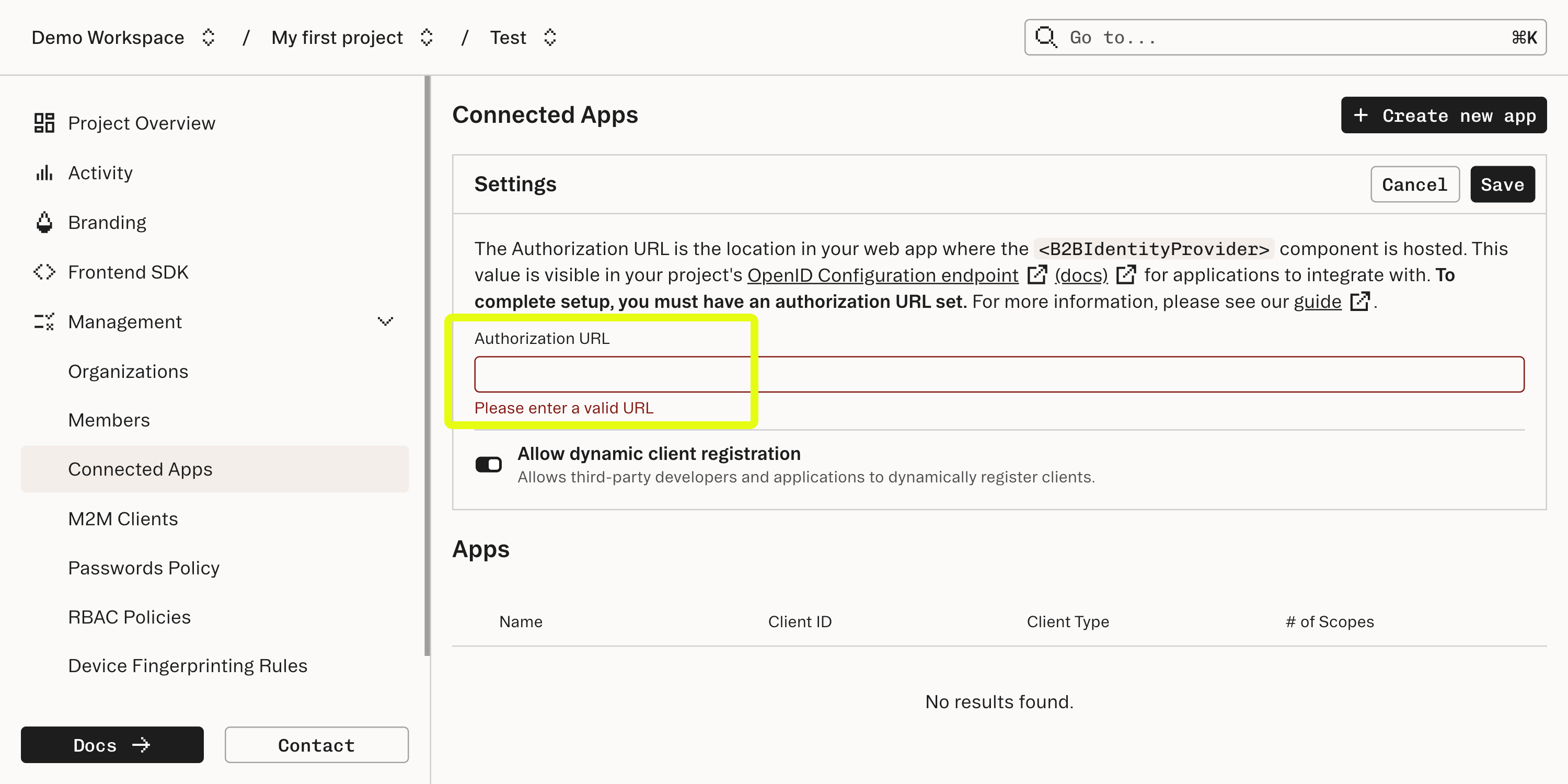
    Enter the URL where the component is mounted into the Authorization URL field in the Connected Apps section of the [Stytch Dashboard](https://stytch.com/dashboard/connected-apps).

    <img src="https://mintcdn.com/stytch-34ca0595/ZKC15aiBkMCWQwo0/images/connected-apps/getting-started/authorization-url.png?fit=max&auto=format&n=ZKC15aiBkMCWQwo0&q=85&s=4adc0bd49a71190934660a70119ad9a2" alt="Authorization Url Pn" width="3000" height="1500" data-path="images/connected-apps/getting-started/authorization-url.png" />
  </Step>

  <Step title="Create a new Connected App in the dashboard" stepNumber={5}>
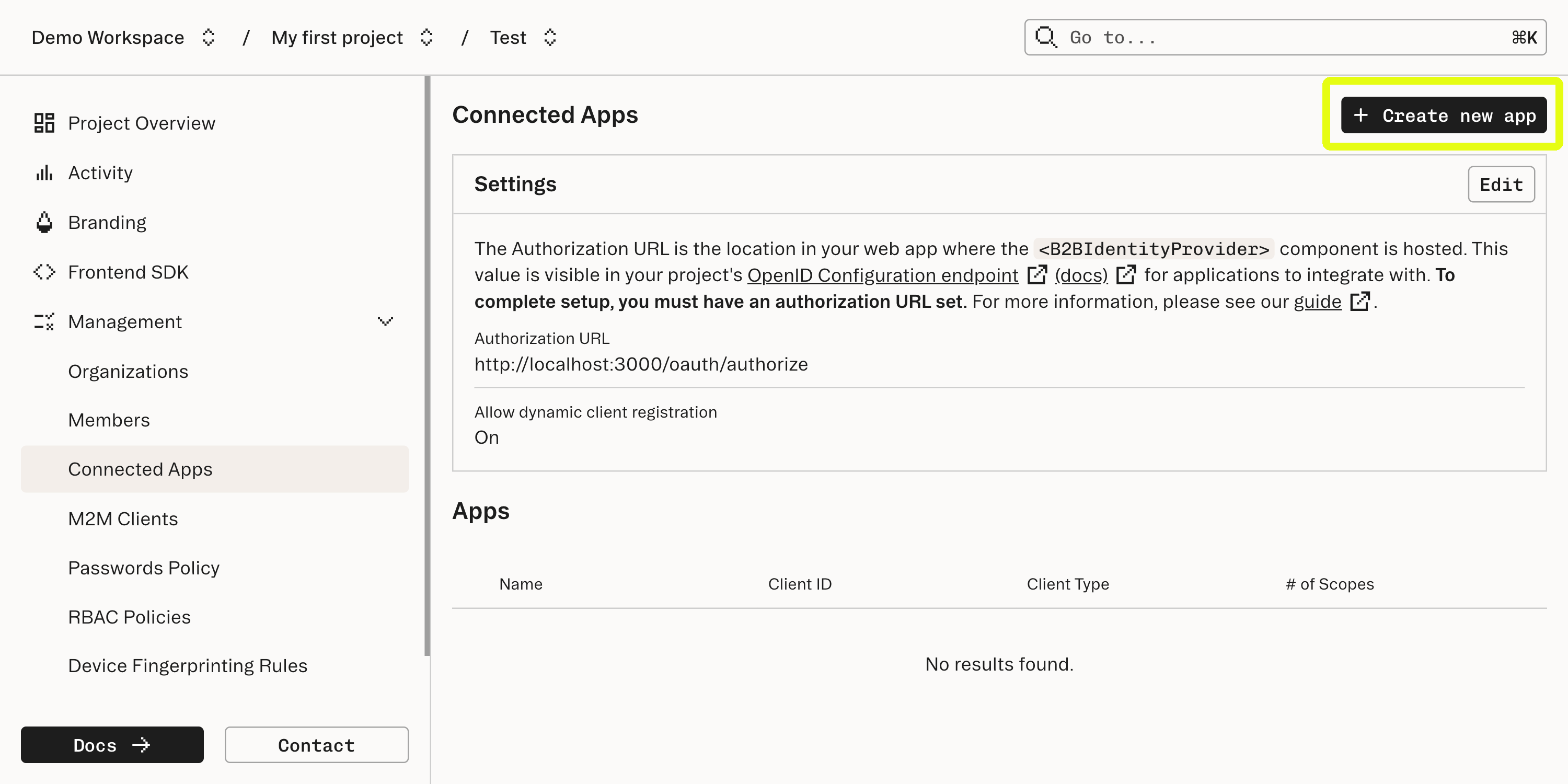
    After Stytch handles verification of the user and the application's ability to access the user's information, Stytch will issue a redirect. To set this up, each Connected App is also configured in the [Connected Apps section](https://stytch.com/dashboard/connected-apps) of the Dashboard.

    <Accordion title="How does the redirect work?" icon="sparkles">
      This redirect is intended to go to a callback URL which should be supplied by the Connected App. The redirect will pass an authorization `code` - a short-lived credential that the Connected App will use to complete the authorization flow.
    </Accordion>

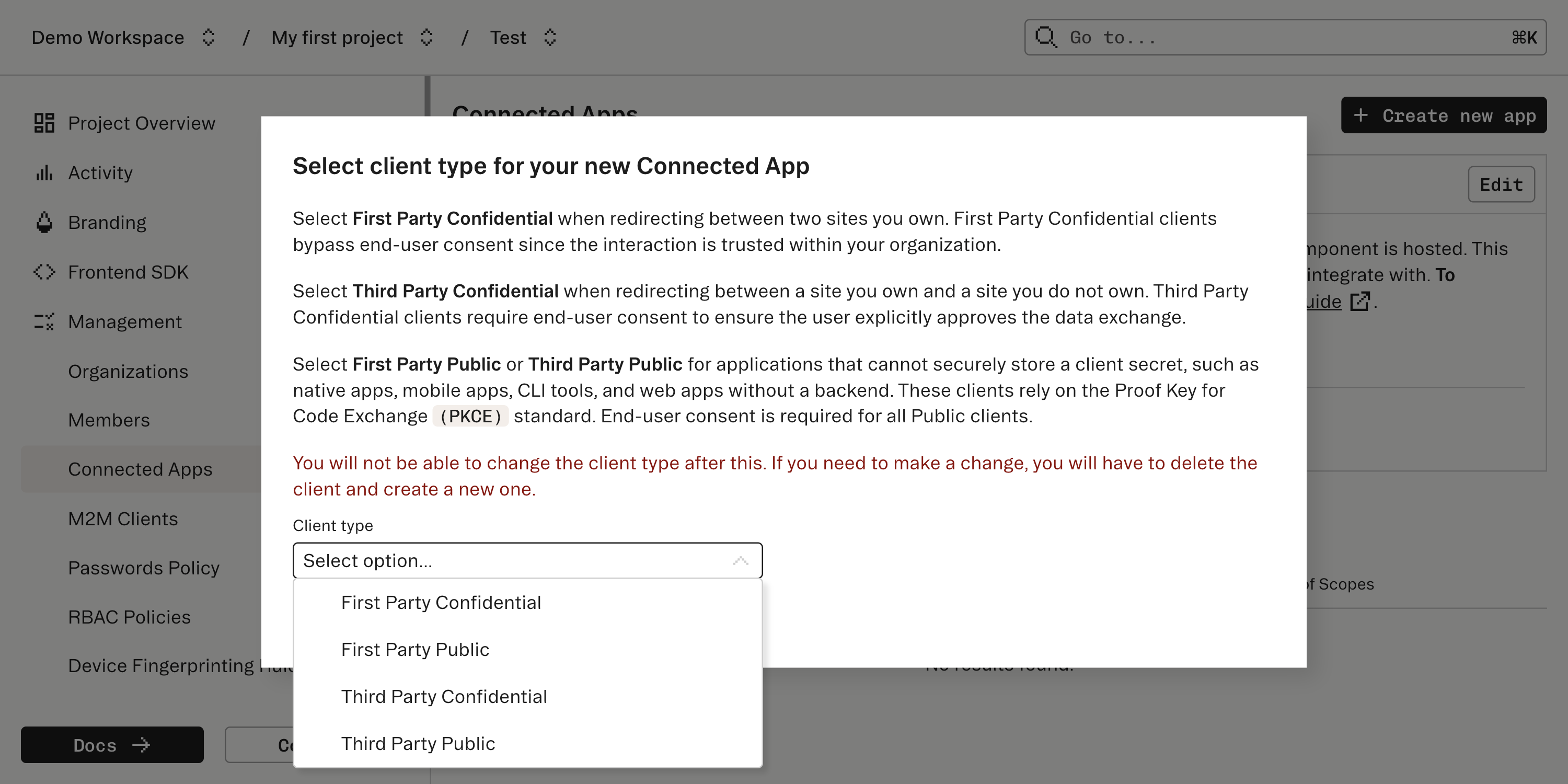
    Create a new Connected App and specify what type of user consent and OIDC flow the Connected App should expect. Stytch supports connecting a few types of client apps which vary based on how much user consent is appropriate and specifics of the OIDC flow.

    <img src="https://mintcdn.com/stytch-34ca0595/cD8BioQ2Qs_VMTqe/images/connected-apps/getting-started/create-new-app.png?fit=max&auto=format&n=cD8BioQ2Qs_VMTqe&q=85&s=11e817caef56f1761414197198f785f2" alt="Create New App Pn" width="3000" height="1500" data-path="images/connected-apps/getting-started/create-new-app.png" />

    <img src="https://mintcdn.com/stytch-34ca0595/cD8BioQ2Qs_VMTqe/images/connected-apps/getting-started/select-client-type.png?fit=max&auto=format&n=cD8BioQ2Qs_VMTqe&q=85&s=e239e1517fefc7d82dd72757a08470f7" alt="Select Client Type Pn" width="3000" height="1500" data-path="images/connected-apps/getting-started/select-client-type.png" />
  </Step>

  <Step title="Configure the Connected App" stepNumber={6} titleSize="h4">
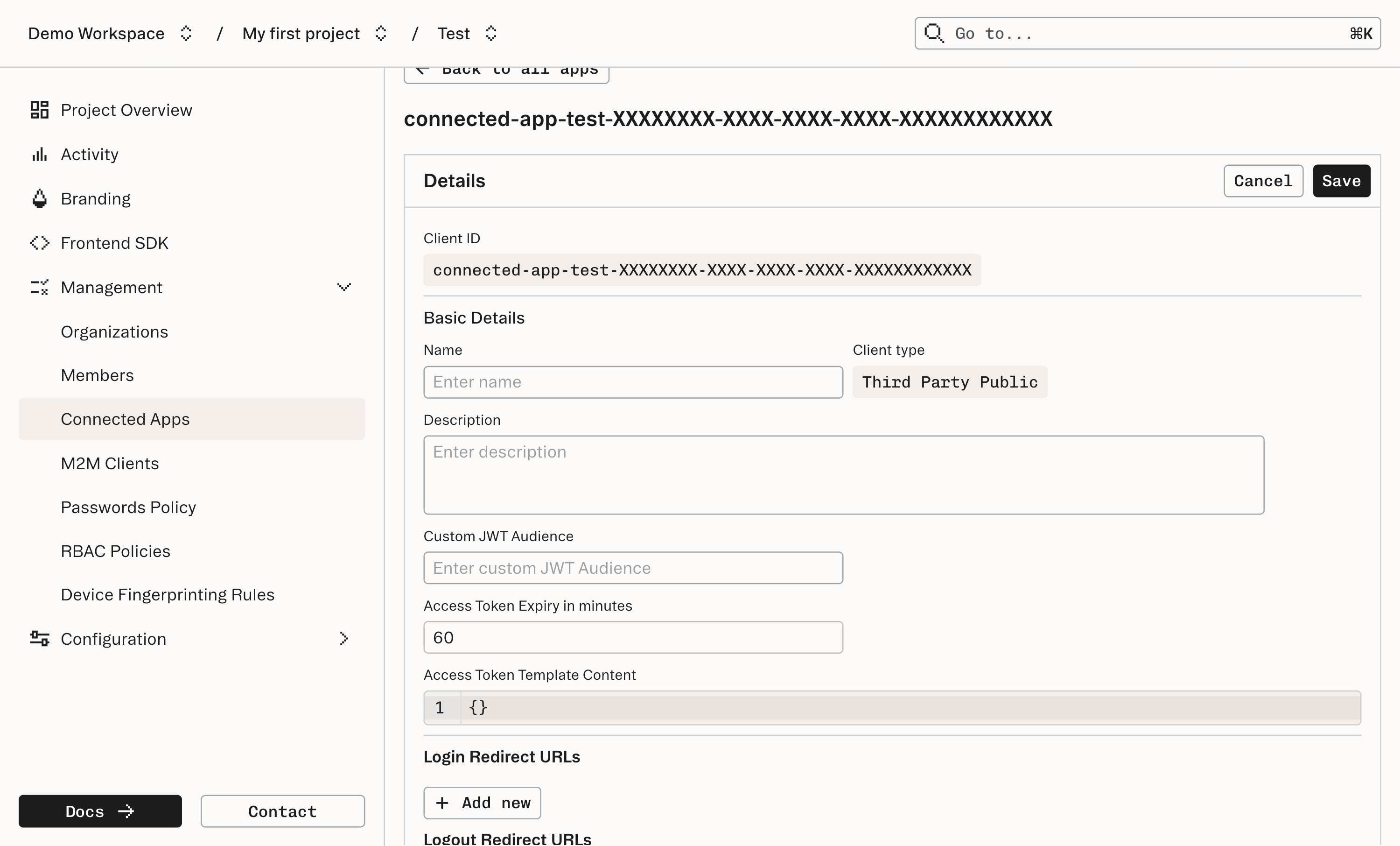
    Continue to configure the Connected App. Make sure to take a note of the “Client ID” and the “Client secret” (for confidential apps); these will be needed by the Connecting App to complete the Authorization Code Flow.

    <img src="https://mintcdn.com/stytch-34ca0595/ZKC15aiBkMCWQwo0/images/connected-apps/getting-started/app-details.png?fit=max&auto=format&n=ZKC15aiBkMCWQwo0&q=85&s=dadb5a506640101f7b3a43a56dd227a7" alt="App Details Pn" width="3000" height="1812" data-path="images/connected-apps/getting-started/app-details.png" />

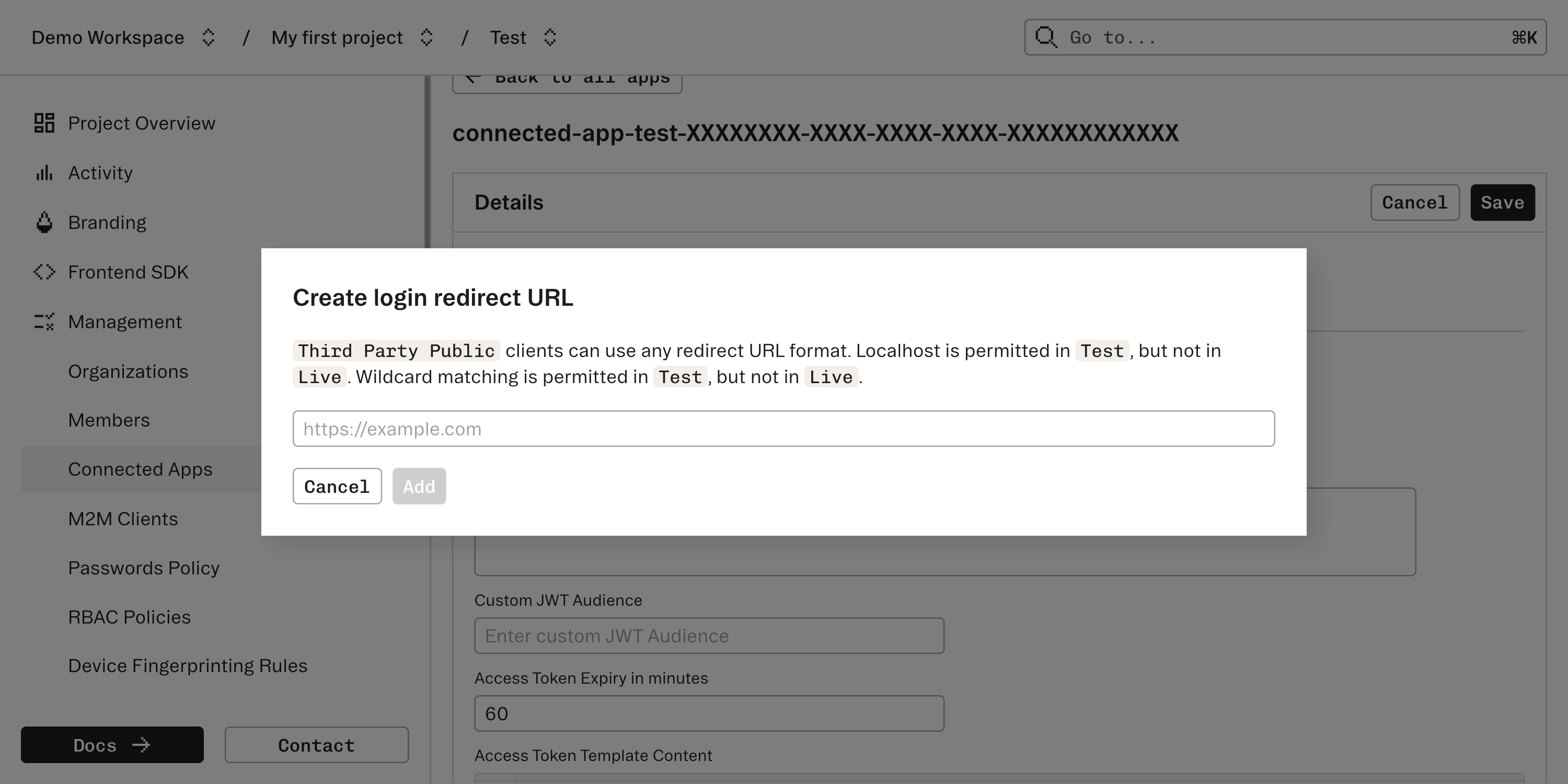
    The Connected App will also supply a Redirect URL for receiving the login information from Stytch after the initial login is complete. This should be entered into the “Redirect URLs” field.

    At this point, off-the-shelf software should be prepared to authorize as a Connected App with Stytch. If implementing your own Connected App, see [this guide](/connected-apps/build-custom-flow/implementing-your-own) to learn more.
    <img src="https://mintcdn.com/stytch-34ca0595/ZKC15aiBkMCWQwo0/images/connected-apps/guides/integrate_with_ai_agents-redirect-urls.png?fit=max&auto=format&n=ZKC15aiBkMCWQwo0&q=85&s=9341c964810bc1d8a0337e74fef65f08" alt="Integrate With Ai Agents Redirect Urls Pn" width="3000" height="1500" data-path="images/connected-apps/guides/integrate_with_ai_agents-redirect-urls.png" />
  </Step>
</Steps>