> ## Documentation Index
> Fetch the complete documentation index at: https://stytch.com/docs/llms.txt
> Use this file to discover all available pages before exploring further.
# Google
> Set up Google OAuth for Consumer Authentication.
## Setup
*Follow these steps if you have not created a Google OAuth client yet.*
1. [Create a Google Cloud account and project](https://support.google.com/googleapi/answer/6251787#zippy=%2Ccreate-a-project) if you have not already done so.
2. [Configure your OAuth consent screen](https://console.cloud.google.com/apis/credentials/consent) if you have not already done so. [More info](/consumer-auth/authentication/oauth/adding-to-custom-auth-flow)
3. [Go to the Google Credentials page](https://console.cloud.google.com/apis/credentials) for your application. Click on **CREATE CREDENTIALS** and then select **OAuth Client ID**. 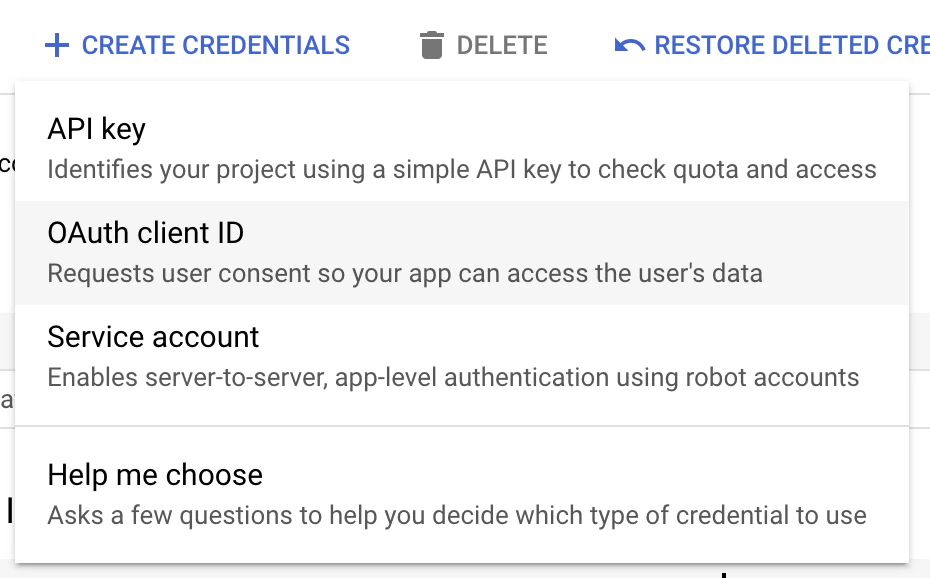 4. Select **Web Application** as the application type (regardless of if it is a mobile or non-web application) and enter a name for your OAuth client.
5. Copy-paste the Stytch redirect URI from the [Dashboard](https://stytch.com/dashboard/oauth) into your OAuth configuration under the **Authorized redirect URIs** section.
4. Select **Web Application** as the application type (regardless of if it is a mobile or non-web application) and enter a name for your OAuth client.
5. Copy-paste the Stytch redirect URI from the [Dashboard](https://stytch.com/dashboard/oauth) into your OAuth configuration under the **Authorized redirect URIs** section. 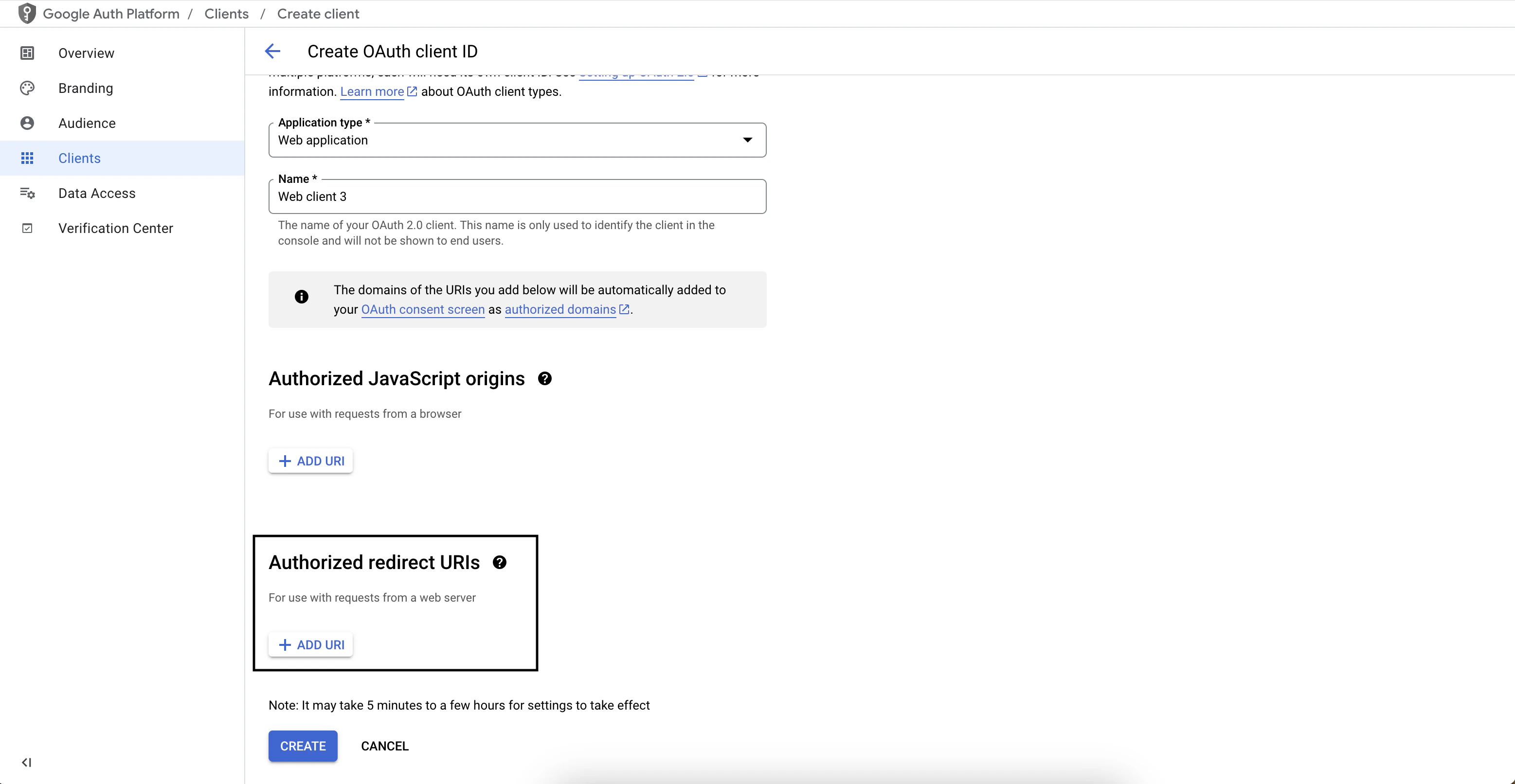 6. Click **create** to save the configuration.
7. **Optional**: If you want the Stytch SDK to support Google One Tap, add your application's URI as an Authorized JavaScript Origin. Read more about [One Tap](/consumer-auth/authentication/oauth/adding-oauth-to-stytch-login).
6. Click **create** to save the configuration.
7. **Optional**: If you want the Stytch SDK to support Google One Tap, add your application's URI as an Authorized JavaScript Origin. Read more about [One Tap](/consumer-auth/authentication/oauth/adding-oauth-to-stytch-login). 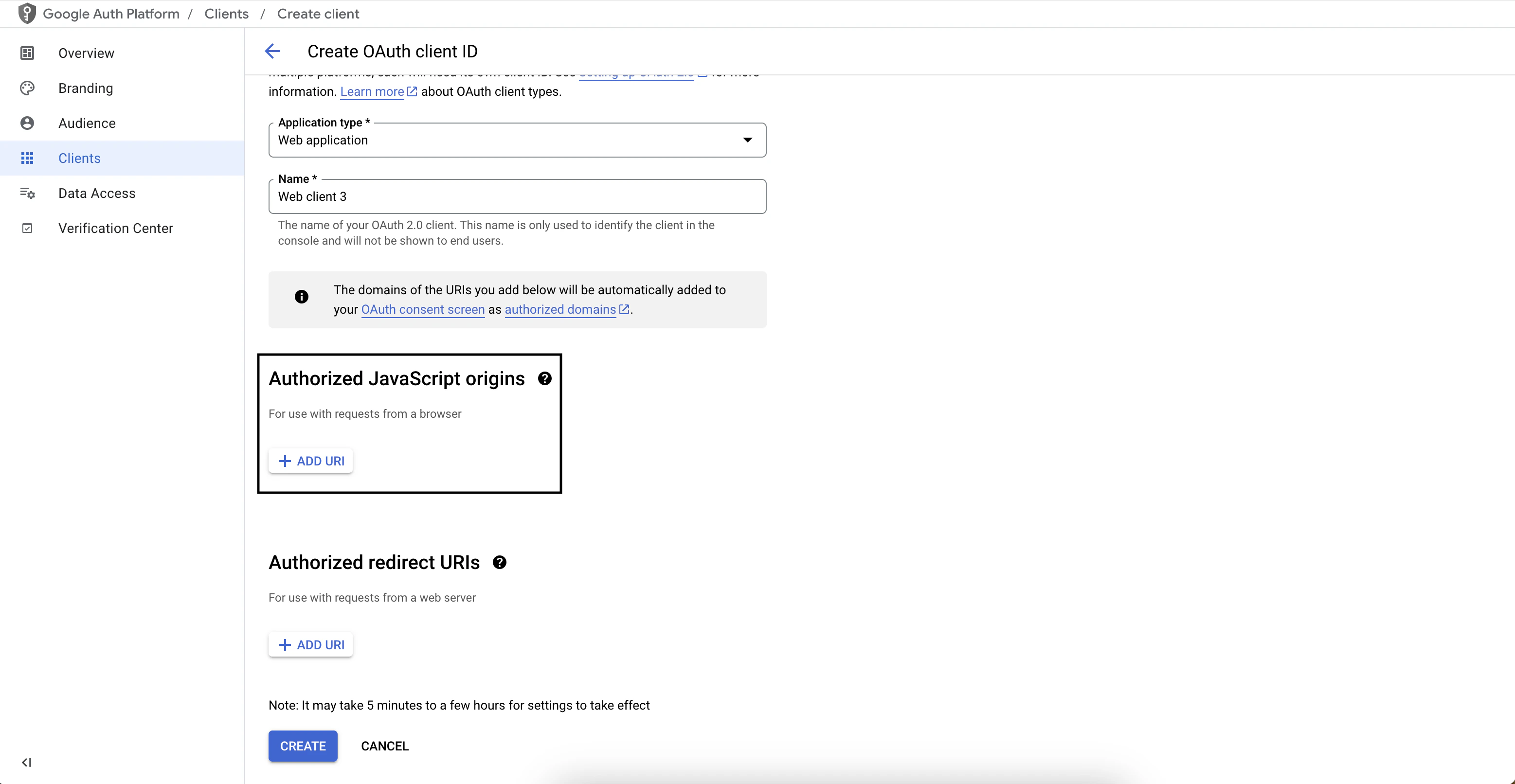 ***
*Follow these steps if you already have an existing Google OAuth client.*
1. Go to the Google Credentials page for your application. You should see your OAuth client under the **OAuth 2.0 Client IDs** section.
2. Click on the OAuth client to edit its configuration.
3. Copy-paste the Stytch redirect URI from the [Dashboard](https://stytch.com/dashboard/oauth) into your OAuth configuration under the **Authorized redirect URIs** section.
4. Click to save the configuration.
5. **Optional**: If you want the Stytch SDK to support Google One Tap, add your application's URI as an Authorized JavaScript Origin. Read more about [One Tap](/consumer-auth/authentication/oauth/adding-oauth-to-stytch-login).
***
*Follow these steps if you already have an existing Google OAuth client.*
1. Go to the Google Credentials page for your application. You should see your OAuth client under the **OAuth 2.0 Client IDs** section.
2. Click on the OAuth client to edit its configuration.
3. Copy-paste the Stytch redirect URI from the [Dashboard](https://stytch.com/dashboard/oauth) into your OAuth configuration under the **Authorized redirect URIs** section.
4. Click to save the configuration.
5. **Optional**: If you want the Stytch SDK to support Google One Tap, add your application's URI as an Authorized JavaScript Origin. Read more about [One Tap](/consumer-auth/authentication/oauth/adding-oauth-to-stytch-login).