> ## Documentation Index
> Fetch the complete documentation index at: https://stytch.com/docs/llms.txt
> Use this file to discover all available pages before exploring further.
# Make decisions
> Make decisions with using verdicts, rules, Intelligent Rate Limiting, and custom decisioning logic.
## Overview
Decisioning is a key phase of prevention in our [fraud prevention framework](/fraud-risk/device-fingerprinting/overview#stytch-fraud-prevention-framework).
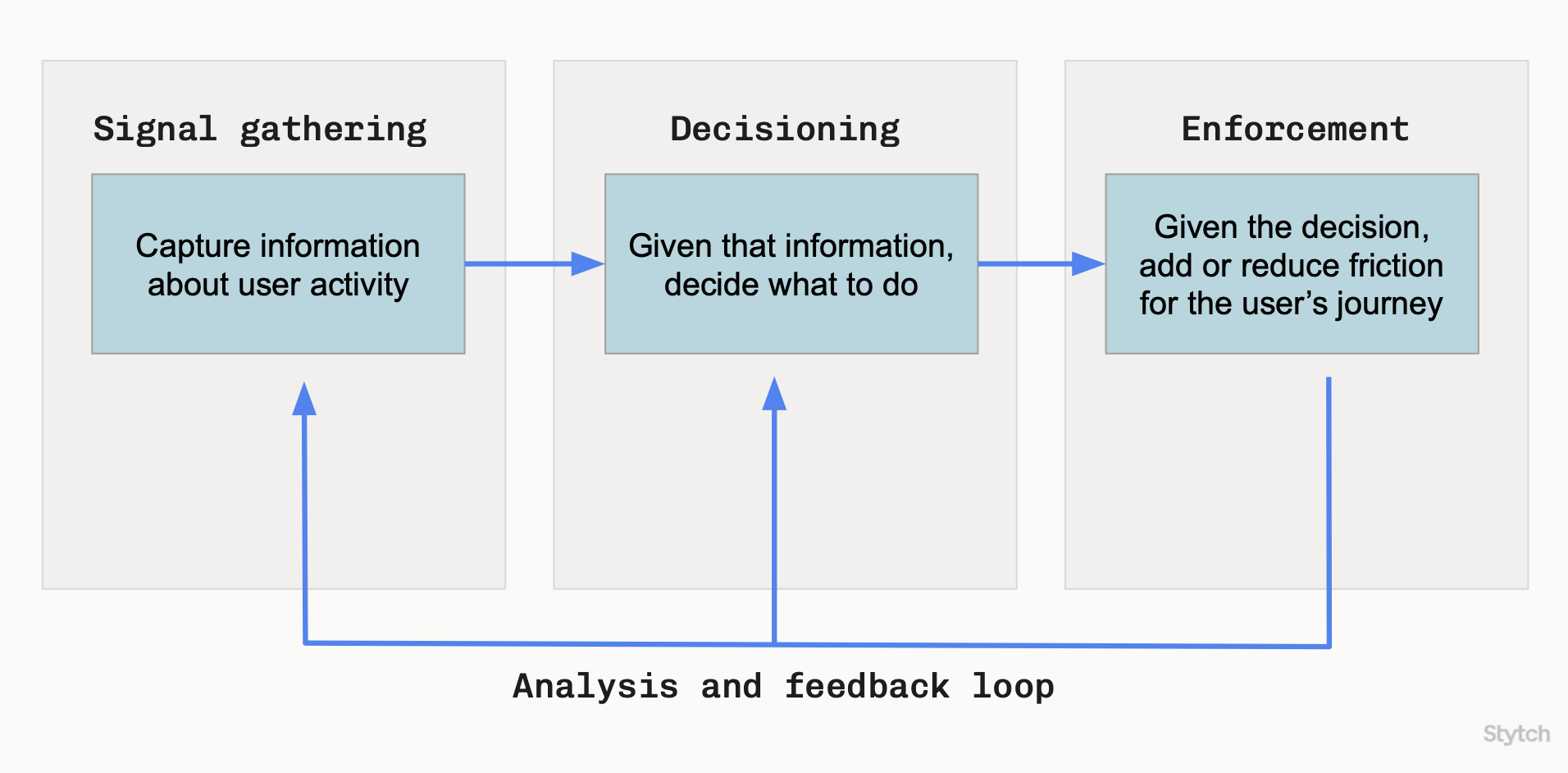 Given a particular set of signals, do we think this is a good user or a bad actor? Is it benign activity, or fraudulent or abusive behavior?
Device Fingerprinting's [verdicts](/fraud-risk/device-fingerprinting/verdict/overview) provide a useful starting point for decisioning. You can use the recommended verdict action directly. Or, you can extend the verdict with your own custom decisioning logic.
Device Fingerprinting supports decisioning with the following features:
1. [Verdicts](#verdicts)
2. [Set rules](#set-rules)
3. [Override verdict reasons](#override-verdict-reasons)
4. [Intelligent Rate Limiting](#intelligent-rate-limiting)
5. [Custom decisioning logic](#custom-decisioning-logic)
***
## Verdicts
Every response from the Lookup API contains a verdict, consisting of:
* A recommended action.
* Reasons or warning flags that explain the recommended action.
* Additional metadata, like the detected device type.
Device Fingerprinting verdicts are designed to be highly precise and explainable, with the goal of ensuring real human traffic for your application. There are no opaque floating-point "risk scores" where you must guess an appropriate threshold.
You can use the recommended verdict action directly, or use it as an input into your own decisioning logic.
Learn more about verdicts, actions, and reasons.
***
## Set rules
As you learn from your fraud prevention analysis and feedback loop, you may find that you want to explicitly increase or reduce friction for specific fingerprints.
Setting rules enables you to customize verdicts. For example:
* You can set a rule to always `ALLOW` a known-good user,
* Or manually `BLOCK` a fingerprint that is associated with a repeat abuser's sockpuppet accounts.
Create rules to customize your decisioning.
***
## Override verdict reasons
You can also customize verdicts in a broader way by adding a verdict reason override, which changes the default action associated with a verdict reason (warning flag).
For example:
* You can configure `VIRTUAL_MACHINE` to `ALLOW` if you expect many legitimate virtual machine users,
* Or you can configure `KNOWN_DATACENTER_IP` to `CHALLENGE` if you prefer to add more friction for datacenter traffic.
Customize the action associated with a verdict reason.
***
## Intelligent Rate Limiting
Intelligent Rate Limiting is a feature of Device Fingerprinting that uses fingerprints for highly-precise rate-limiting. When Stytch detects high-velocity traffic from a single origin and set of fingerprints, Intelligent Rate Limiting automatically updates the verdict with escalating friction from `CHALLENGE` to `BLOCK`.
Unlike traditional IP-based rate limiting, the fingerprint-based approach ensures that you don't accidentally block good users who happen to share the same enterprise or university network as an attacker.
For suspicious fingerprints that are not associated with any known hardware and software configuration, Intelligent Rate Limiting also sets lower rate limits, which caps the impact of novel attacks without penalizing real users with unusual devices.
Learn more about better rate limiting powered by device intelligence.
***
## Custom decisioning logic
While Device Fingerprinting provides recommended actions through the verdict, you may be able to make better decisions after factoring in your own proprietary data, application workflows, and business needs.
Examples of how current Stytch customers have added custom decisioning logic:
* One of your enterprise customers always uses an enterprise VPN that triggers a `CHALLENGE` due to `POSSIBLE_TLS_MITM`. You write custom code that `ALLOW`s all users from that enterprise (based on their organization and IP address), as long as `POSSIBLE_TLS_MITM` is the only warning flag present.
* Your business is highly-sensitive to false positives, so you never want to `BLOCK` a user automatically. Instead, you write custom code that permits all `BLOCK` verdicts to proceed, but logs each verdict to an internal auditing system for manual review.
* Your fraud team already has a sophisticated ML-based "risk engine" that integrates data from across the whole system. You can treat Device Fingerprinting verdicts like any other data, and feed them to your ML models. In this scenario, you will continue using the output of the risk engine for decisioning.
The standard Device Fingerprinting Lookup API does not expose many of the raw signals collected, which may be useful in this scenario.
If you are interested in additional raw signal data, contact [support@stytch.com](mailto:support@stytch.com) or your account team.
***
## Next steps
Learn more enforcing verdicts with Device Fingerprinting.
Given a particular set of signals, do we think this is a good user or a bad actor? Is it benign activity, or fraudulent or abusive behavior?
Device Fingerprinting's [verdicts](/fraud-risk/device-fingerprinting/verdict/overview) provide a useful starting point for decisioning. You can use the recommended verdict action directly. Or, you can extend the verdict with your own custom decisioning logic.
Device Fingerprinting supports decisioning with the following features:
1. [Verdicts](#verdicts)
2. [Set rules](#set-rules)
3. [Override verdict reasons](#override-verdict-reasons)
4. [Intelligent Rate Limiting](#intelligent-rate-limiting)
5. [Custom decisioning logic](#custom-decisioning-logic)
***
## Verdicts
Every response from the Lookup API contains a verdict, consisting of:
* A recommended action.
* Reasons or warning flags that explain the recommended action.
* Additional metadata, like the detected device type.
Device Fingerprinting verdicts are designed to be highly precise and explainable, with the goal of ensuring real human traffic for your application. There are no opaque floating-point "risk scores" where you must guess an appropriate threshold.
You can use the recommended verdict action directly, or use it as an input into your own decisioning logic.
Learn more about verdicts, actions, and reasons.
***
## Set rules
As you learn from your fraud prevention analysis and feedback loop, you may find that you want to explicitly increase or reduce friction for specific fingerprints.
Setting rules enables you to customize verdicts. For example:
* You can set a rule to always `ALLOW` a known-good user,
* Or manually `BLOCK` a fingerprint that is associated with a repeat abuser's sockpuppet accounts.
Create rules to customize your decisioning.
***
## Override verdict reasons
You can also customize verdicts in a broader way by adding a verdict reason override, which changes the default action associated with a verdict reason (warning flag).
For example:
* You can configure `VIRTUAL_MACHINE` to `ALLOW` if you expect many legitimate virtual machine users,
* Or you can configure `KNOWN_DATACENTER_IP` to `CHALLENGE` if you prefer to add more friction for datacenter traffic.
Customize the action associated with a verdict reason.
***
## Intelligent Rate Limiting
Intelligent Rate Limiting is a feature of Device Fingerprinting that uses fingerprints for highly-precise rate-limiting. When Stytch detects high-velocity traffic from a single origin and set of fingerprints, Intelligent Rate Limiting automatically updates the verdict with escalating friction from `CHALLENGE` to `BLOCK`.
Unlike traditional IP-based rate limiting, the fingerprint-based approach ensures that you don't accidentally block good users who happen to share the same enterprise or university network as an attacker.
For suspicious fingerprints that are not associated with any known hardware and software configuration, Intelligent Rate Limiting also sets lower rate limits, which caps the impact of novel attacks without penalizing real users with unusual devices.
Learn more about better rate limiting powered by device intelligence.
***
## Custom decisioning logic
While Device Fingerprinting provides recommended actions through the verdict, you may be able to make better decisions after factoring in your own proprietary data, application workflows, and business needs.
Examples of how current Stytch customers have added custom decisioning logic:
* One of your enterprise customers always uses an enterprise VPN that triggers a `CHALLENGE` due to `POSSIBLE_TLS_MITM`. You write custom code that `ALLOW`s all users from that enterprise (based on their organization and IP address), as long as `POSSIBLE_TLS_MITM` is the only warning flag present.
* Your business is highly-sensitive to false positives, so you never want to `BLOCK` a user automatically. Instead, you write custom code that permits all `BLOCK` verdicts to proceed, but logs each verdict to an internal auditing system for manual review.
* Your fraud team already has a sophisticated ML-based "risk engine" that integrates data from across the whole system. You can treat Device Fingerprinting verdicts like any other data, and feed them to your ML models. In this scenario, you will continue using the output of the risk engine for decisioning.
The standard Device Fingerprinting Lookup API does not expose many of the raw signals collected, which may be useful in this scenario.
If you are interested in additional raw signal data, contact [support@stytch.com](mailto:support@stytch.com) or your account team.
***
## Next steps
Learn more enforcing verdicts with Device Fingerprinting.