> ## Documentation Index
> Fetch the complete documentation index at: https://stytch.com/docs/llms.txt
> Use this file to discover all available pages before exploring further.
# Set decisioning rules
> Create rules to customize your decisioning for Device Fingerprinting.
## Overview
In some cases you may want to increase or reduce friction for previously fingerprinted instances. For example, manually `ALLOW` a user due to a false positive, or `BLOCK` an authentic user who violated the terms of service.
You can create a rule that changes the verdict action based on fingerprint attributes.
In this guide you'll learn how to set up rules. By the end, you'll have:
* Called the [Set Rule endpoint](/api-reference/fraud/api/set-rule) to apply an authorization action on a specific fingerprint.
* Removed the rule.
***
## Important considerations
Consider the following when setting a rule:
### Verify the request
When you receive a support request to be unblocked, you should consider the risk of social engineering. Bad actors can also file support requests to try to evade your defenses, so you shouldn't blindly set `ALLOW` rules based on support requests.
When setting an `ALLOW` rule for a customer who reaches out, you should confirm that the user is a good actor and should be allowed access to your application.
### Determine which identifier to use
You'll need a fingerprint, ID, or IPGEO attribute (IP address, ASN, or country code) you want to set a rule for. These identifiers are returned by the [Fingerprint Lookup endpoint](/api-reference/fraud/api/fingerprint-lookup) for each `telemetry_id`.
The ideal rule is precise and targets the specific users you are looking for. Consider the granularity and other characteristics to avoid setting a rule that unintentionally affects good users.
| **Identifier** | **Characteristics** | **Use Cases** | **Precedence** |
| ------------------------ | -------------------------------------------------------------------------------------------------------------------------------------------------------------------------------------------- | -------------------------------------------------------------------------------------------------------------------------------------------------------------------------------------------------------------------------------------------------------------------------------------------------------------------------------------------------------------------------------- | -------------- |
| **Visitor ID** | Entirely unique, stable for the lifetime of the cookie.
Ineffective for setting BLOCK verdicts as bad actors can churn Visitor ID by clearing cookies or local storage. | Permanent ALLOW rules to unblock a false positive, since it is entirely unique and will not impact other users | 1 |
| **Browser ID** | Entirely unique, fairly stable but can change during normal usage including clearing cookies.
Ineffective for setting BLOCK verdicts as bad actors can churn Browser ID. | Permanent ALLOW rules to unblock a false positive, since it is entirely unique and will not impact other users. | 2 |
| **Visitor Fingerprint** | 99.9% unique and rarely changes. | Typically best choice for permanent or temporary BLOCKs.
Can also be used for temporary or permanent ALLOW rules, if you are prioritizing stability over 100% uniqueness | 3 |
| **Browser Fingerprint** | Not very unique, often shared by users with the same browser version and device type.
Fairly stable, but will change across browsers and may change on major version updates. | Good candidate for a temporary block if a malicious actor is churning other more unique identifiers.
Not recommended for longer expiry windows (>= 24 hours), as you risk impacting other users on the same browser version and device type. | 4 |
| **Hardware Fingerprint** | Not very unique, shared by all users on the same specific machine make/model with the same device configurations.
Fairly stable, but will change based on device configurations. | Good candidate for a temporary BLOCK if a malicious actor is churning other more unique identifiers.
Not recommended for longer expiry windows (>= 24 hours), as you risk impacting other users on the same device model.
Less effective for mobile devices, which generally have more homogenous hardware and therefore a high overlap between devices. | 5 |
| **Network Fingerprint** | Not very unique, based on the TLS fingerprint. | For use with blocking bad actors: if the network fingerprint in question has a low overlap with other users, can be good for issuing more permanent BLOCK verdicts. | 6 |
| **CIDR Block** | Not very unique, shared by all users with IP addresses within the CIDR block. | Permanent ALLOW rules for a known IP address, or temporary BLOCKs if a specific IP address is attacking your application. | 7 |
| **ASN** | Not unique, shared by all users with IP addresses within the ASN. | Temporary BLOCKs if a specific ASN is attacking your application. | 8 |
| **Country Code** | Not unique, shared by all users within the given country. | Permanent BLOCK rules for countries that you wish to ban from your application. You may not set an ALLOW rule for a country code. | 9 |
If multiple rules apply, the highest precedence wins. For example, one request matches a Visitor ID Rule to `ALLOW` and a Country Code Rule to `BLOCK`, the more-specific Visitor ID Rule wins and the verdict is `ALLOW`.
#### CIDR rule conflicts
Since CIDR block rules may conflict with each other, we have two additional rules for precedence:
* The smallest block size takes precedence. For example, if an `ip_address` overlaps with a `cidr_block` rule of `ALLOW` for a block with a prefix of `/32` and a `cidr_block` rule of `BLOCK` with a prefix of `/24`, the rule match verdict will be `ALLOW`.
* Among equivalent size blocks, `BLOCK` takes precedence over `CHALLENGE`, which takes precedence over `ALLOW`. For example, if an `ip_address` overlaps with two `cidr_block` rules with blocks of the same size that return `CHALLENGE` and `ALLOW`, the rule match verdict will be `CHALLENGE`.
### Validate against historical traffic
Before setting a rule on an identifier, compare the identifier against your historical traffic if available.
You can look up the various fingerprint types to identify the uniqueness in the [Dashboard](https://stytch.com/dashboard/activity?tab=dfp-logs).
* When you search an identifier in the Device Fingerprinting Dashboard,
it will show how frequently other fingerprint types have shared that identifier. You should make sure the percentage of ALLOWs isn't too high.
* When you create a new rule in the Dashboard,
you can test the impact to check the number of changes is expected.
* In addition to the Stytch Dashboard, you should cross-reference the identifier with your own internal monitoring
to verify that the rule won't affect other valid users. Ensure the rule targets your expected scope of users.
***
## Prerequisites
* An existing Stytch project in the [Dashboard](https://stytch.com/dashboard).
* The `project_id` and `secret` for your project's Test environment. These can be found under your project's *Project ID & API keys* section in the [Dashboard](https://www.stytch.com/dashboard).
* Device Fingerprinting [enabled for your project](https://stytch.com/dashboard/dfp-rules).
* If you don't have Device Fingerprinting enabled, you can [request access here](https://offers.stytch.com/dfp-30-day-trial?utm_source=stytch_docs\&utm_medium=direct\&utm_content=dfp_30_day_trial).
## Steps
1. Navigate to [Device Fingerprinting Rules](https://stytch.com/dashboard/dfp-rules) in the Dashboard.
2. Click **New rule**.
3. Enter the identifier, like a `visitor_id` or `browser_id`, or an IPGEO attribute (IP address, ASN, or country code).
4. Set action to `ALLOW`, `BLOCK`, or `CHALLENGE`.
5. (Optional) Set an expiration time and a description for the rule.
6. Click **Test rule impact** and confirm the expected impact.
7. Click **Save**.
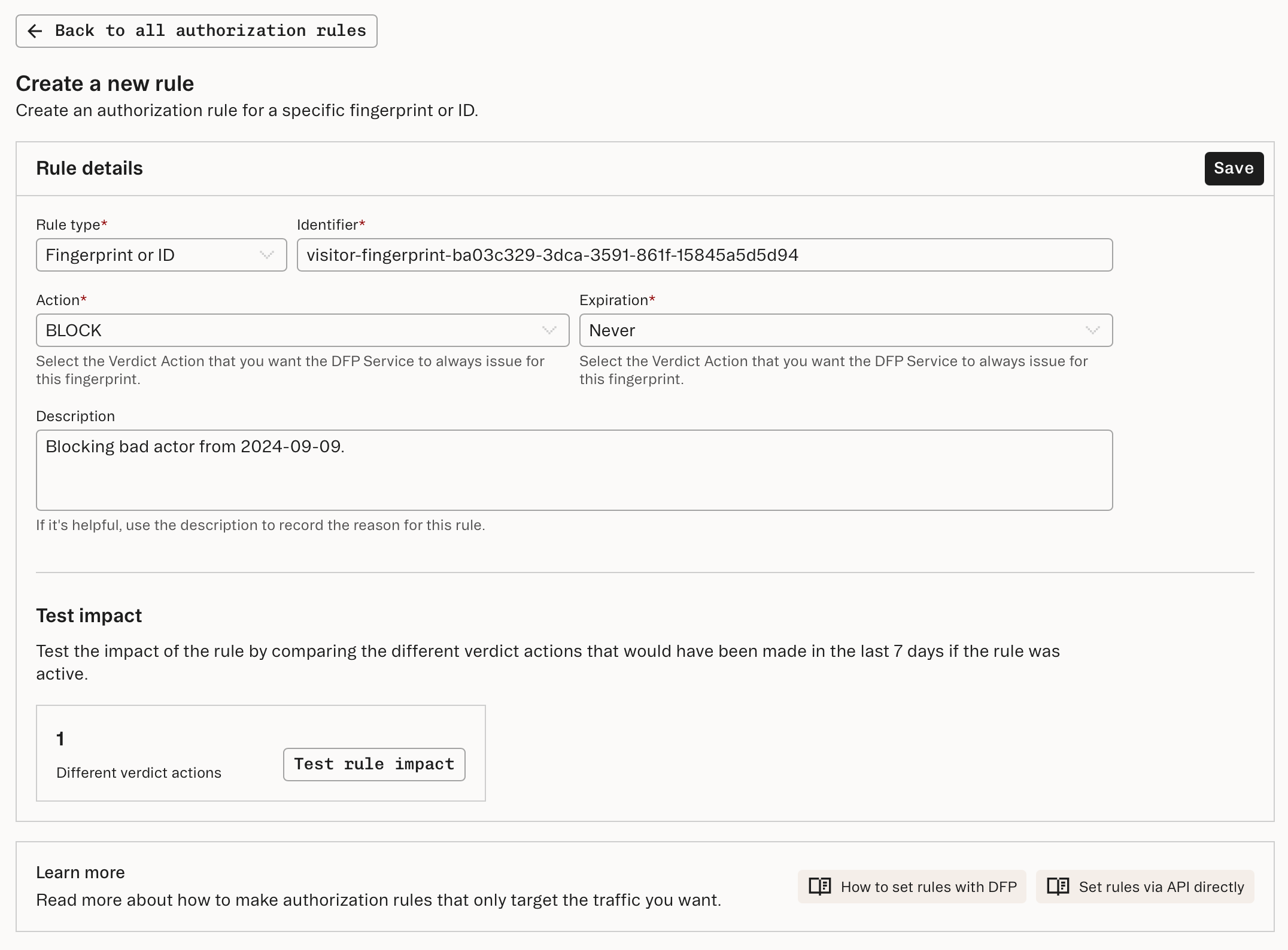 The example above creates a rule that ensures this Visitor ID always receives a `BLOCK` [verdict](/fraud-risk/device-fingerprinting/verdict/block). Any future calls to the Fingerprint Lookup endpoint involving this fingerprint will automatically return a `BLOCK` verdict with a reason of `RULE_MATCH`.
You also have the option of providing an `expires_in_minutes` parameter if you need a rule to expire after a specified lifetime.
Since `expires_in_minutes` was omitted in our example request, the rule will be kept permanently.
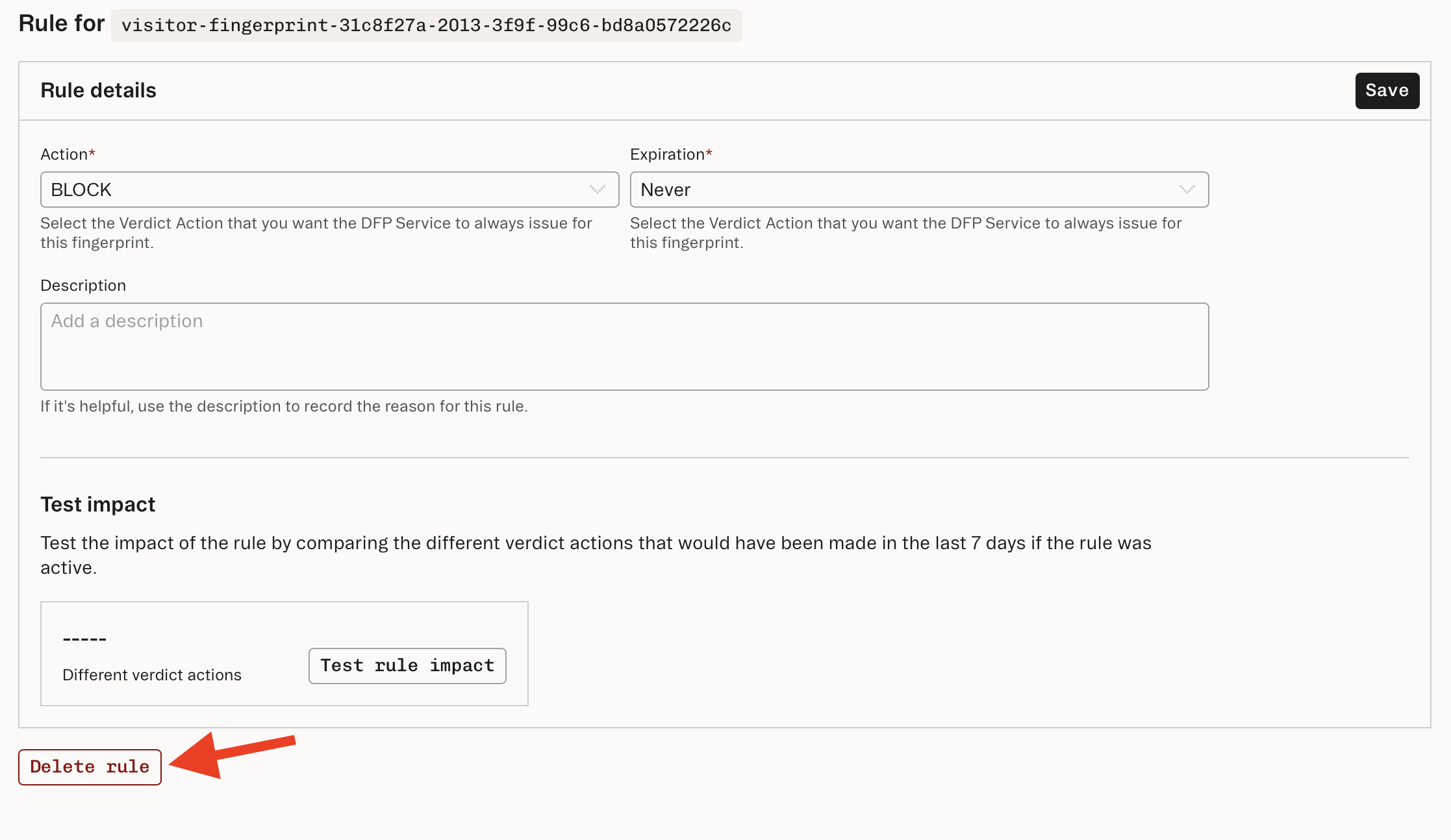
1. Click the **Delete rule** button to delete the rule.
The example above creates a rule that ensures this Visitor ID always receives a `BLOCK` [verdict](/fraud-risk/device-fingerprinting/verdict/block). Any future calls to the Fingerprint Lookup endpoint involving this fingerprint will automatically return a `BLOCK` verdict with a reason of `RULE_MATCH`.
You also have the option of providing an `expires_in_minutes` parameter if you need a rule to expire after a specified lifetime.
Since `expires_in_minutes` was omitted in our example request, the rule will be kept permanently.
1. Click the **Delete rule** button to delete the rule.
 Call the [Set Rule endpoint](/api-reference/fraud/api/set-rule) with the following body parameters in the request:
* The identifier, for example a `visitor_id` or `browser_id`.
* An action set to `ALLOW`, `BLOCK`, or `CHALLENGE`.
* An optional `expires_in_minutes` set to a specified `int`.
```bash theme={null}
curl --request POST \
--url https://telemetry.stytch.com/v1/rules/set \
-u 'project-test-...' \
--data '{
"visitor_id": "visitor-6139cbcc-4dda-4b1f-b1c0-13c08ec64d72",
"action": "BLOCK"
}'
```
The example request above creates a Rule that ensures this Visitor ID always receives a `BLOCK` [verdict](/fraud-risk/device-fingerprinting/verdict/block). Any future calls to the Fingerprint Lookup endpoint involving this fingerprint will automatically return a `BLOCK` verdict with a reason of `RULE_MATCH`.
You also have the option of providing an `expires_in_minutes` parameter if you need a rule to expire after a specified lifetime. Since `expires_in_minutes` was omitted in our example request, the rule will be kept permanently.
To remove a rule you've set, call the same [Set Rule endpoint](/api-reference/fraud/api/set-rule) with the following body parameters in the request:
* The same `visitor_id` or `browser_id` from **step 2**.
* An `action` set to `NONE`.
```bash theme={null}
curl --request POST \
--url https://telemetry.stytch.com/v1/rules/set \
-u '${projectId}:${secret}' \
--data '{
"visitor_id": "visitor-6139cbcc-4dda-4b1f-b1c0-13c08ec64d72",
"action": "NONE"
}'
```
***
Find out why Stytch's device intelligence is trusted by Calendly, Replit, and many more.
Call the [Set Rule endpoint](/api-reference/fraud/api/set-rule) with the following body parameters in the request:
* The identifier, for example a `visitor_id` or `browser_id`.
* An action set to `ALLOW`, `BLOCK`, or `CHALLENGE`.
* An optional `expires_in_minutes` set to a specified `int`.
```bash theme={null}
curl --request POST \
--url https://telemetry.stytch.com/v1/rules/set \
-u 'project-test-...' \
--data '{
"visitor_id": "visitor-6139cbcc-4dda-4b1f-b1c0-13c08ec64d72",
"action": "BLOCK"
}'
```
The example request above creates a Rule that ensures this Visitor ID always receives a `BLOCK` [verdict](/fraud-risk/device-fingerprinting/verdict/block). Any future calls to the Fingerprint Lookup endpoint involving this fingerprint will automatically return a `BLOCK` verdict with a reason of `RULE_MATCH`.
You also have the option of providing an `expires_in_minutes` parameter if you need a rule to expire after a specified lifetime. Since `expires_in_minutes` was omitted in our example request, the rule will be kept permanently.
To remove a rule you've set, call the same [Set Rule endpoint](/api-reference/fraud/api/set-rule) with the following body parameters in the request:
* The same `visitor_id` or `browser_id` from **step 2**.
* An `action` set to `NONE`.
```bash theme={null}
curl --request POST \
--url https://telemetry.stytch.com/v1/rules/set \
-u '${projectId}:${secret}' \
--data '{
"visitor_id": "visitor-6139cbcc-4dda-4b1f-b1c0-13c08ec64d72",
"action": "NONE"
}'
```
***
Find out why Stytch's device intelligence is trusted by Calendly, Replit, and many more.