> ## Documentation Index
> Fetch the complete documentation index at: https://stytch.com/docs/llms.txt
> Use this file to discover all available pages before exploring further.
# Migrate from Consumer to B2B
> Migrate from Consumer to B2B auth in Stytch.
export const sso = "Authentication process allowing users to access multiple applications with one set of credentials.";
export const organization = "Represents an instance or tenant in your application, typically mapping to each of your top-level customers.";
export const member = "Represents an individual end user's account within a given Organization, uniquely identified within that Organization by their email address.";
export const userTip = "Represents an end user's account in your application.";
At some point, you may find that Stytch's user-first Consumer data model no longer works for your use case and you want to migrate to the organization-first B2B data model.
Migrating Stytch data models requires some work so please be sure to first consider your desired end state, login flows, and other requirements you might have. Feel free to [ask us](https://stytch.com/contact) if you have any questions about this transition.
For more information, please check out [this guide](/docs/multi-tenant-auth/overview) on the differences between the two models.
## Common use cases
* You are moving from a single-tenant to a multi-tenant model, and thus need Organizations to represent tenants and isolate data within each tenant.
* You require native SSO (SAML/OIDC) support and [Trusted Auth Tokens](/docs/consumer-auth/authentication/trusted-auth-tokens) do not fit your use case.
* You require [SCIM](/docs/multi-tenant-auth/enterprise-ready/scim/overview) to enable end users to be managed by their workforce IdP.
## Before you begin
In B2B authentication, the equivalent to a User is a Member.
Users may be created with an email address, phone number, or no auth factor at all. On the other hand, Members *must* have an email address. Email addresses must be unique within an Organization, but can be shared by Members across multiple Organizations.
When updating your authentication flows, keep in mind that there are two different login flows paths in B2B: Discovery flows generally return an Intermediate Session Token and a list of discovered Organizations, and Organization-specific authentication endpoints require a specific `organization_id` to be passed in. For more information, please see [this guide](/docs/multi-tenant-auth/overview#core-flows).
If you support Passwords as an authentication method, please be sure to read through [this guide](/docs/multi-tenant-auth/authentication/passwords/overview) to determine whether you want to use Cross-Organization or Org-Scoped Passwords, as you cannot change this setting once you have active Passwords.
## Prerequisites
Please note that most of these steps can be managed via [Programmatic Workspace Actions](/docs/api-reference/pwa/api/v3/overview) or [the API](/docs/api-reference/b2b/api/overview), either by using your existing infrastructure as code, or by getting the corresponding object and re-creating it with the B2B-specific API endpoint.
1. Create a new Project and select **B2B SaaS Application**.
2. Configure any Project-level settings that existed for your Consumer Project, e.g. [Redirect URLs](/docs/consumer-auth/build-auth/login-or-signup), [Custom Domains](/docs/resources/branding/custom-domains), [Custom Claims](/docs/multi-tenant-auth/manage-sessions/custom-claims), Frontend SDK configuration, [RBAC policies](/docs/multi-tenant-auth/enterprise-ready/rbac/create-rbac-policy#the-rbac-policy), etc.
## Migrating your users
To migrate your Consumer Users to B2B Members we must first create all of the Organizations, i.e. tenants, for those Members to belong to.
There are many strategies you can take for pre-creating Members and Organizations depending upon your application logic today, i.e. whether you already have tenancy in your application, whether you want to do a dual write or just-in-time migration, etc. For this guide we'll keep it very general but definitely [reach out](https://stytch.com/contact) to our team if you have some questions or want specific recommendations.
Create Organizations via our [Create Organization endpoint](/docs/api-reference/b2b/api/organizations/create-organization).
Here you will also want to consider what authentication options you'd like per Organization.
Now, you'll migrate your Users by creating them as Members under their corresponding Organization(s). You can reference the steps in [this guide](/docs/resources/migrations/migrating-user-data) to learn about best practices here.
Make sure you create Members as `active`, not `pending`, as otherwise you'll need to go through an authentication flow to "activate" them.
## Migrate your codebase
Now, you'll want to migrate your codebase to use our B2B endpoints.
Switch out the Consumer endpoints for their B2B equivalents and modify your application logic to account for this new tenancy model.
You can feature flag these changes in conjunction with the previous step in a gradual roll out to minimze impact on your end users.
## Migrating sessions
Finally, you may want to consider migrating existing Consumer sessions for B2B sessions to ensure the migration is seamless for your end users, preventing them from needing to re-authenticate.
Note, this can be somewhat complex and you should carefully weigh the cost benefit ratio of preserving pre-existing sessions with the work required to migrate them.
Often times a switch to our B2B API may bring along new auth requirements, as your user's teams can now define restricted auth methods or MFA, and this migration represents a good time to force a re-authentication for all users.
To migrate your Consumer sessions to B2B, you can utilize [Trusted Auth Tokens](/docs/consumer-auth/authentication/trusted-auth-tokens) and exchange a JWT from a Consumer session for a B2B one using the [Attest Session](/docs/api-reference/b2b/api/sessions/attest-session) endpoint.
In your B2B Project, create a [Trusted Auth Token Profile](https://stytch.com/dashboard/trusted-auth-tokens).
Set **Audience** to the `aud` the Consumer session JWT will have (typically the `project_id` of the Consumer Project). Set **Issuer** to the `iss` the Consumer session JWT will have (typically `stytch.com/`). Set **JWKS** to `https://test.stytch.com/v1/sessions/jwks/`. Replace this with `api.stytch.com` for Live environments. Set `email` to whatever attribute represents the email address, added via Custom Claims (see steps below). Here, we'll use `email`. Set `token_id` to `sub`. (Optional) Set any other attribute mappings. 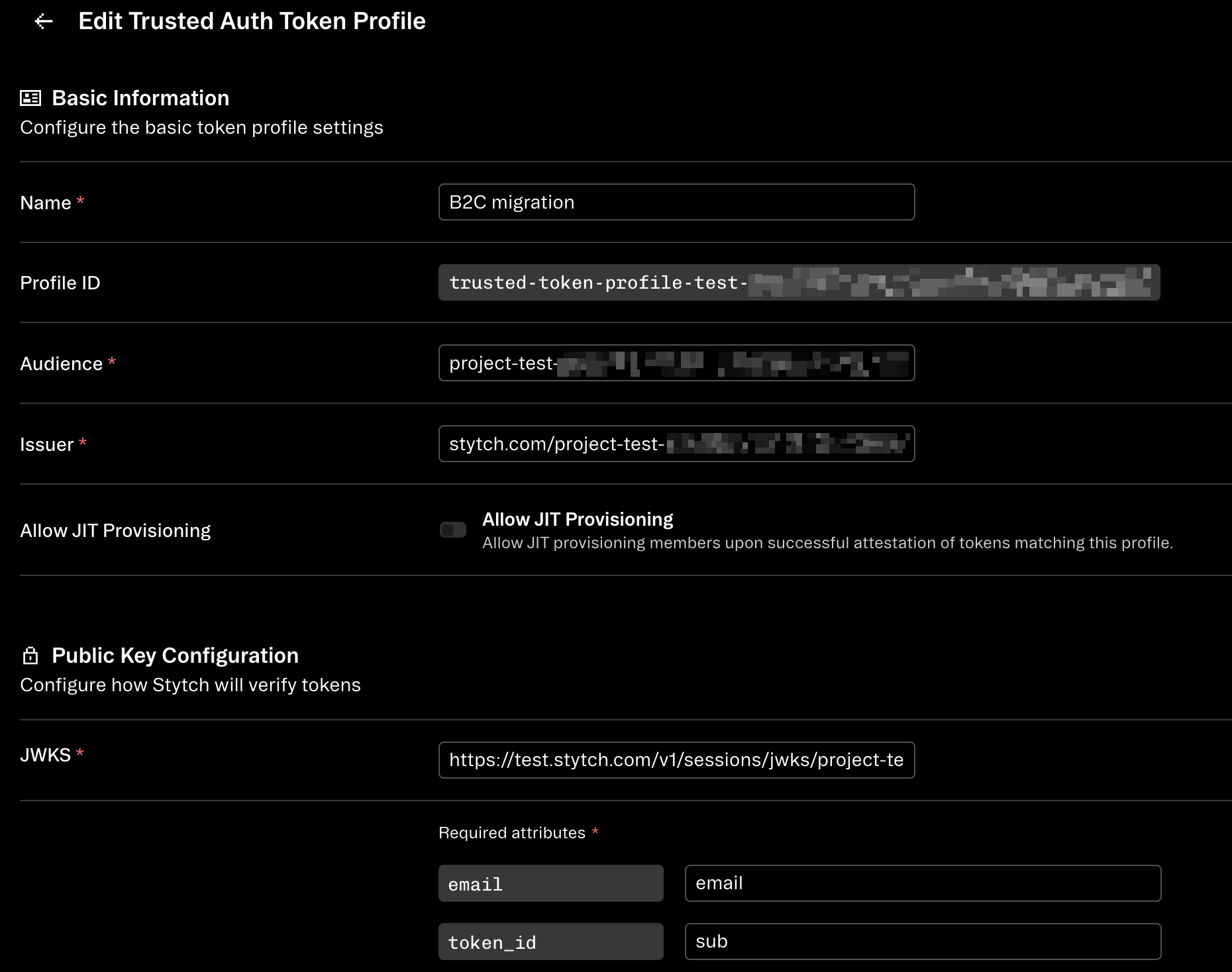 Add an attribute identifying an end user's email address to the Stytch User's [`trusted_metadata`](/docs/api-reference/consumer/api/resources/metadata) in your Consumer Project. This can be done in bulk with the [Update User](/docs/api-reference/consumer/api/users/update-user) endpoint.
This will expose the user's email to be consumed by the Trusted Auth Token step below.
Example using `email` as the name of the attribute:
Add an attribute identifying an end user's email address to the Stytch User's [`trusted_metadata`](/docs/api-reference/consumer/api/resources/metadata) in your Consumer Project. This can be done in bulk with the [Update User](/docs/api-reference/consumer/api/users/update-user) endpoint.
This will expose the user's email to be consumed by the Trusted Auth Token step below.
Example using `email` as the name of the attribute: 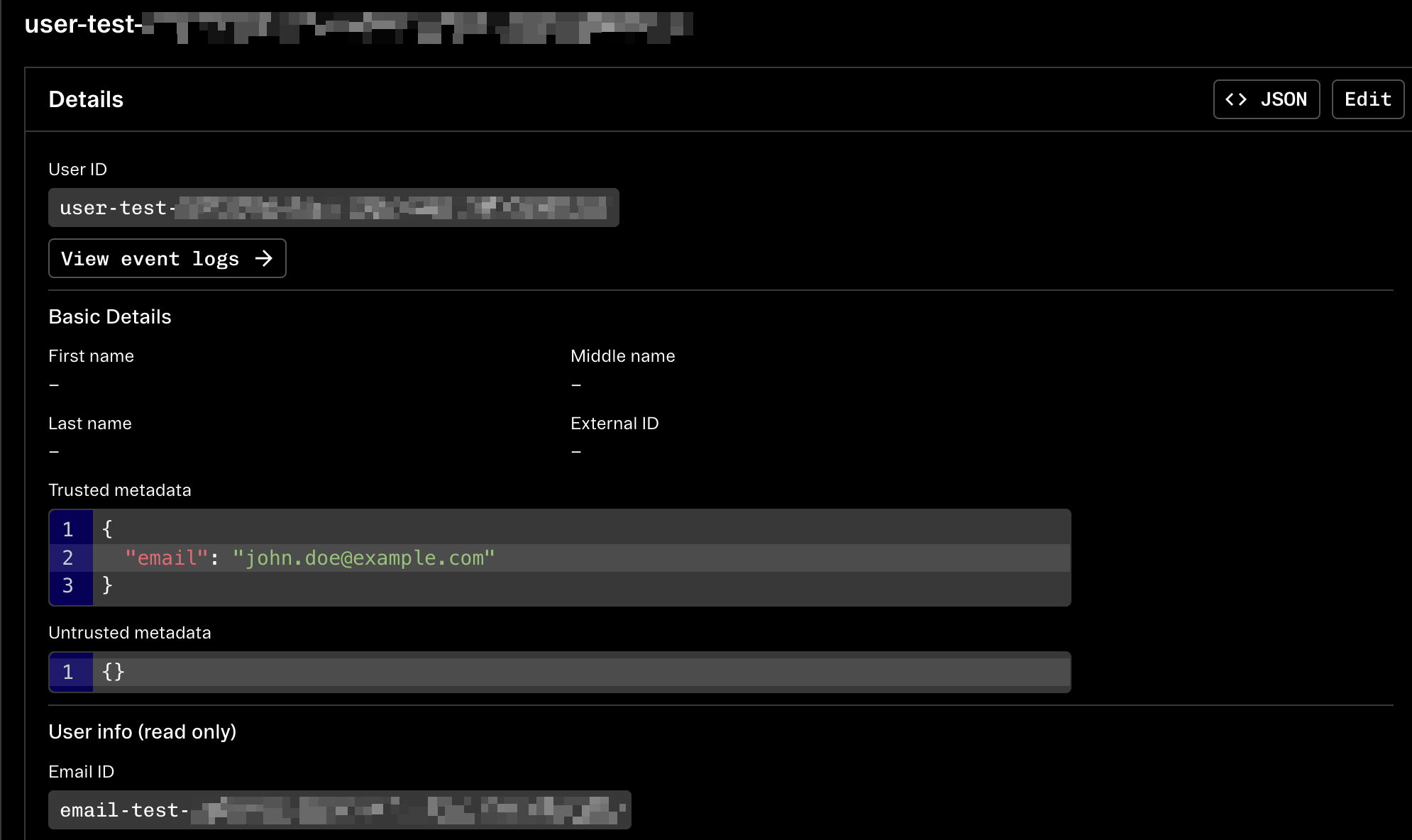 Modify the [Custom Claim Template](/docs/consumer-auth/manage-sessions/custom-claims) in your Consumer Project, and ensure the template content contains some sort of attribute representing the email address to use.
Again, we'll use `email` in the example below; note that the value should reference the same attribute name you added to the `trusted_metadata` in the previous step:
```json theme={null}
{
"email": {{ user.trusted_metadata.email }}
}
```
This will ensure that all newly minted session JWTs will include this new Custom Claim, which our Trusted Auth Token Profile will utilize.
Now you should be all set, and all you'll need to do is take Consumer session JWTs for your Users, and use it to attest a B2B session.
Get the Consumer session JWTs you would like to migrate with the [Get Sessions](/docs/api-reference/consumer/api/sessions/get-sessions) endpoint for each of your Users with an active session.
You may additionally want to "refresh" any older/existing sessions for a new one via the [Authenticate Session](/docs/api-reference/consumer/api/sessions/authenticate-session) endpoint, so that the JWT contains an email (or whatever you named your attribute) in the Custom Claims added in the previous step.
Pass these JWTs into the [Attest Session](/docs/api-reference/b2b/api/sessions/attest-session) endpoint, along with the `profile_id` of your Trusted Auth Token Profile and the `organization_id`.
You should get a newly minted B2B session for the Member that matches the `email` in the JWT.
Now that you have B2B sessions, you'll want to hydrate these sessions wherever you use Stytch sessions today.
If you are using our frontend SDKs, you'll use their [Update Session method](/docs/api-reference/b2b/frontend-sdks/vanilla-js/methods/sessions/update-session) to update the client with the new session.
If you're using our Backend SDKs and your application manages the session cookie lifecycle, you'll want to feed these new B2B sessions into that path.
You're done! All of your users with pre-existing sessions in our Consumer API now have up-to-date and still valid sessions in our B2B API as well, no re-authentication required.
## Other resources
* Export Users from your Consumer Project with this [export utility script](https://github.com/stytchauth/stytch-node-export-users)
Modify the [Custom Claim Template](/docs/consumer-auth/manage-sessions/custom-claims) in your Consumer Project, and ensure the template content contains some sort of attribute representing the email address to use.
Again, we'll use `email` in the example below; note that the value should reference the same attribute name you added to the `trusted_metadata` in the previous step:
```json theme={null}
{
"email": {{ user.trusted_metadata.email }}
}
```
This will ensure that all newly minted session JWTs will include this new Custom Claim, which our Trusted Auth Token Profile will utilize.
Now you should be all set, and all you'll need to do is take Consumer session JWTs for your Users, and use it to attest a B2B session.
Get the Consumer session JWTs you would like to migrate with the [Get Sessions](/docs/api-reference/consumer/api/sessions/get-sessions) endpoint for each of your Users with an active session.
You may additionally want to "refresh" any older/existing sessions for a new one via the [Authenticate Session](/docs/api-reference/consumer/api/sessions/authenticate-session) endpoint, so that the JWT contains an email (or whatever you named your attribute) in the Custom Claims added in the previous step.
Pass these JWTs into the [Attest Session](/docs/api-reference/b2b/api/sessions/attest-session) endpoint, along with the `profile_id` of your Trusted Auth Token Profile and the `organization_id`.
You should get a newly minted B2B session for the Member that matches the `email` in the JWT.
Now that you have B2B sessions, you'll want to hydrate these sessions wherever you use Stytch sessions today.
If you are using our frontend SDKs, you'll use their [Update Session method](/docs/api-reference/b2b/frontend-sdks/vanilla-js/methods/sessions/update-session) to update the client with the new session.
If you're using our Backend SDKs and your application manages the session cookie lifecycle, you'll want to feed these new B2B sessions into that path.
You're done! All of your users with pre-existing sessions in our Consumer API now have up-to-date and still valid sessions in our B2B API as well, no re-authentication required.
## Other resources
* Export Users from your Consumer Project with this [export utility script](https://github.com/stytchauth/stytch-node-export-users)