> ## Documentation Index
> Fetch the complete documentation index at: https://stytch.com/docs/llms.txt
> Use this file to discover all available pages before exploring further.
# Zero-downtime deployment
> Strategies and best practices to deploy your Stytch auth integration to production.
export const org_specific = "Organization-specific login flow where end users go to a specialized login page for their tenant, often a subdomain or route that contains the Organization Slug (e.g. acme-corp.yourapp.com or yourapp.com/team/acme-corp).";
This section covers strategies and best practices to deploy your Stytch auth integration to production. There are a few approaches when it comes to deployment.
## Option 1: Zero-downtime sessions deployment
We offer a Zero-Downtime Sessions feature which enables developers to mint Stytch Sessions from an external session (such as an Auth0 JWT). This solution is designed to facilitate a smooth **zero-downtime** cutover between Stytch and an external provider, by ensuring your end users stay logged into your application throughout the entire migration process. For this guide, we will use Auth0 as an example.
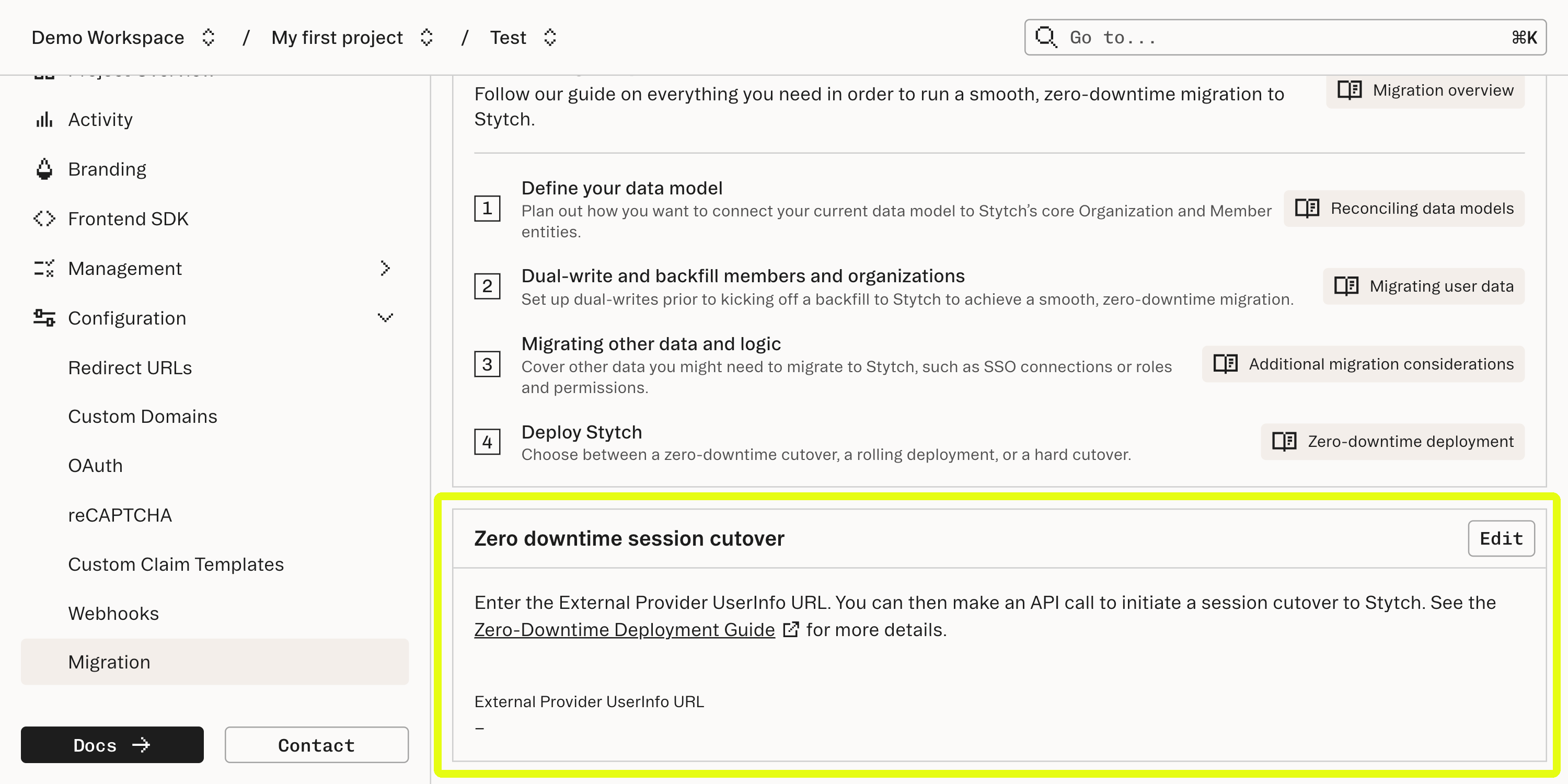
To enable this feature for your account, go to your Dashboard's [Migrations](https://stytch.com/dashboard/migrations). Enter your external provider's OIDC-compliant UserInfo endpoint in the form.
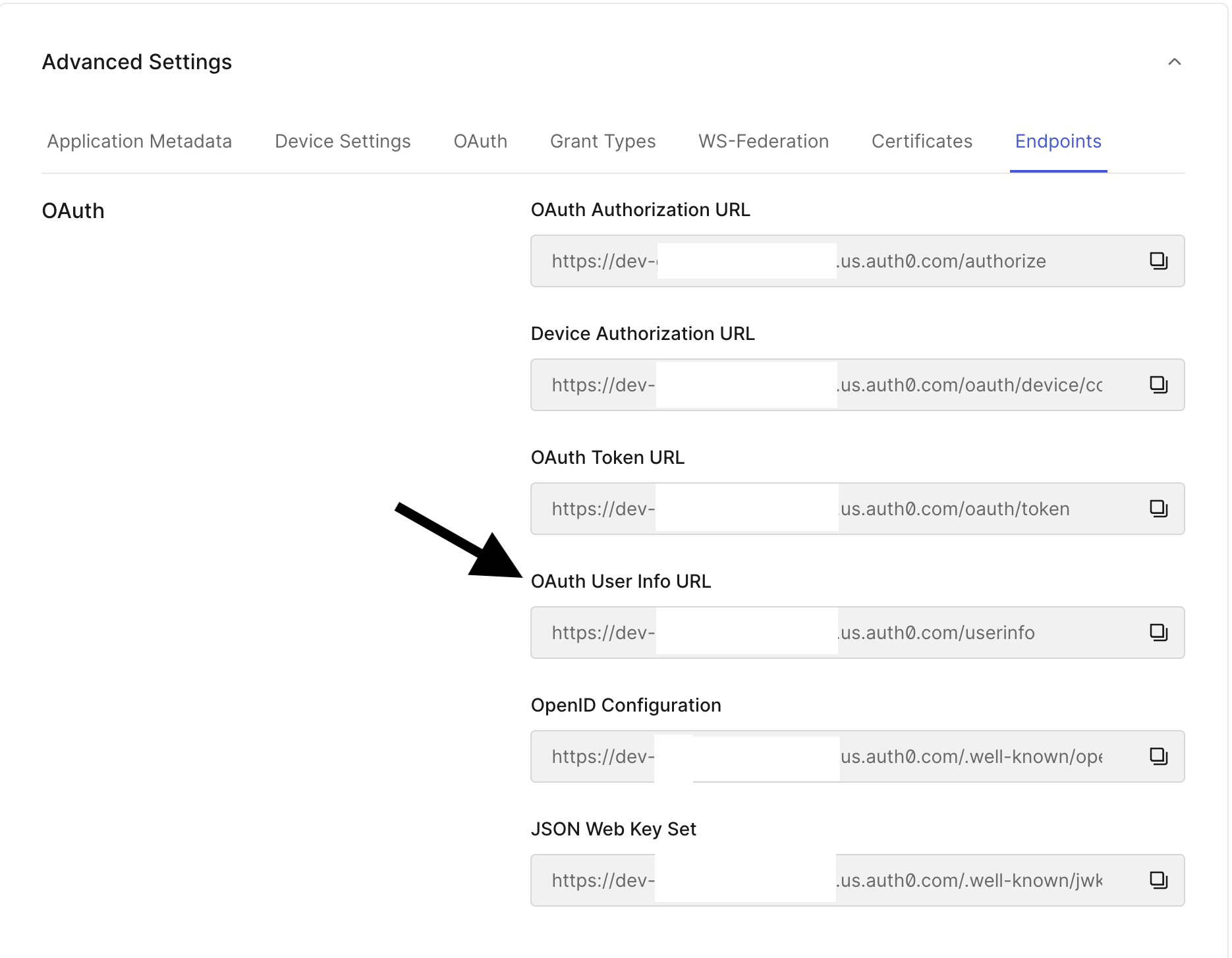
 For Auth0, you can find the UserInfo URL in the application settings:
 Grab your access token from your legacy provider. For example, with Auth0, you can use the [Authorization Code Flow](https://auth0.com/docs/get-started/authentication-and-authorization-flow/authorization-code-flow/call-your-api-using-the-authorization-code-flow) to grab the `access_token` (for example, with Auth0, this starts with **eyJ**).
```js theme={null}
{
"access_token": "eyJz39a...hOo5WwA",
"id_token": "eyJhb...Vp8hog",
"token_type": "Bearer"
}
```
After you have [migrated a user to Stytch](/resources/migrations/migrating-user-data), call the [Migrate Session API](/api-reference/consumer/api/sessions/migrate-session) with your external provider's access token / session token. Stytch will respond with a session you can associate with this user.
```curl theme={null}
curl --request POST \
--url https://test.stytch.com/v1/sessions/migrate \
-u 'PROJECT_ID:SECRET' \
-H 'Content-Type: application/json' \
-d '{
"session_token": "eyJz39a...hOo5WwA"
}'
```
You should receive a response with a User object as well as a User session object usable with Stytch.
```js theme={null}
{
"status_code": 200,
"request_id": "request-id-test-b05c992f-ebdc-489d-a754-c7e70ba13141",
"user_id": "user-test-32fc5024-9c09-4da3-bd2e-c9ce4da9375f",
"session": "{...}",
"session_token": "mZAYn5aLEqKUlZ_Ad9U_fWr38GaAQ1oFAhT8ds245v7Q",
"session_jwt": "eyJ...",
"user": "{...}"
}
```
After you have [created a Stytch member](/api-reference/b2b/api/members/overview), call the [Migrate Session API](/api-reference/b2b/api/sessions/migrate-session) with your external provider's access token / session token . Stytch will respond with a session you can associate with this member.
```curl theme={null}
curl --request POST \
--url https://test.stytch.com/v1/b2b/sessions/migrate \
-u 'PROJECT_ID:SECRET' \
-H 'Content-Type: application/json' \
-d '{
"session_token": "eyJz39a...hOo5WwA",
"organization_id": "organization-test-07971b06-ac8b-4cdb-9c15-63b17e653931",
}'
```
You should receive a response with a [Member object](/api-reference/b2b/api/members/member-object) as well as a [Member Session object](/api-reference/b2b/api/sessions/session-object) usable with Stytch.
```curl theme={null}
{
"status_code": 200,
"request_id": "request-id-test-b05c992f-ebdc-489d-a754-c7e70ba13141",
"member_id": "member-test-32fc5024-9c09-4da3-bd2e-c9ce4da9375f",
"session_token": "mZAYn5aLEqKUlZ_Ad9U_fWr38GaAQ1oFAhT8ds245v7Q",
"session_jwt": "eyJ...",
"member": "{...}",
"organization": "{...}"
}
```
## Option 2: All-at-once deployment
An all-at-once deployment adheres to the following sequence:
1. Deploy your Stytch auth implementation to production and to all users at once.
2. Upon deployment, your users will require Stytch Sessions in your middleware / server-side logic. As a result, all users will be logged out and need to log back in.
3. Users log back in with the Stytch auth flow when they revisit your app.
An all-at-once deployment is the most straightforward. It is the best option when you're ready to move quickly as it removes any need to build secondary logic to aid in the migration.
## Option 3: Rolling deployment
A rolling deployment roughly adheres to the following sequence:
1. Deploy auth changes to a portion of your users at a time using a feature flag (IP, geography, other measures such as a cookie).
2. Users under the feature flag will see Stytch powered login flow and will need a Stytch Session to be considered logged in.
3. Users that are not feature flagged into Stytch will continue to see your legacy auth flow. These users will not be logged out and can continue using their existing legacy sessions.
4. In your middleware / server-side logic, you will need to determine if each JWT is from Stytch or your legacy flow.
5. You will also need to maintain two middleware routes to authenticate the session: one for Stytch's auth flow and another for your legacy auth flow.
This strategy requires a few bits of additional logic in your app to ensure a smooth transition:
* A feature flag within your authentication flow that bifurcates your user base between Stytch and your legacy authentication at a controllable percentage.
* If desired, you can set a cookie (or similar) on each user's device that tracks which authentication flow to present. You may also use factors such as IP or geography if you have access to that information.
* For new users that go through your sign up flow via Stytch, you will need to create a record in your legacy flow to handle the edge case where this user returns logged out on a different device and is presented with the legacy authentication UI.
A rolling deployment strategy allows you to quickly and easily monitor your integration with minimal user impact, and adjust your transition if necessary. It's also typically used when your application stack includes **mobile clients**, since you need to manage the user base on older versions of your application.
A rolling deployment roughly adheres to the following sequence:
1. Deploy auth changes incrementally across your user base by using feature flags to segment your users into discrete groups. You could divide your user base by IP, geography, and other measures like cookies. If your application only utilizes organization-specific login flows, you could create feature flags users by Stytch Organizations.
2. Users under the feature flag will see Stytch powered login flow and will need a Stytch Session to be considered logged in.
3. Users that are not feature flagged into Stytch will continue to see your legacy auth flow. These users will not be logged out and can continue using their existing legacy sessions.
4. In your middleware / server-side logic, you will need to determine if each JWT is from Stytch or your legacy flow.
5. You will also need to maintain two middleware routes to authenticate the session: one for Stytch's auth flow and another for your legacy auth flow.
This strategy requires a few bits of additional logic in your app to ensure a smooth transition:
* A feature flag within your authentication flow that bifurcates your user base between Stytch and your legacy authentication at a controllable percentage.
* If desired, you can set a cookie (or similar) on each user’s device that tracks which authentication flow to present. You may also use factors such as IP or geography if you have access to that information.
* For new users that go through your sign up flow via Stytch, you will need to create a record in your legacy flow to handle the edge case where this user returns logged out on a different device and is presented with the legacy authentication UI.
A rolling deployment strategy allows you to quickly and easily monitor your integration with minimal user impact, and adjust your transition if necessary. It's also typically used when your application stack includes **mobile clients**, since you need to manage the user base on older versions of your application.
## General deployment best practices
Stytch recommends to use environment variables (such as .env-live and .env-test) in your application for test and live Stytch keys. When using env files, the Stytch public token, project ID and secret map to your environment dynamically, preventing the common mistake of forgetting to change your API keys to your live set upon deployment to production.
Grab your access token from your legacy provider. For example, with Auth0, you can use the [Authorization Code Flow](https://auth0.com/docs/get-started/authentication-and-authorization-flow/authorization-code-flow/call-your-api-using-the-authorization-code-flow) to grab the `access_token` (for example, with Auth0, this starts with **eyJ**).
```js theme={null}
{
"access_token": "eyJz39a...hOo5WwA",
"id_token": "eyJhb...Vp8hog",
"token_type": "Bearer"
}
```
After you have [migrated a user to Stytch](/resources/migrations/migrating-user-data), call the [Migrate Session API](/api-reference/consumer/api/sessions/migrate-session) with your external provider's access token / session token. Stytch will respond with a session you can associate with this user.
```curl theme={null}
curl --request POST \
--url https://test.stytch.com/v1/sessions/migrate \
-u 'PROJECT_ID:SECRET' \
-H 'Content-Type: application/json' \
-d '{
"session_token": "eyJz39a...hOo5WwA"
}'
```
You should receive a response with a User object as well as a User session object usable with Stytch.
```js theme={null}
{
"status_code": 200,
"request_id": "request-id-test-b05c992f-ebdc-489d-a754-c7e70ba13141",
"user_id": "user-test-32fc5024-9c09-4da3-bd2e-c9ce4da9375f",
"session": "{...}",
"session_token": "mZAYn5aLEqKUlZ_Ad9U_fWr38GaAQ1oFAhT8ds245v7Q",
"session_jwt": "eyJ...",
"user": "{...}"
}
```
After you have [created a Stytch member](/api-reference/b2b/api/members/overview), call the [Migrate Session API](/api-reference/b2b/api/sessions/migrate-session) with your external provider's access token / session token . Stytch will respond with a session you can associate with this member.
```curl theme={null}
curl --request POST \
--url https://test.stytch.com/v1/b2b/sessions/migrate \
-u 'PROJECT_ID:SECRET' \
-H 'Content-Type: application/json' \
-d '{
"session_token": "eyJz39a...hOo5WwA",
"organization_id": "organization-test-07971b06-ac8b-4cdb-9c15-63b17e653931",
}'
```
You should receive a response with a [Member object](/api-reference/b2b/api/members/member-object) as well as a [Member Session object](/api-reference/b2b/api/sessions/session-object) usable with Stytch.
```curl theme={null}
{
"status_code": 200,
"request_id": "request-id-test-b05c992f-ebdc-489d-a754-c7e70ba13141",
"member_id": "member-test-32fc5024-9c09-4da3-bd2e-c9ce4da9375f",
"session_token": "mZAYn5aLEqKUlZ_Ad9U_fWr38GaAQ1oFAhT8ds245v7Q",
"session_jwt": "eyJ...",
"member": "{...}",
"organization": "{...}"
}
```
## Option 2: All-at-once deployment
An all-at-once deployment adheres to the following sequence:
1. Deploy your Stytch auth implementation to production and to all users at once.
2. Upon deployment, your users will require Stytch Sessions in your middleware / server-side logic. As a result, all users will be logged out and need to log back in.
3. Users log back in with the Stytch auth flow when they revisit your app.
An all-at-once deployment is the most straightforward. It is the best option when you're ready to move quickly as it removes any need to build secondary logic to aid in the migration.
## Option 3: Rolling deployment
A rolling deployment roughly adheres to the following sequence:
1. Deploy auth changes to a portion of your users at a time using a feature flag (IP, geography, other measures such as a cookie).
2. Users under the feature flag will see Stytch powered login flow and will need a Stytch Session to be considered logged in.
3. Users that are not feature flagged into Stytch will continue to see your legacy auth flow. These users will not be logged out and can continue using their existing legacy sessions.
4. In your middleware / server-side logic, you will need to determine if each JWT is from Stytch or your legacy flow.
5. You will also need to maintain two middleware routes to authenticate the session: one for Stytch's auth flow and another for your legacy auth flow.
This strategy requires a few bits of additional logic in your app to ensure a smooth transition:
* A feature flag within your authentication flow that bifurcates your user base between Stytch and your legacy authentication at a controllable percentage.
* If desired, you can set a cookie (or similar) on each user's device that tracks which authentication flow to present. You may also use factors such as IP or geography if you have access to that information.
* For new users that go through your sign up flow via Stytch, you will need to create a record in your legacy flow to handle the edge case where this user returns logged out on a different device and is presented with the legacy authentication UI.
A rolling deployment strategy allows you to quickly and easily monitor your integration with minimal user impact, and adjust your transition if necessary. It's also typically used when your application stack includes **mobile clients**, since you need to manage the user base on older versions of your application.
A rolling deployment roughly adheres to the following sequence:
1. Deploy auth changes incrementally across your user base by using feature flags to segment your users into discrete groups. You could divide your user base by IP, geography, and other measures like cookies. If your application only utilizes organization-specific login flows, you could create feature flags users by Stytch Organizations.
2. Users under the feature flag will see Stytch powered login flow and will need a Stytch Session to be considered logged in.
3. Users that are not feature flagged into Stytch will continue to see your legacy auth flow. These users will not be logged out and can continue using their existing legacy sessions.
4. In your middleware / server-side logic, you will need to determine if each JWT is from Stytch or your legacy flow.
5. You will also need to maintain two middleware routes to authenticate the session: one for Stytch's auth flow and another for your legacy auth flow.
This strategy requires a few bits of additional logic in your app to ensure a smooth transition:
* A feature flag within your authentication flow that bifurcates your user base between Stytch and your legacy authentication at a controllable percentage.
* If desired, you can set a cookie (or similar) on each user’s device that tracks which authentication flow to present. You may also use factors such as IP or geography if you have access to that information.
* For new users that go through your sign up flow via Stytch, you will need to create a record in your legacy flow to handle the edge case where this user returns logged out on a different device and is presented with the legacy authentication UI.
A rolling deployment strategy allows you to quickly and easily monitor your integration with minimal user impact, and adjust your transition if necessary. It's also typically used when your application stack includes **mobile clients**, since you need to manage the user base on older versions of your application.
## General deployment best practices
Stytch recommends to use environment variables (such as .env-live and .env-test) in your application for test and live Stytch keys. When using env files, the Stytch public token, project ID and secret map to your environment dynamically, preventing the common mistake of forgetting to change your API keys to your live set upon deployment to production.