import {
  Products,
  createStytchClient,
  StytchLogin,
} from "@stytch/vanilla-js";

const stytch = createStytchClient('public-token-test-be835f9a-ac37-44cf-817d-f58ac2b3ae3d');

// Set the login configuration
const config = {
  products: [Products.emailMagicLinks, Products.oauth],
  oauthOptions: {
    providers: [
      { type: 'google', one_tap: true },
      { type: 'microsoft' }
    ],
    loginRedirectURL: 'https://example.com/authenticate',
    signupRedirectURL: 'https://example.com/authenticate',
  },
  emailMagicLinksOptions: {
    loginRedirectURL: 'https://example.com/authenticate',
    signupRedirectURL: 'https://example.com/authenticate',
  },
  sessionOptions: {
    sessionDurationMinutes: 60,
  },
};

// Set the styles for the prebuilt UI
const presentation = {
  theme: { 'font-family': 'Arial' },
};

// Set the callbacks to fire as a result of events from the prebuilt UI
const callbacks = {
  onEvent: ({ type, data }) => {
    console.log(type, data);
  },
  onError: (error) => {
    console.log(error);
  },
};

// Customize the text in the prebuilt UI
const strings = {
  'login.title': 'Log in or sign up',
};

// Register the custom element and set all of the options
customElements.define('stytch-ui', StytchLogin);
document.getElementById('stytch-ui').render({
  client: stytch,
  presentation,
  callbacks,
  config,
  strings,
});

// in HTML:
// <stytch-ui id="stytch-ui" />
import { Products } from '@stytch/vanilla-js';

const config = {
  products: [Products.emailMagicLinks, Products.oauth],
  emailMagicLinksOptions: {
    loginRedirectURL: 'https://example.com/authenticate',
    signupRedirectURL: 'https://example.com/authenticate',
  },
  oauthOptions: {
    providers: [
      { type: 'google', one_tap: true, cancel_on_tap_outside: false },
      { type: 'microsoft' },
      { type: 'apple' },
    ],
    loginRedirectURL: 'https://example.com/authenticate',
    signupRedirectURL: 'https://example.com/authenticate',
  },
  sessionOptions: {
    sessionDurationMinutes: 60,
  },
};
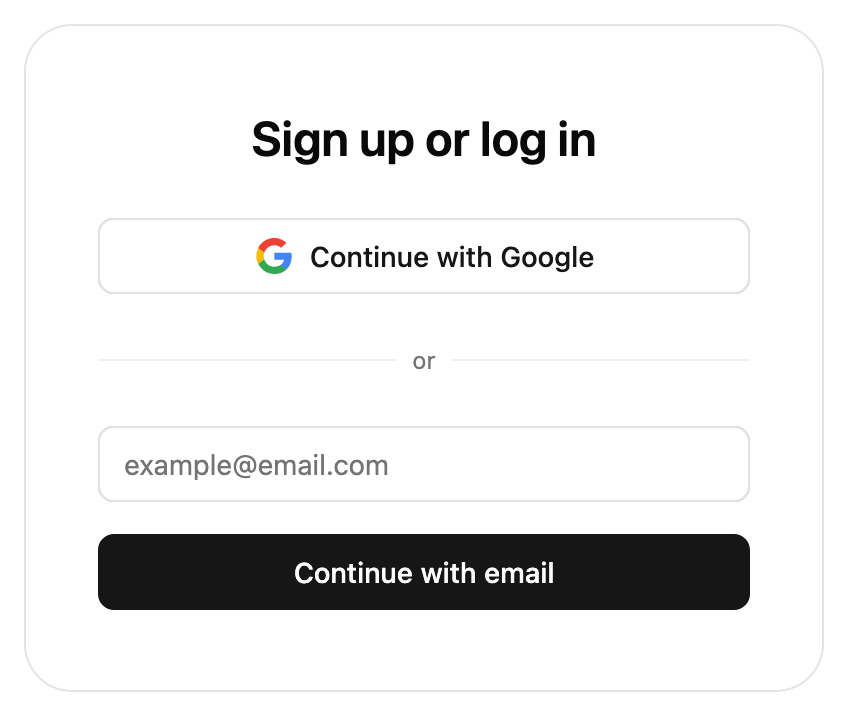
Example of the prebuilt UI login components
Stytch Login is a prebuilt UI component that handles login and signup flows for Consumer Authentication. It supports a mix of authentication methods (Email Magic Links, OAuth, OTPs, passwords, and more) and returns a Session when a user completes authentication.

Props

config
object
required
The configuration object for the StytchLogin pre-built UI component.
presentation.theme
object or array
The presentation.theme object allows you to customize the look of the SDK. You can specify some of them or none at all. We’ll use our defaults for the ones you don’t specify.If you pass in an array of two themes, the first will automatically be used when the user’s OS is in light mode, and the second in dark mode.See our pre-built themes, how to write your own theme or reference for all properties.
presentation.options
object
The presentation.options object customizes non-style related aspects of the SDK’s appearance.You can specify some of them or none at all. We’ll use our defaults for the ones you don’t specify.
presentation.icons
object
Allows our icons to be overridden. See icon customization guide for more information.
callbacks
object
Optional callbacks that are triggered by various events in the SDK. See more details about the callbacks here.
strings
object
Specify custom strings to be used in the prebuilt UI. Consult the message catalog (messages/en.po) for the list of available strings. Each value should be specified using ICU MessageFormat.Strings that are not defined will use the default English value as a fallback.See Text Customization for more information.