Documentation Index
Fetch the complete documentation index at: https://stytch.com/docs/llms.txt
Use this file to discover all available pages before exploring further.
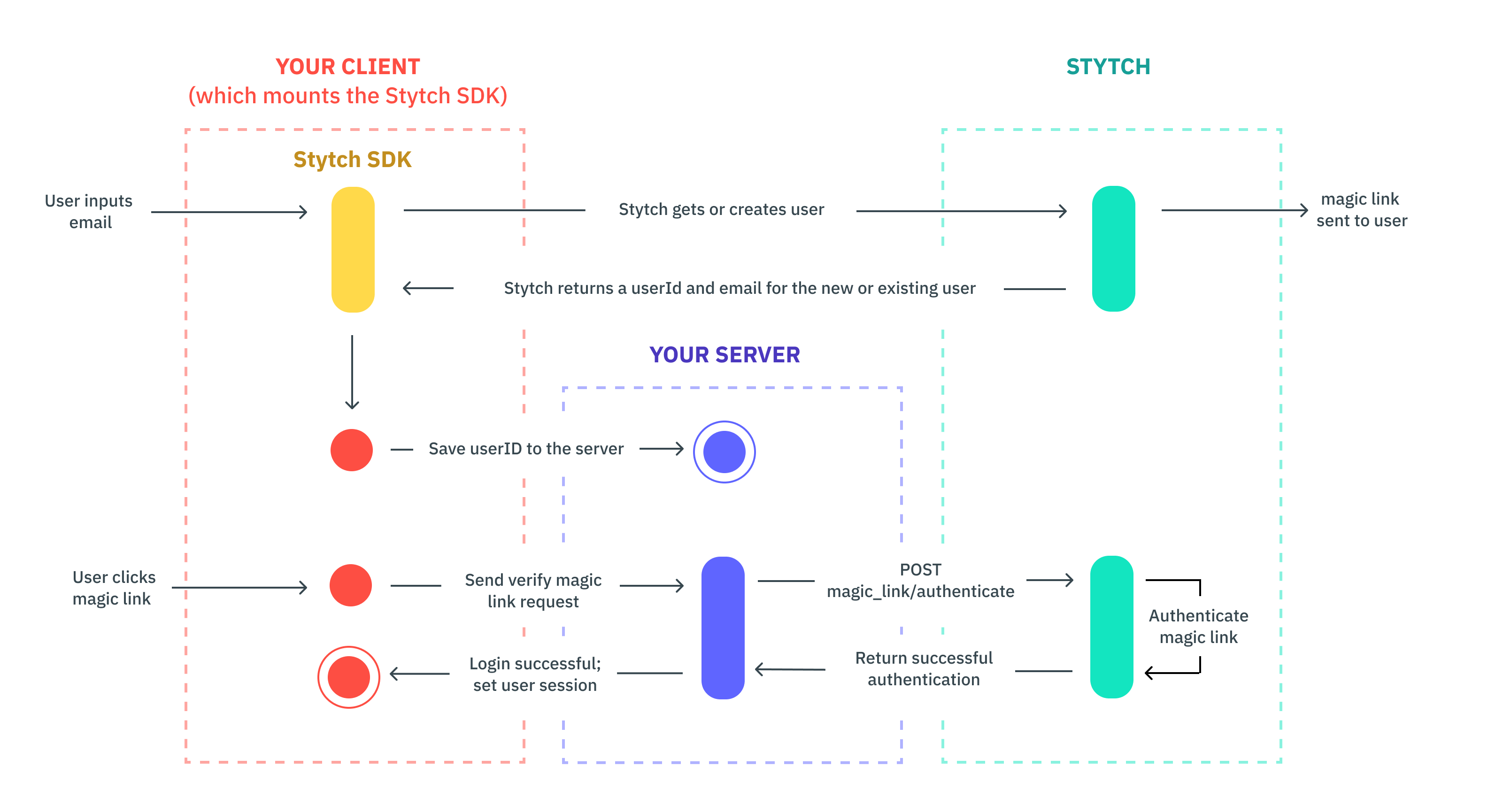
This guide shows how to enable Email Magic Links in Stytch Login, then authenticate Magic Link tokens on your backend. For broader SDK details, see the frontend SDK docs.
Configure your project in the Stytch Dashboard
Install the frontend SDKs
Install the frontend package:npm install @stytch/react --save
Wrap your app with StytchProvider
import { createStytchClient, StytchProvider } from '@stytch/react';
const stytch = createStytchClient('PUBLIC_TOKEN');
const root = ReactDOM.createRoot(document.getElementById("root")!);
root.render(
<StytchProvider stytch={stytch}>
<App />
</StytchProvider>,
);
Configure Stytch Login with Magic Links
import { Products, StytchLogin } from '@stytch/react';
const config = {
emailMagicLinksOptions: {
loginExpirationMinutes: 30,
loginRedirectURL: 'https://example.com/authenticate',
signupExpirationMinutes: 30,
signupRedirectURL: 'https://example.com/authenticate',
},
products: [Products.emailMagicLinks],
};
export const Login = () => {
return <StytchLogin config={config} />;
};
Customize the UI (optional)
const presentation = {
theme: { 'font-family': '"Helvetica Neue", Helvetica, sans-serif' },
};
export const Login = () => {
return (
<StytchLogin
config={config}
presentation={presentation}
/>
);
};
Add server-side support
Install the backend SDK:npm install stytch --save
When a user logs in for the first time, the SDK creates a Stytch User and returns a user_id. Save it in your user store.app.post('/users', function (req, res) {
var stytchUserId = req.body.userId;
// TODO: Save stytchUserId with your user record in your app's storage
res.send(`Created user with stytchUserId: ${stytchUserId}`);
});
Handle Magic Link authentication on a route that receives the token query param:const stytch = require('stytch');
const client = new stytch.Client({
project_id: "PROJECT_ID",
secret: "SECRET",
env: stytch.envs.test
});
app.get('/authenticate', function (req, res) {
var token = req.query.token;
client.magicLinks.authenticate(token)
.then(response => {
req.session.authenticated = true;
req.session.save(function(err) {
console.log(err);
});
res.redirect('/home')
})
.catch(error => {
console.log(error);
res.send('There was an error authenticating the user.');
});
});
If authentication is successful, create a user session and log them into your app. To keep users logged in longer, set session_duration_minutes. See the session management guide.