

Pre-requisites
In order to complete this guide, you’ll need:- A Stytch project. If you don’t have one already, or would like to create a new one, in the Dashboard, click on your existing project name in the top left corner of the Dashboard, click Create Project, and then select Consumer Authentication.
- The MCP Inspector. This is a tool that will help us ensure that our MCP server is exposing the correct interface, is running properly, and allows us to explore the features of the MCP protocol in a web-based tool.
Create a remote MCP server on Cloudflare
1
Configure Stytch for our example app
Navigate to “Project Settings” to note your “Project ID” and “Public token”. You will need these values later.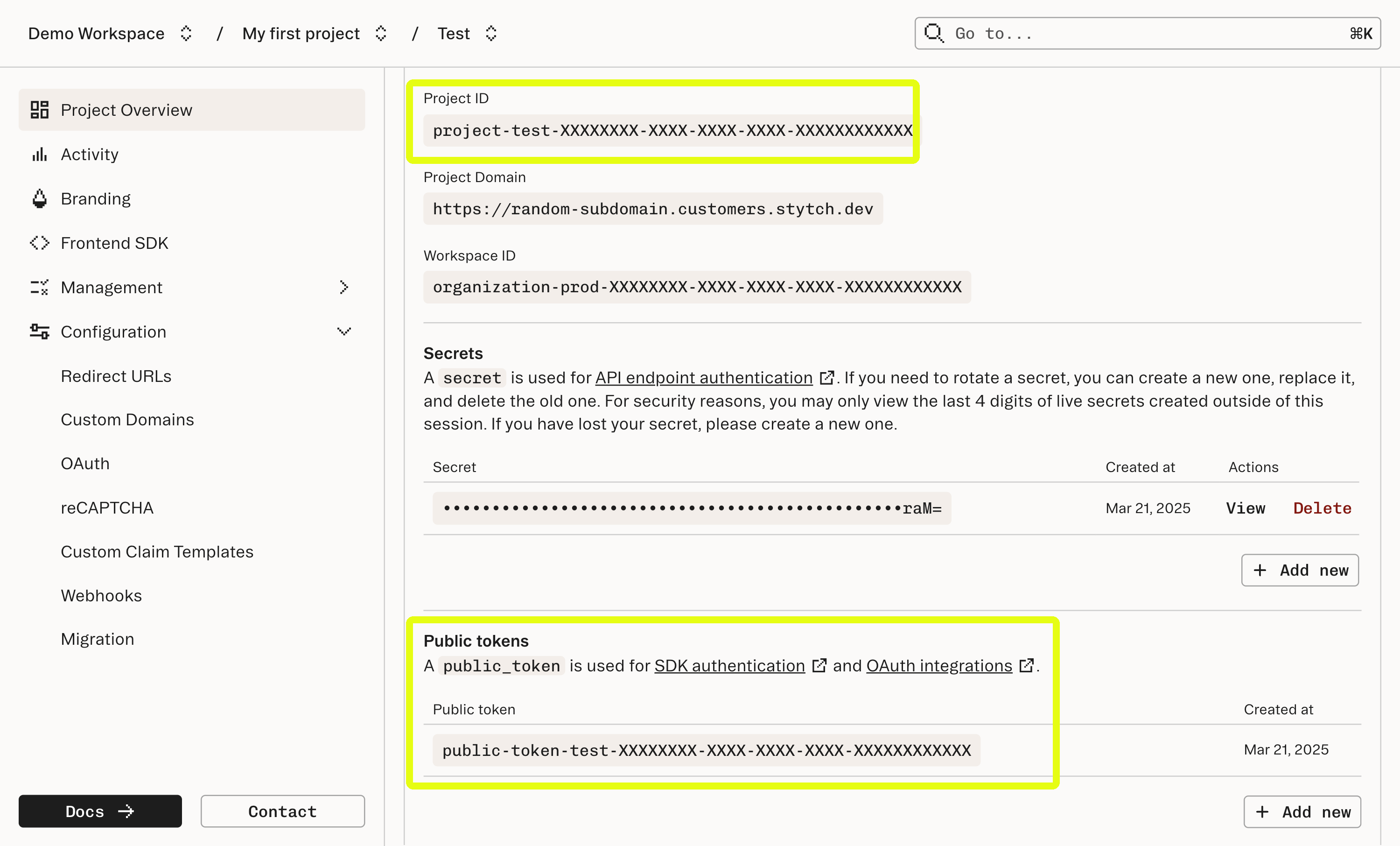
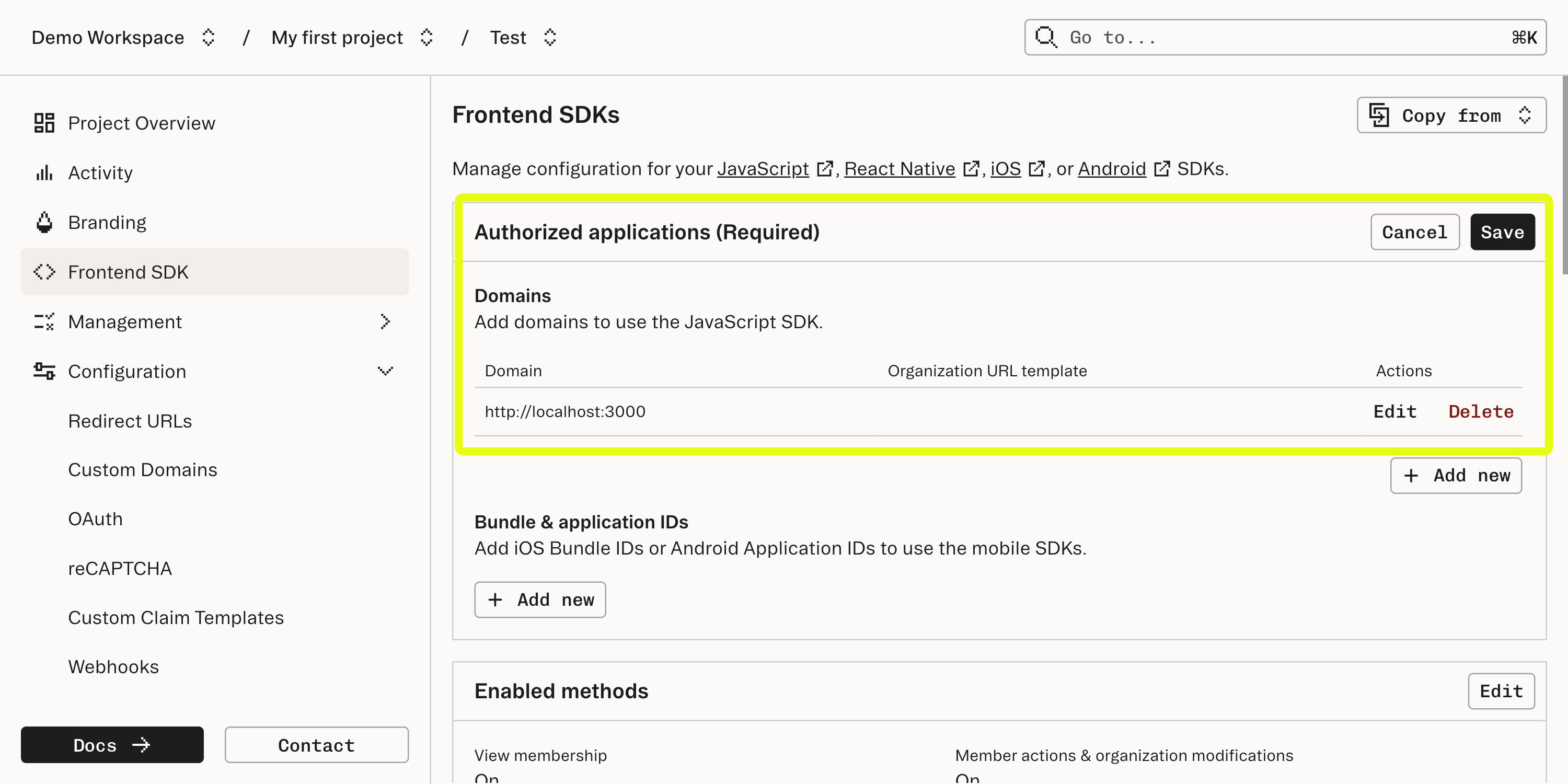
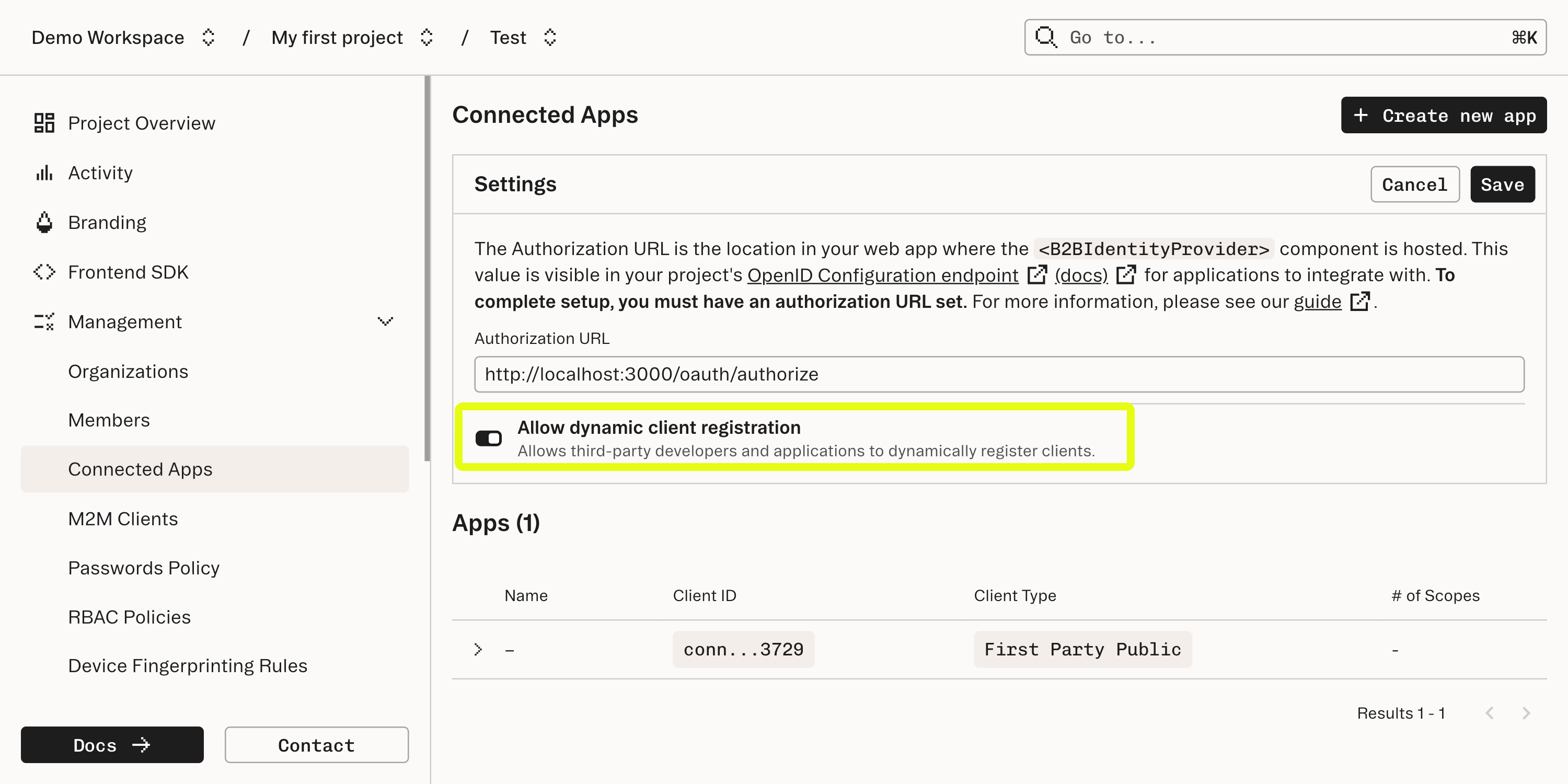
http://localhost:3000Dynamic Client Registration is a protocol that allows applications to register themselves with Stytch as a Connected App client. We will dive more into how Dynamic Client Registration works later in this guide.
2
Clone the GitHub repository for this guide
The companion repository for this guide is located in GitHub. Go to that repository, clone it, and follow the README to get the TODO app up and running on your local machine.Once you have the example up and running, explore its functionality and start to get a sense of how the app is structured, then return here for a tour of the app’s implementation.
3
Examine how the HTTP client and server implementations are built
The app exposes a straightforward REST API that implements state management and access control. This API (which can be examined at /api/TodoAPI.ts) exposes methods to create, read, update, and delete TODO items. State management and persistence are eventually handled by the /api/TodoService.ts class which manages the app’s data in the data store.The browser frontend includes React components that work together to render the app. In /src/Todos.tsx, the frontend makes requests to the backend API to change the state of our data.Take a moment to read the source code, run the app, and interact with the app’s state to get a feel for how data is being modeled and what operations are valid.
4
Learn how the MCP server is defined
The MCP Core architecture documentation is a good reference for understanding how an MCP server is implemented.
We’ll dive more deeply into how authentication is implemented in the next step.
Summary of relevant concepts
Summary of relevant concepts
MCP servers use a protocol based on JSON-RPC 2.0 for message passing between the remote MCP server (what we’re building) and the client, which is the LLM that is integrating with the server. The RPC protocol uses POST requests and Server-Sent Events to pass messages back and forth between the server and client. There are a few core primitives (Resources, Prompts, Tools, etc…) defined by the MCP specification that describe the schema of the messages in this protocol and what behaviors can be expected.This is a structurally different protocol than vanilla HTTP requests, so implementing a Remote MCP server is more nuanced than a typical HTTP request/response flow. Thankfully there are libraries to assist in implementing MCP servers. Our example uses @modelcontextprotocol/sdk to handle the specifics of conforming with the MCP protocol.In /api/TodoMCP.ts, you can follow along as the
McpServer class defines the resources and tools that are exposed through the MCP protocol. Note that, just as in the HTTP implementation, the MCP server uses the same TodoService class to handle application state.The details of how exactly an MCP server defines its components are implementation-dependent, but for the purposes of this walkthrough the key concept is that MCP defines a protocol for our server to implement in order to establish communications with an LLM client. This protocol can coexist with an HTTP server or stand on its own, but the fundamentals of establishing authentication and access control are similar for each.5
Learn how authentication and authorization with Stytch is implemented
Dynamic Client Registration
Dynamic Client Registration
Dynamic Client Registration is an OAuth standard for allowing a client to automatically register itself with an Identity Provider (IdP) server and is included as part of the Remote MCP protocol.The first time the MCP Inspector attempts to access our TODO app it will receive a
401 Unauthorized response. This will cause the MCP Inspector to fetch metadata about our server. In /api/index.ts the TODO app creates a route at /.well-known/oauth-authorization-server which returns metadata about the OAuth server (as covered in the Authorization Server Metadata standard).Once the MCP Inspector has fetched the metadata from our TODO app Stytch and the MCP Inspector will handle the rest of the Dynamic Client Registration process to create a new Connected Apps client.All dynamically registered clients are Third Party Public apps and will show up in the Stytch Dashboard when registration is complete.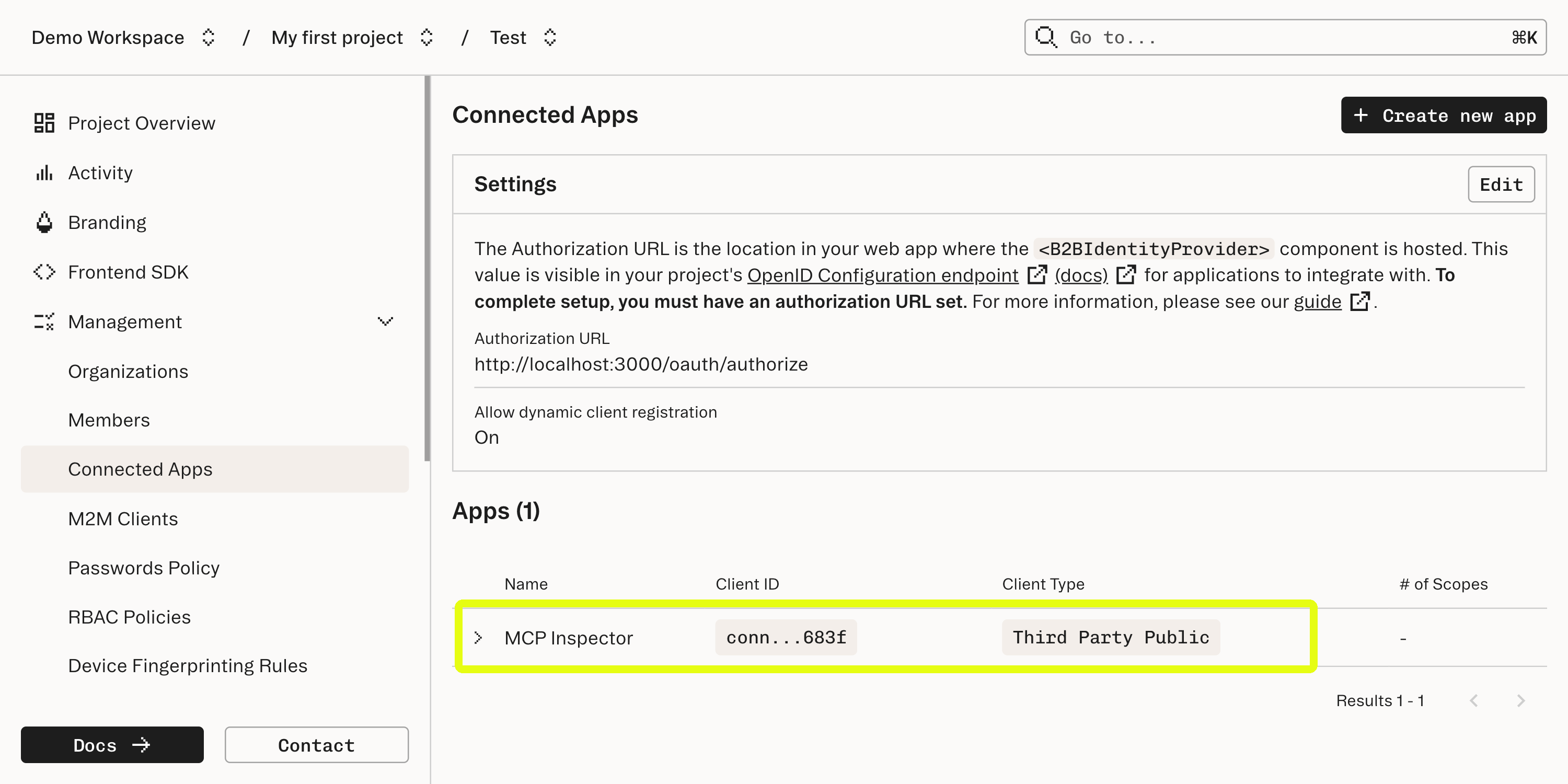
Client-side authentication
Client-side authentication
In the web client, the app wraps components in a parent component that enforces authentication. This component verifies that there is a current Stytch user logged in before rendering its child component. If no user is logged in, it redirects to the login page.
Server-side authentication
Server-side authentication
On the server side, authentication is handled slightly differently depending on whether the REST API or the MCP protocol are being used.For the REST API, Hono middleware is used to grab the Stytch session cookie and check its validity. This middleware is used on each route in /api/TodoAPI.ts. As each operation happens within the context of a single API request, wrapping each request in the middleware will enforce the validity of each operation.Similarly, when the connection to the MCP server is first established, again using Hono middleware, the server saves the credentials from the request into properties that will be accessible to the MCP server. These credentials are used when constructing the TodoService class.
6
Deploying to Cloudflare
The GitHub README covers the steps necessary to deploy the app as a Cloudflare Worker. After the deploy, be sure to note that the location of the server will have changed, which requires additional configuration in Stytch. Once you have the URL for your Cloudflare Worker, repeat the process in Step 1 to add this URL as an “Authorized Application” in the “Frontend SDK” settings.
What’s next
- View our guide on our B2B MCP Server example app to see a similar app using B2B Authentication with OAuth scopes and Role-Based Access Control
- Familiarize yourself with Stytch’s B2B SDKs and Consumer SDKs for a deeper dive on how to integrate your MCP server with Stytch.
- Browse the Model Context Protocol documentation for more information about Remote MCP Servers.