Since session_jwt and session_token are stored in the site’s cookies, the browser will include these cookies in the request headers to your backend if they share a domain.Select between validating a JWT or session token:
Validate a JWT
Validate a session token
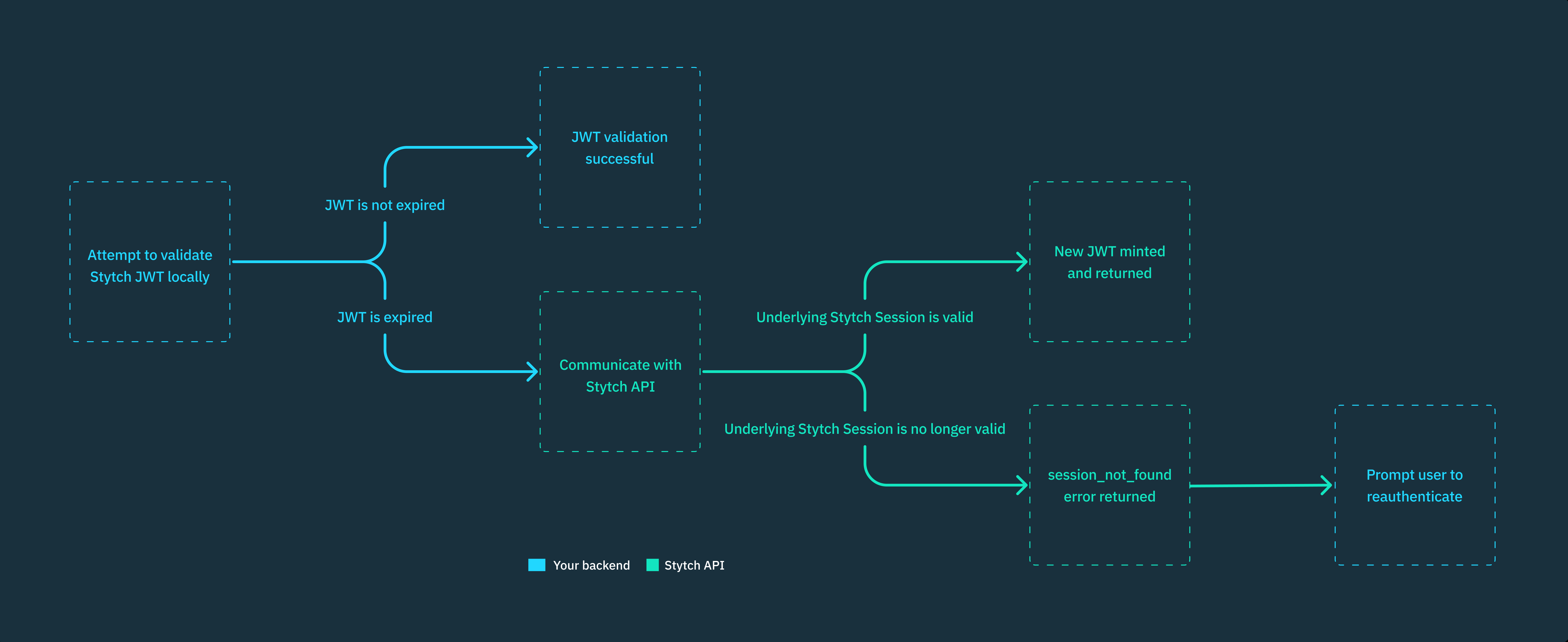
Using JSON Web Tokens (JWT) over opaque session tokens allows you to validate the token locally entirely within your backend service, which is significantly faster than communicating with Stytch’s API on every user session validation check.
authenticateJwt() does not return the full User object when validated locally. If you need data from the User object to complete additional authorization checks or any other additional action, use custom claims to add it to the JWT itself.
Stytch JWTs are compatible with other standard JWT validation libraries. You’ll need to:
Implement logic to fall back to Stytch’s Authenticate Session endpoint when the JWT is expired. You can refer to the Authenticate JWT method for what that logic might look like.
Supply your validation library the Stytch Get JWKS endpoint for JWKS rotation. Otherwise, your application should decide which JWKS to use for validation by inspecting the JWT and JWKS kid value.
We strongly recommend using our backend SDKs (available in Python, Node, Ruby, Go, and Java) for JWT validation. Our libraries handle the logic to authenticate JWTs locally and automatically fall back to the Stytch API when the JWT is expired.
Stytch automatically rotates your JWKS every 6 months for security purposes. Newly minted JWTs will be signed using the new key set. Both key sets will be returned by the Get JWKS endpoint for a 1 month grace period.
~1 month before your Project’s old JWKS expires, a new JWKS will be automatically generated.
When this happens, there will be a 5 minute period where some JWTs will be signed by the old JWKS and some by the new, due to the JWT set lifetime.
Match the kid value of the JWT and JWKS to determine the correct JWKS to use for validation.
Most JWT libraries have a mechanism to handle this automatically; if not, you may see errors like "kid" invalid, unable to lookup correct key (depending on the library and version you use).
Stytch’s backend SDKs handle JWKS rotation for you automatically.
Session tokens are considered opaque because they don’t contain any information about the underlying User Session.
Strict security requirements: Session tokens cannot be locally validated. You must always make a Stytch API call to authenticate the token, which guarantees that the token is valid at that point in time. This provides stricter guarantees than JWTs, which have a 5-minute window where the underlying User Session may have been revoked before the JWT was refreshed.